 Plan Services, songs, and attendance, with the team scheduled.
 People Your directory, volunteers, and team chat in one place.
 Present Lyrics, scripture, slides, and stage display, free in any browser.
 Produce One dashboard for the switcher, PTZ cameras, and the stream.
 Publish Stream Sunday, keep every sermon on your watch page, clip it.
 Patch Every device, cable, and signal path, mapped and printable.
 Pulse Know the moment the stream or a device drops.
Sermon transcription · Free in Tech Manager, any browser on Pro
Sermon transcription that puts every word to work.
WorshipMetrics transcribes the whole service recording, with every line timed to the video. Search it, copy it, cut clips from its lines, and caption them word by word. On your church's own computer, it's free.
A 47-minute service from Faithful Signal Church, our demo church: 445 lines, every one timed.
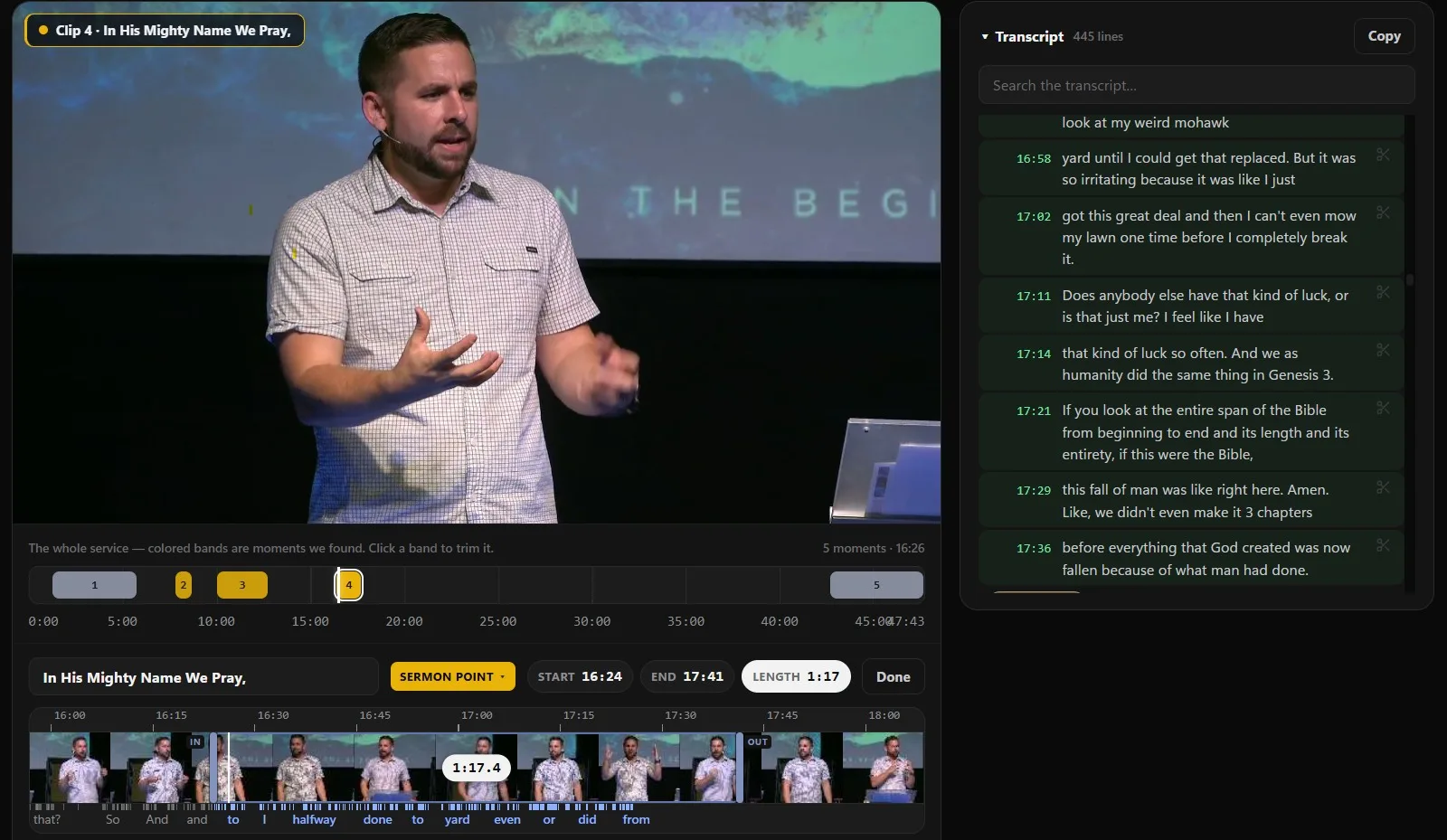
One recording, transcribed once
Four things nobody on your team has to type.
A transcript on its own is a long document nobody opens. Here it's the start of everything you do with the message after Sunday.
The full transcript
Every line with its time in the service. Search it, click a time to jump the video there, and copy the whole thing in one click.
Clips cut from the words
Reels reads the transcript to find the moments worth sharing: sermon points, scripture readings, songs and prayers. Or click the scissors on two lines to cut your own.
Captions, word by word
Every clip gets its captions from the transcript, burned onto the video, with each word lighting up as it's said.
The message's details
Fill it in with AI reads the transcript and suggests the message's title, description, speaker, series, scripture and tags for your Content Library.
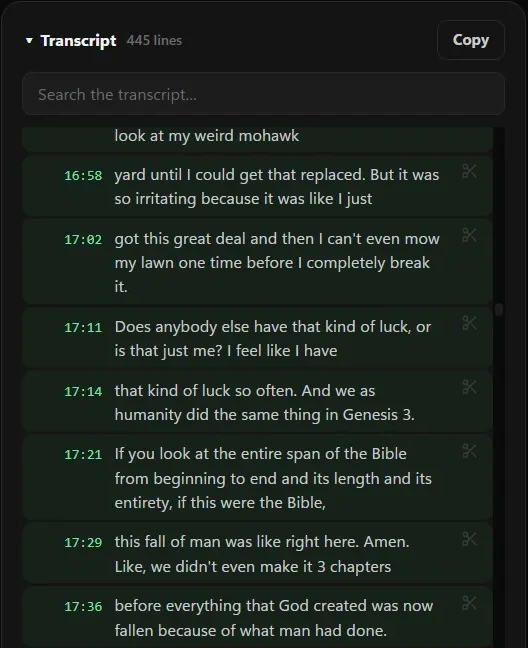
The transcript
A transcript you can work in, not just read.
It sits right beside the video, so finding a line and hearing it are the same click.
- Every line carries its time in the service. Click the time and the video jumps there.
- While the video plays, the line being said lights up and the transcript scrolls along with it.
- Search the transcript for a phrase you remember and see every line it's in.
- Copy puts the whole transcript on your clipboard as plain text, ready to paste into sermon notes, a small-group guide or an email.
- Click the scissors on the line where a clip should start and again where it should end. The new clip is named from the words said in it, and you can rename it.
- Later, search every clip you've made by what was said in it.
See it on video
Watch the transcript turn into clips.
In the Reels walkthrough, Paul Richards searches the transcript, trims clips from its lines, captions them, and lets Reels write each post's title, description and hashtags from what was said.

Rather read it? The same walkthrough as a blog post.
Made for a church service
It knows it's listening to church.
A general speech engine stumbles on exactly the words that matter on Sunday: your church's name, Habakkuk and Philemon, the songs you sang.
Your words, before it listens
Online, it's given your church's name, the message title, all 66 books of the Bible and the songs from your recent plans. In Tech Manager, it gets your church's name and the message title for English services.
Songs captioned from your lyrics
Microphones mishear singing (“race” for “grace”). A song clip can use your church's own words for the song, lined up with the singing. A line that doesn't match keeps what was heard, so a wrong lyric never goes on the video.
The language you preached in
Online, the language is detected for you, so a Spanish service gets a Spanish transcript. Tech Manager transcribes English out of the box, and other languages after a free download.
Captions for every clip
Most people scroll with the sound off. Your captions are the sermon.
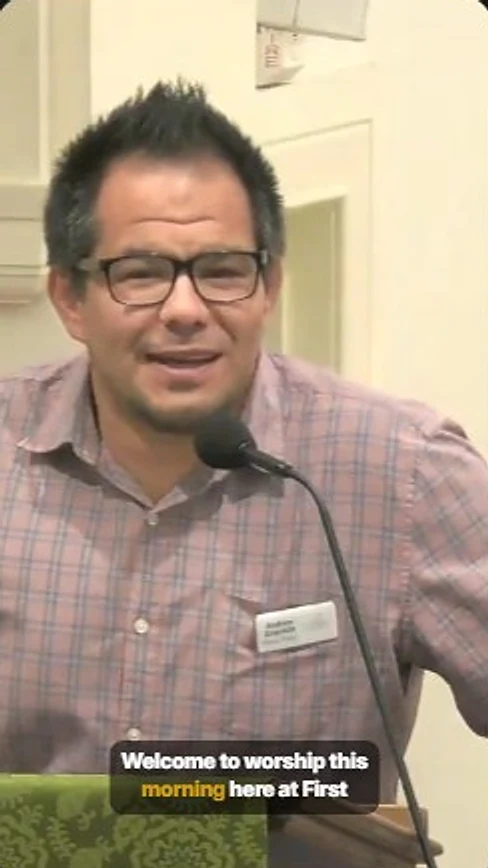
Because the transcript knows when each word was said, every clip Reels makes is captioned in step with your pastor, without anyone typing a word.
- Burned onto the video, so they show wherever the clip is posted, shared or downloaded.
- Highlight the spoken word lights each word as it's said, as a color, a pill behind it, or a pop, in your brand color unless you pick another.
- Clean, Bold, High-contrast or your own style, at the top, middle or bottom of the picture.
- Never more than two lines, fitted inside the safe area, clear of the like and share buttons on a vertical Reel.
- Vertical for Reels, Shorts and TikTok, square for the feed, or wide for YouTube and your website.
- A song clip can take its captions from your church's own lyrics for that song, lined up with the singing, instead of what the microphone heard.
See how Reels finds, styles and posts the clips.
From transcript to sermon notes
Give your congregation the notes, right under the message.
We don't write your pastor's notes for them. We hand your team every word, and a place on your watch site to put what they make from it.
- 1
Copy the transcript
In Reels, open the message and click Copy above the transcript. Every word of the service is on your clipboard.
- 2
Shape it into notes
Paste it into the editor you already use and turn it into sermon notes, a discussion guide or a fill-in-the-blank handout. You start from every word instead of a blank page.
- 3
Put it beside the message
Add the file to the message in your Content Library: a PDF, Word or PowerPoint file, text or an image. Each one becomes its own button on the message's page on your watch site.
While you're there, Fill it in with AI reads the same transcript and suggests the message's title, description, speaker, series, scripture and tags. Nothing changes until you save. Publishing messages to your Content Library comes with Pro and Max.
Two ways to transcribe
Free in the booth. From anywhere on Pro.
The transcript, the clips and the captions are the same either way. What changes is where the work runs.
| Compare | In Tech Manager Every plan | In any browser Pro and Max |
|---|---|---|
| Where it's transcribed | On your church's own computer | On our servers |
| What it costs | Free, on every plan | Included in Pro and Max |
| Internet | Not needed once the speech model is downloaded | Needed |
| The service video | Stays on that computer. Only a finished clip goes up, when you post or schedule it | Kept in your church's storage with us |
| Languages | English out of the box; other languages with a free multilingual model | Detected automatically |
| Getting the recording in | Import a file, or transcribe a message from your Library | Upload a file, add a message from your Library, or send a stream recording |
Tech Manager runs on Windows and Mac. How free sermon clips work · See pricing
From the Knowledge Base
Go deeper on transcripts and captions.
FAQ
Questions churches ask about sermon transcription
How do we transcribe a sermon with WorshipMetrics?
Open Publish > Reels and bring in the service: upload the recording, add a message from your Content Library, or send a recording from Live Streaming. Reels writes the transcript on its own. A full service takes several minutes, and you can leave the page while it works. Then open Transcript beside the video.
Is sermon transcription free?
Yes, in Tech Manager, our free desktop app for Mac and Windows. The transcript is made on your church's own computer, so it's free on every plan. Transcribing from any browser comes with Pro and Max, as part of AI Reels.
How does it get our names and Bible books right?
Online, it's given your church's name, the message title, all 66 books of the Bible and the songs from your recent plans before it listens. Tech Manager gets your church's name and the message title for English services. Clear audio still matters most: a feed from your sound desk beats a microphone at the back of the room.
Does our service video leave the building?
Not when you transcribe in Tech Manager. The video stays on that computer and is transcribed there, and only a finished clip is uploaded, when you post or schedule it. The AI that finds the moments and writes titles reads the transcript's text in our cloud, not the video.
Can we download the transcript or a caption file?
Copy puts the whole transcript on your clipboard as plain text, one line after another, so you can paste it anywhere. There's no transcript file or SRT caption file to download today. Captions are burned into the clips Reels makes.
Can we fix a word it got wrong?
Not in the transcript today: the transcript and the captions are what was heard. A song clip can take its captions from your church's own lyrics instead, and Timing nudge moves captions earlier or later if they feel off. You can also make a clip with captions turned off.
Does it caption our live stream?
No. WorshipMetrics transcribes the recording after the service, not the stream while you're live. The captions go on the clips you make from it.
Does it translate the sermon?
No. The transcript and the captions are in the language that was preached. Online, the language is detected for you. In Tech Manager, pick your church's language in Settings, and for anything other than English download the free multilingual model once.
Can people read the transcript on our watch page?
Not by itself. The transcript lives in Reels for your team. If you want it public, copy it into a document and add it to the message as a file, and it becomes a button on the message's page.
Transcribe this Sunday's sermon for free.
Install Tech Manager on the computer that already runs your stream, open the recording in Reels, and the transcript is waiting when you come back.