The 3 AM page nobody needed
Here is the failure mode that quietly kills trust in every monitoring system: it is 3 AM on a Thursday, a switch port in the booth hiccups for ninety seconds, and one computer briefly loses its path to a PTZ camera. The camera is fine. The camera never stopped working. But the monitoring tool only had that one computer’s word to go on, so it did the only thing it could — it declared the camera offline and paged the tech director.
Do that twice and something worse than lost sleep happens: the team stops believing the alerts. The next page gets a shrug instead of a response, and the one time the camera really is dead on a Saturday night, nobody walks to the booth to check.
The fix is not a longer delay or a quieter notification. The fix is structural: never let a single machine’s opinion about the network become the whole system’s verdict. That is what a multi-observer health rollup does, and this article walks through exactly how it works — the five health states, why “offline” requires unanimous agreement, what the 10-minute staleness window protects you from, and where the per-device alert delay fits in.
What an “observer” is
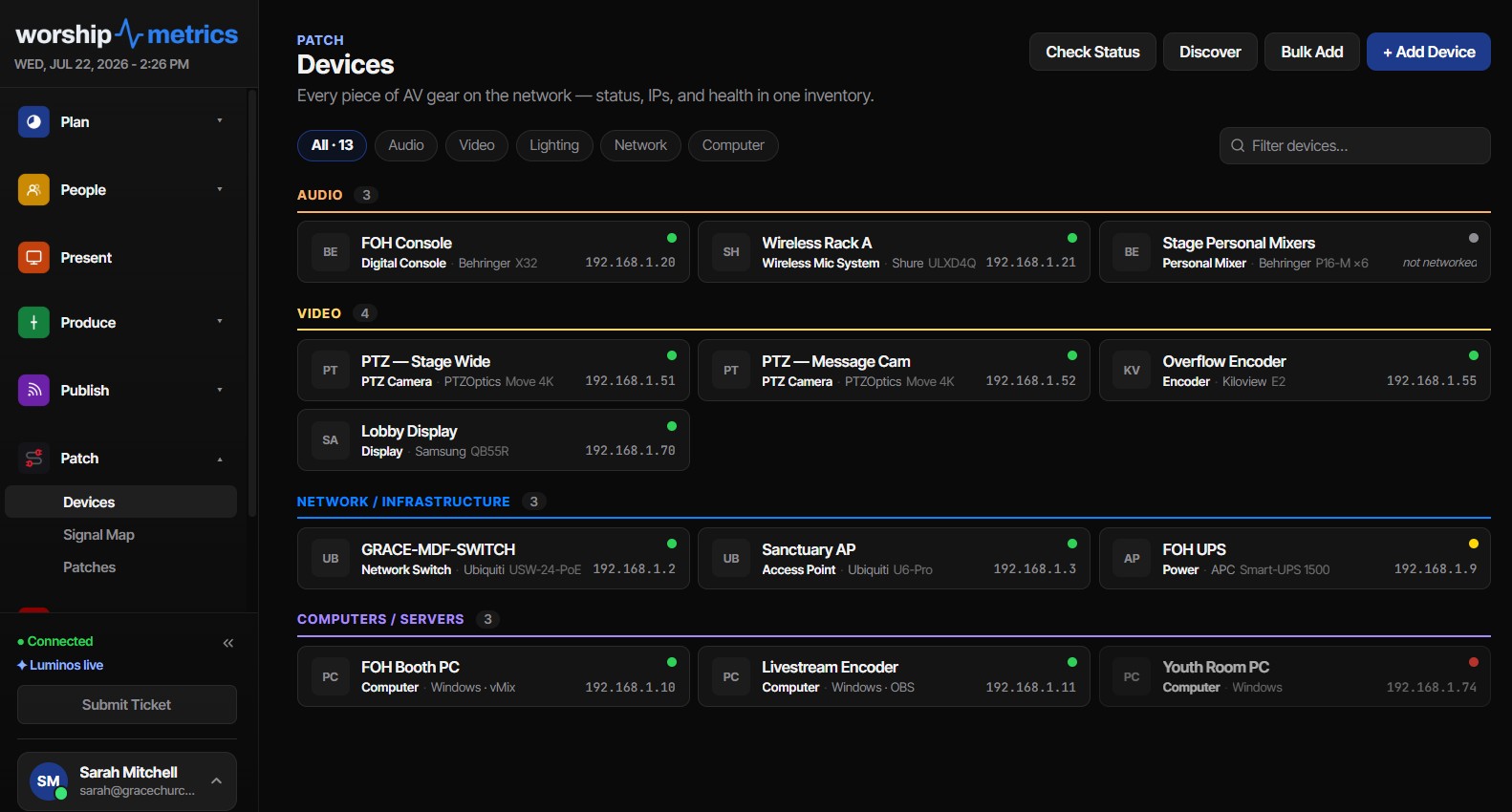
Every computer in your building that runs the Tech Manager desktop app is more than a monitored machine — it is also a watcher. Alongside its own telemetry (a light beat every 15 seconds, a full heartbeat every 60 seconds), each machine probes the networked AV gear you have flagged “Alert when offline” — cameras, digital consoles, video switchers, anything with an IP address you care about on Sunday — and reports what it found in its heartbeat.
That means a camera in your system is not “up” or “down” in the abstract. It is reachable from the front-of-house PC, reachable from the streaming machine, unreachable from the lobby signage player. Each machine contributes one observation, and the cloud rolls those observations up into a single verdict per device.
If you only have one machine running Tech Manager, the rollup still works — you simply have a jury of one, and the per-device alert delay (more on that below) becomes your main defense against blips. But the moment you have two or more booth machines, the rollup starts doing something a single watcher never can: if any one booth computer can still reach the camera, it shows online. One machine losing its path to a camera is a network problem, not a camera problem, and your phone should not buzz for it.
The five states, and what each one tells you
The rollup resolves every monitored device into one of five states. Each one is a distinct, honest claim:
| State | What it means | What to do |
|---|---|---|
| Online | Fresh observers can reach the device | Nothing — this is the goal |
| Degraded | The device answers, but not completely. If any one booth computer can reach it, it shows online | Check the device itself — its web page, its network settings, its firmware |
| Stale | The observers themselves have gone quiet — no fresh report in 10 minutes | Check the booth machines; the device’s real state is currently unknowable |
| Offline | Every fresh observer agrees the device is unreachable | This is real — the walk to the booth is worth it |
| Unknown | No observation to work from at all | Usually a newly added device no machine has probed yet |
The rule that saves the most confusion is the one behind online: if any one booth computer can reach a device, it shows online. When your streaming PC can see the camera but the front-of-house machine cannot, that is not a camera problem, and calling it “offline” would send you troubleshooting the wrong thing entirely. If one machine keeps losing its path to your gear, the underlying issue is almost always switch and VLAN design rather than the gear itself — our guides to church network design for AV and which AV signals survive a network switch cover the fixes.
Why “offline” requires unanimity
The rollup’s central rule is deliberately strict: a device is only declared offline when every fresh observer agrees it is unreachable.
One dissenting observer — one machine anywhere in the building that can still reach the camera — vetoes the offline verdict. That sounds cautious, but think about what each outcome actually costs:
- A false offline alert wakes someone up, erodes trust, and trains the team to ignore the system.
- A brief delay in a true offline alert costs, at most, the seconds it takes for the last observer to confirm what the others already reported.
When a device genuinely dies — power supply fails, someone unplugs it, the device itself locks up — every observer loses it at essentially the same moment, so unanimity arrives almost immediately. The only scenarios where observers disagree are precisely the scenarios where the device is fine and something in between is broken. Requiring agreement doesn’t slow down real alerts; it filters out the fake ones.
There is a quieter benefit, too. Because the verdict is built from independent vantage points, the fleet view stays truthful during partial network trouble. During a switch failure that takes out half a room, you’ll see a cluster of offline states that maps to your physical topology — which is often enough to identify the failed switch before anyone touches a cable. Churches that keep a live AV inventory with locations attached get the most out of this: the pattern of states is the diagnosis.
The 10-minute staleness window: honest over reassuring
An observer is only allowed to vote while its reports are fresh. If a booth machine goes quiet — powered down for the week, mid-update, or off the network itself — its last observations age out after 10 minutes, and it is excluded from every rollup decision until it reports again.
This window is doing two jobs at once.
First, it prevents a dead observer from blocking real alerts. Without staleness handling, a machine that reported “camera reachable” and then crashed would keep vetoing the offline verdict forever, holding the whole system hostage to a report from the past.
Second — and this is the part most monitoring designs get wrong — it prevents a dead observer from faking good news. If every machine that watches a device has gone quiet, the honest answer is not “online” (frozen at the last known state) and not “offline” (nobody actually observed that). The honest answer is stale: we currently have no fresh eyes on this device. The dashboard says exactly that, instead of comforting you with a green light backed by nothing.
Ten minutes is a deliberate compromise. Booth machines heartbeat every 60 seconds and are themselves marked offline after 90 seconds of silence, so a 10-minute observation window tolerates restarts, updates, and brief network drops without churning device states — while still guaranteeing that no verdict is ever built on data more than 10 minutes old. (If a booth machine goes quiet, that triggers its own offline detection on its own faster clock — the full threshold reference lays out every timer side by side.)
The per-device alert delay: slack where each device needs it
Unanimity handles disagreement between observers. The per-device alert delay handles the other nuisance: momentary blips that every observer sees at once.
Some devices are simply twitchy. A camera on a congested VLAN, a console that pauses networking during a firmware save, a device behind a switch that renegotiates on schedule — all of these can vanish from everyone’s view for a few seconds and come right back. So each monitored device carries its own configurable delay — 60 seconds by default — that must elapse, with the device continuously unreachable, before an offline alert fires.
The practical tuning advice:
- Leave 60 seconds for most devices. It absorbs port renegotiations and momentary congestion without meaningfully delaying real alerts.
- Lengthen it for devices with known-flaky paths or scheduled network interruptions, so their quirks stay out of the alert feed.
- Shorten it cautiously for devices where seconds matter — but resist making everything instant. An alert that fires on every two-second blip is an alert the team learns to swipe away.
Because the delay is per device, one temperamental camera doesn’t force a sluggish setting onto the console sitting one clean switch hop away.
What this design prevents, concretely
Put the three mechanisms together — unanimous offline, the 10-minute staleness window, per-device delays — and each classic false-page scenario gets caught by a different layer:
- One machine’s bad network path (the 3 AM scenario): the other observers still reach the device. Verdict: online, not offline. No page.
- A booth machine crashes while everything else is fine: its stale observations age out within 10 minutes and it stops voting. Devices stay online on the strength of the remaining observers. No page.
- Every observer shut down for the week: devices demote to stale rather than pretending to be online — and rather than mass-paging offline alerts for gear nobody is actually observing.
- A two-second network blip everyone sees: the per-device delay outlasts it. No page.
- A camera actually dies: every observer loses it simultaneously, the delay elapses, and the alert fires — once. The same anti-flap machinery that governs the rest of the platform applies here: one alert per incident, automatic resolution in the feed when the device returns.
The result is a system whose silence means something. When no alert arrives, it is because machines in your building are actively confirming your gear is reachable — not because the monitoring gave up quietly.
How WorshipMetrics handles this
The multi-observer rollup described here is the standing behavior of Pulse, the monitoring layer of WorshipMetrics. Every machine running the Tech Manager desktop app doubles as an observer, its heartbeats carry the probe results for every device flagged “Alert when offline,” and the cloud resolves the five states — online, degraded, stale, offline, unknown — continuously, whether or not anyone has a dashboard open. Per-device alert delays are set right on each device’s page, offline alerts fire once per incident and auto-resolve on recovery, and the alert feed keeps the history so “has this camera done this before?” has a real answer.
Nobody’s Sunday gets better because a monitoring tool cried wolf at 3 AM. The rollup exists so that when your phone does buzz, the walk to the booth is always worth it.
Multi-Campus People Management: Time Zones, Teams, and Lists
NextScheduling Volunteers a Month at a Time: The Matrix Workflow
Related Articles
Controlling Projectors, PTZ Cameras, and Sound Boards with Bitfocus Companion
Bitfocus Companion can control far more than OBS and vMix. Projectors over PJLink, PTZ cameras over VISCA, digital sound boards over the network, and almost anything else with an IP address. Here's how churches connect the rest of the room, and how to plan a 'Start Service' button that does it all.
PTZ Camera Troubleshooting for Churches: The 10 Problems Behind Almost Every Sunday Failure
A symptom-first field guide to the PTZ and network camera failures church booths actually hit — cameras that vanish from the network, presets that drift, flicker under LED lighting, video lagging the audio — with fast checks for each, and the upgrades that end the guessing: a mapped system, cameras on watch, and AI that knows your wiring.
AI That Knows Your Wiring: How Luminos and Journey Actually Work
The AV manager's tour of the context architecture: how the Signal Map, live inventory, telemetry, and support history become an assistant that answers questions about YOUR booth — in the app as Luminos, on the phone as Journey.