 Produce · Self Healing
Your stream drops. You know in seconds. One tap brings it back.
Self Healing watches your live stream and your recording in OBS or vMix. The moment either one stops unexpectedly, it tells you — on the booth, in the app, by email or text — and offers to restart it. Anyone on your team can tap Restart, from wherever they are.
On by default in Tech Manager, on every plan — including Free. Nothing to switch on before Sunday.

4
outputs watched: OBS stream and recording, vMix stream and recording
1
tap to restart, from the booth or from your phone
On
by default, on every plan, including Free
The problem
Nobody is watching the encoder when it matters.
The person in the booth is running lyrics, riding the pastor's mic, and answering a text about the nursery. The stream drops during the second song, and the first anyone hears of it is a comment from a homebound member: “Is it just me?” Worse, the recording quietly stopped at 10:40 and nobody finds out until Monday, when the sermon clip doesn't exist.
Self Healing takes the watching off the volunteer. It doesn't get distracted, it doesn't wait to be sure, and it puts a Restart button in front of everyone who can help.
How it works
Noticed, told, restarted, checked.
-
Step 1
It notices
A stream or recording that WorshipMetrics started stops without anyone stopping it from WorshipMetrics. There's no waiting period — the stop is the signal.
-
Step 2
It tells you, everywhere at once
A banner on the booth — “Your stream stopped at 9:46 AM. Restart it?” — and a row in Alerts on the web and phone app, each with Restart and Leave it off. The people you choose get an email or a text, plus a phone push.
-
Step 3
Anyone on the team taps Restart
The volunteer in the booth, the tech director in the second row, or the pastor's spouse watching from home — whoever taps first, wins. The booth re-checks the switcher first and never restarts something that's already running.
-
Step 4
It checks its own work
About twenty seconds after a restart, the booth looks again and reports back: verified, not fixed, or couldn't confirm. If the output comes back on its own, the offer closes itself.
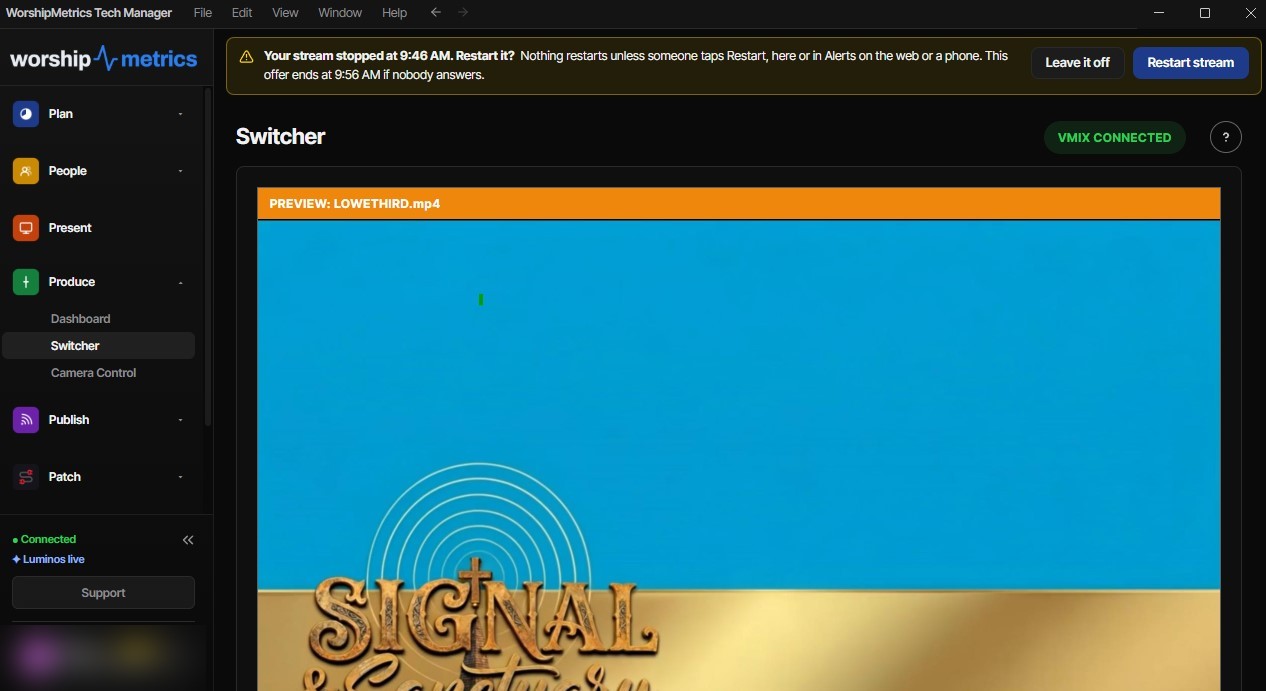
“Nothing restarts unless someone taps Restart, here or in Alerts on the web or a phone.” The same prompt appears in Alerts — whoever answers first, wins.
What it watches
The stream and the recording, in OBS or vMix.
Self Healing watches whichever switcher your booth is set up to use, through the same connection Tech Manager already has to it. See OBS integration and vMix integration.
OBS stream
The stream WorshipMetrics started in OBS — and if it stops, you hear about it the moment OBS reports it.
OBS recording
The archive copy of the service. The failure nobody notices until Monday, caught on Sunday.
vMix stream
Every stream slot WorshipMetrics started in vMix, checked every five seconds.
vMix recording
The recording WorshipMetrics started in vMix, checked on the same five-second cycle.
Fast, but never pushy
The alert finds you. The decision stays yours.
Told immediately, wherever you are.
On the booth
A pop-up on the Tech Manager screen, right where the volunteer is already looking.
In the WorshipMetrics app
A row in Alerts on the web and on your phone, with the same Restart and Leave it off buttons.
Email or text
Turn on Self Healing notifications and you're emailed or texted when Self Healing asks — and again when someone answers, so everyone knows it's handled.
Phone push
For anyone who's ticked “Notify me about alerts like this.” Each person chooses for themselves.
Email and text are set under Settings → Notifications → Self Healing notifications; push channels under Notification settings on the Alerts page. See how Pulse alerts reach the rest of your team.
A restart is always a person's call.
A stop isn't always a failure. Sometimes the pastor asked to cut the feed for a private prayer time. So Self Healing tells you instantly and makes restarting a single tap, but it never fights your team.
- Nothing restarts until a person taps Restart
- Only outputs WorshipMetrics started — a stream you started by hand in OBS or vMix is never touched
- Stopping from WorshipMetrics never triggers an offer
- Leave it off means it stops asking until the output is started from WorshipMetrics again
- Offers lapse after 10 minutes, so a stale prompt can't restart anything an hour later
- A crashed OBS or vMix is reported, never relaunched — a crash can mean a problem a person should look at
Settings
On out of the box. One switch if you want it off.
Self Healing is configured in Tech Manager, under Settings → Production Switcher:
Self Healing — on by default
Turn it off and the offers stop. To be emailed or texted when Self Healing asks, and when it's answered, turn on Self Healing notifications under Settings → Notifications. The same switch is available from the web for each booth, and System Health shows at a glance whether restart offers are on.
Nothing silent
Every stop, every answer, on the record.
Every offer, who answered it and from where, and whether the restart worked goes into your system history. If the booth loses internet, it keeps the record and sends it once it's back online.
Over a few months that history turns into a diagnosis. A booth that drops once a quarter is fine. One that drops every Sunday at 10:40 has a network or hardware problem worth chasing, and when you call 910-WORSHIP, support is already looking at the same record.
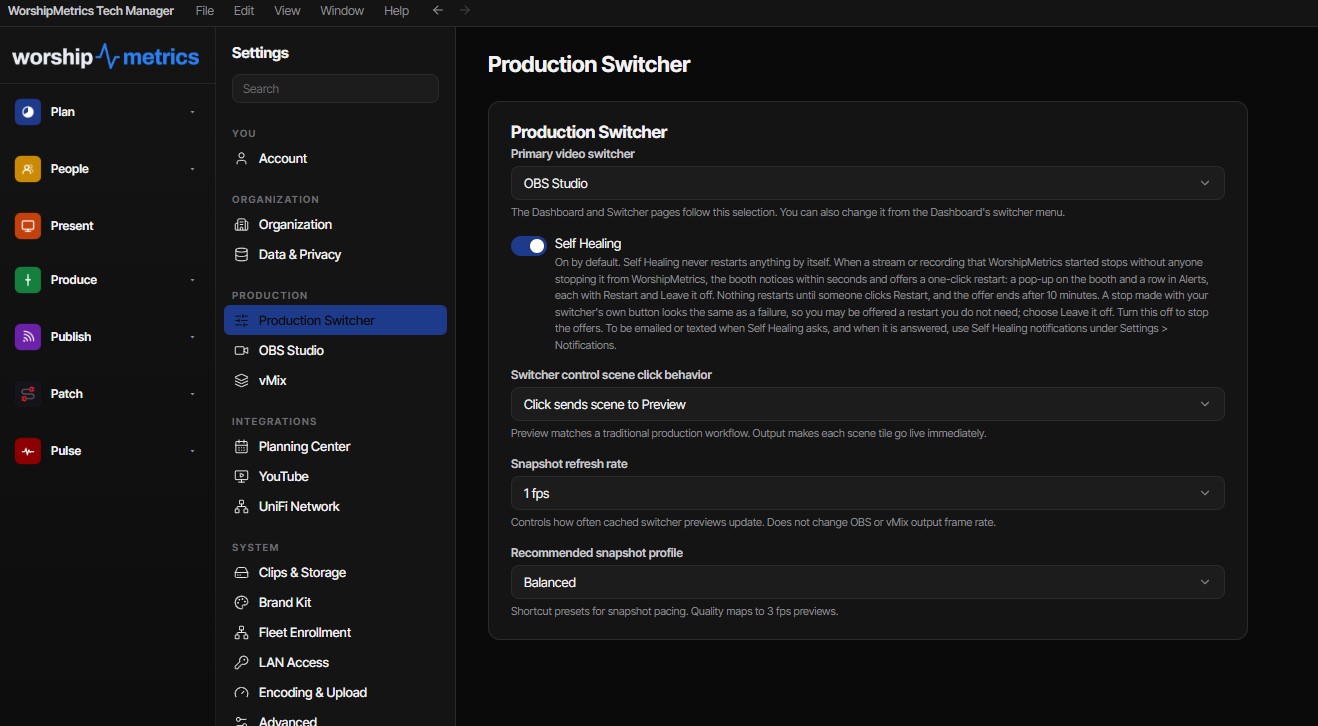
Settings → Production Switcher in Tech Manager. One switch, on out of the box.
FAQ
Self Healing, answered.
Is Self Healing on by default?
Yes. Every booth running Tech Manager offers to restart a stream or recording that stops unexpectedly, on every plan, including Free. There's nothing to set up before your first service.
Does it restart my stream automatically?
It offers, and a person decides. The moment a stream or recording stops unexpectedly, you're told and offered a one-tap restart on the booth and in the app. Nothing restarts until someone taps Restart. A stop can be on purpose, and we'd rather ask than fight your team.
How will I find out the stream went down?
A banner on the booth and a row in Alerts in the WorshipMetrics app, both immediately. Turn on Self Healing notifications under Settings → Notifications to be emailed or texted when Self Healing asks and when someone answers; phone push is there too.
Does it work with OBS and vMix?
Yes. It watches the stream and the recording in whichever switcher your booth is set to use — OBS Studio or vMix. OBS reports a stop the instant it happens; vMix is checked every five seconds.
What if we stopped the stream on purpose?
If you stopped it from WorshipMetrics, there's no offer at all. If you stopped it with your switcher's own button, that looks the same as a failure from the outside, so you may be offered a restart you don't need. Tap Leave it off and it won't ask again for that output.
Where are the settings?
In Tech Manager, under Settings → Production Switcher, as the Self Healing switch. Turn it off there to stop the offers. Email and text alerts are set under Settings → Notifications → Self Healing notifications.
Is there a record of what happened?
Yes. Every offer, every answer — who tapped what, from the booth or from the web — and the result of every restart is logged to your system history. Support sees the same record if you call 910-WORSHIP.
From the Knowledge Base
Stream-drop questions churches actually ask.
Stop finding out from the comments.
Install Tech Manager on the booth computer and Self Healing is watching your stream and recording before the first song.
Works with OBS Studio and vMix. On by default, on every plan.
Modernize your AV · Instant tech support
Download Tech Manager free — and put a tech support number in the booth.
Tech Manager connects your church's AV system to WorshipMetrics: documented, monitored 24/7, and backed by a number your team can call the moment anything acts up. Our AI support sees your actual system — so issues get solved before frustration starts.
Curious how good church tech support can be? Call right now and find out →
Tech support, any time
910-WORSHIP(910) 967-7447
Answered around the clock by AI that knows your system — with real production engineers when Sunday's on the line.