 Publish
Connect Once, Stream Seamlessly
On Max, send us one feed and your service reaches YouTube, Facebook, and your own website player — recorded, archived, and cut into Reels your team can share before Monday. WorshipMetrics allows you to know who's in the room, and reach who isn't.
How the feed travels
Connect once. We handle the rest.
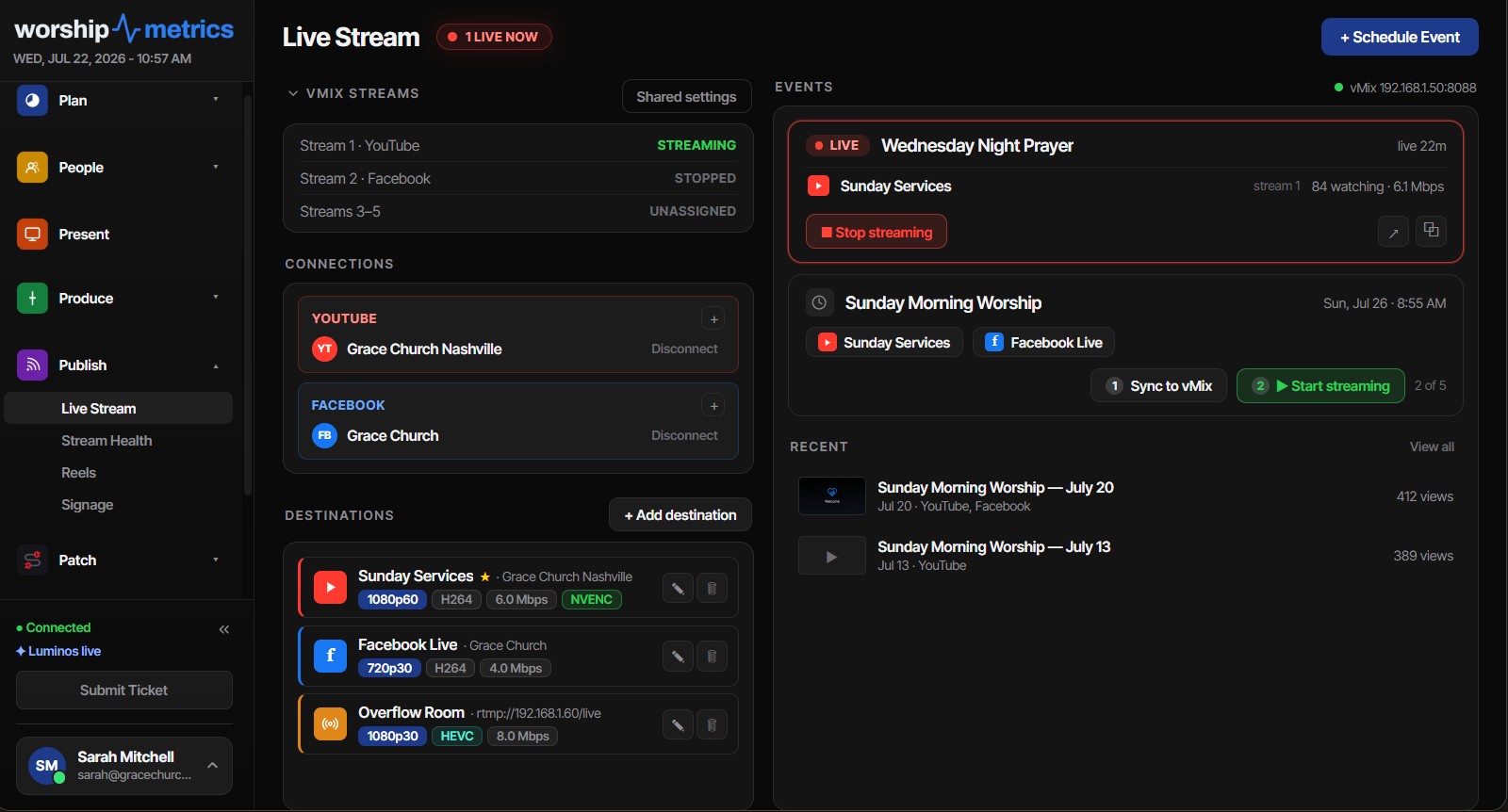
Your encoder points at WorshipMetrics one time. From there the same feed reaches every destination at once — and lands in your archive on the way past.
Re-streaming
Stop juggling stream keys.
On Max, one feed reaches everyone, everywhere. Add or drop a destination in a click — your encoder settings never change.
YouTube
Scheduled broadcasts, go live, end, and history — handled end to end.
Simulcast to your page without touching a second encoder.
Your website
A clean player embed for your church site — no platform branding.
More destinations
Twitch, BoxCast, Restream, and Castr — plus additional RTMP endpoints we allowlist for you on request.
The Stream console
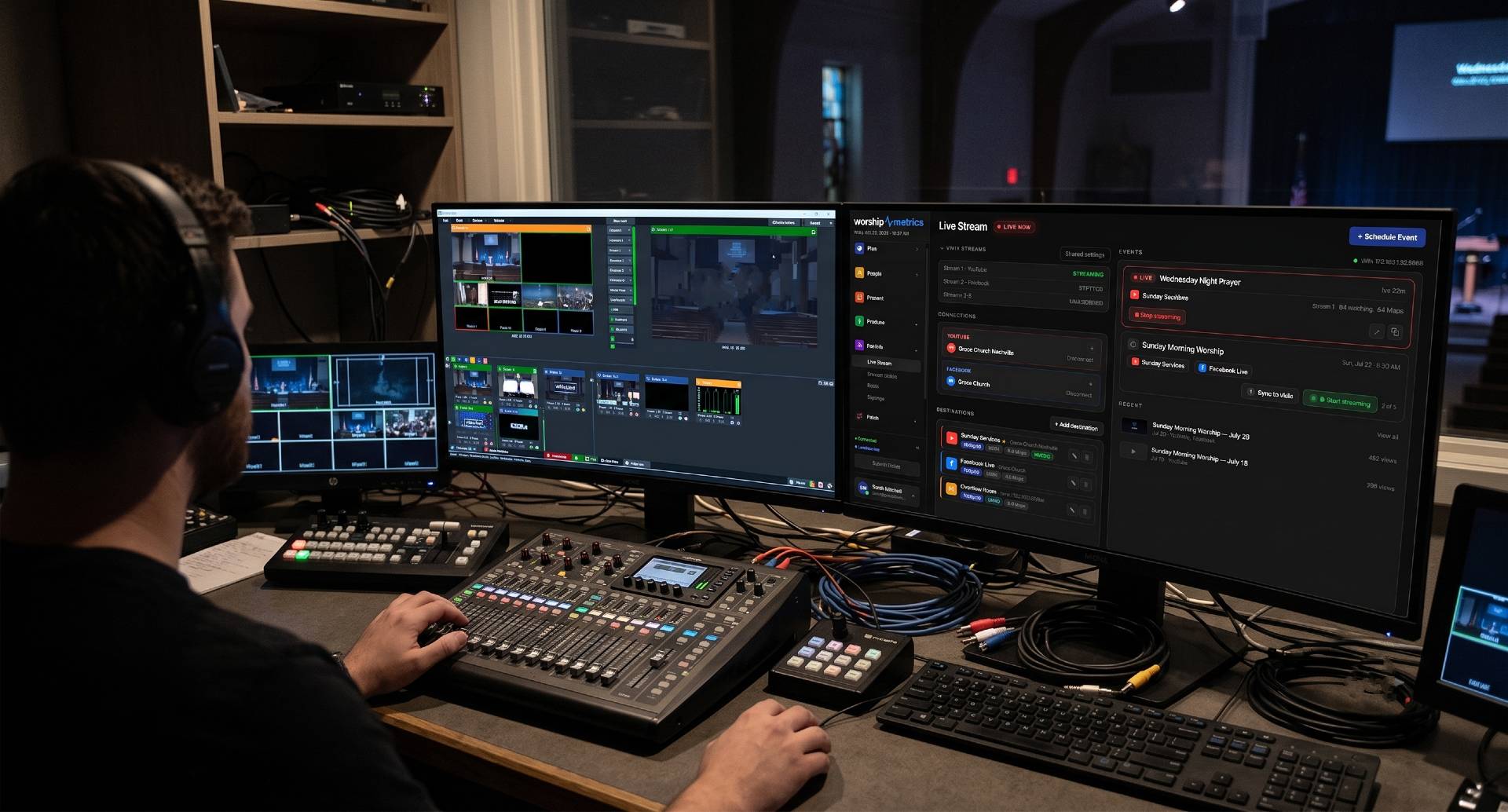
Encoders, connections, and scheduled events in one console — sync to vMix and go live in two clicks.
What's inside
Streaming that runs like the platforms twice the price.
Built on a global network
Your encoder pushes one RTMPS or SRT feed to stream.worshipmetrics.com, and a worldwide delivery network handles the adaptive bitrate ladder, recordings, and playback. Resilient ingest, not a server in a closet.
One feed, ten destinations
The cloud fans your single uplink out to up to ten destinations at once — YouTube, Facebook, Twitch, the major restreamers, and your own embedded player — without asking your encoder to do more work.
YouTube & Facebook, end to end
Broadcasts are created, scheduled, started, and ended for you — with reusable stream keys so vMix is configured exactly once, and settings chosen so a network blip can't permanently kill a broadcast. Facebook tokens renew themselves before they expire.
Recordings that just happen
Every service records automatically and lands in your archive exactly once, ready to watch as soon as the stream ends. Recording is separate from the broadcast, so nothing about the archive can ever interrupt the live stream.
Clip while it's live
Cut 'the last 30 seconds' out of the stream while it's still running, or scrub finished recordings and cut frame-accurate clips without downloading multi-gigabyte files first.
Reels that find the moments
Transcription tuned for church language — an up-to-80-term vocabulary boost so 'propitiation' and your pastor's name transcribe correctly — then AI scores every candidate moment across ten categories and writes a hook caption for each.
Branded renders, three formats
Vertical, square, and widescreen at 30 fps with burned captions in four styles, six lower-third looks, your brand colors and logo, and intro/outro panels — publishable straight to YouTube.
A scored report for every stream
Telemetry samples every five seconds build a 0–100 health score per service on Max, with per-issue recommendations. A 45-second grace window means one bad hiccup reads as a reconnect, not a new report.
Online attendance fills itself in
Concurrent viewers are sampled every minute; when the broadcast ends, peak and average roll into that day's service attendance automatically. Nobody transcribes YouTube numbers into a spreadsheet on Monday.
Stream health
Sunday has a pulse. We watch it.
Encoder load, dropped frames, bitrate history, per-event logs — live, on a dashboard, with alerts the moment anything drops. Your congregation should never know about a problem before you do.
And when something does go wrong, you're not alone: call 910-WORSHIP any hour. Journey, our AI phone assistant, answers with your setup in view and brings in a person who runs church production when you need one.
Recordings & clips
Sunday doesn't end at noon.
Chop clips live
Mark moments during the service — the worship set, the sermon point, the baptism — and they're clips before the service ends.
Trim from the recording
On Max, every service lands in your recordings library automatically. Trim the full service, cut the sermon, and hand highlights straight to Reels.
Publish-ready by Monday
Captioned, rendered, and formatted for the platforms your congregation actually scrolls. The sermon finds people who weren't in the room.
Connected through the cloud
Your stream team, wherever they are.
Questions
Streaming questions, answered.
How do we get streaming turned on?
Streaming to YouTube and Facebook from Tech Manager on your church's computer is free on every plan. Hosted live streaming — your own watch page and player, up to 10 destinations at once, cloud recordings, and live chat — comes with Max. We turn it on for you within one business day, set up your ingest with you, then confirm your first test stream together before it counts.
Do we have to change our encoder or software?
No. Point vMix, OBS, or any RTMP encoder at your WorshipMetrics ingest once. Everything downstream — destinations, recordings, clips, monitoring — happens on our side.
What happens if the stream drops mid-service?
We're watching it live. The moment bitrate drops or the feed dies, you get an alert — and support answers any hour, including Sunday morning. You find out from us, not from a text from someone watching at home.
Can we still stream directly to YouTube?
Yes. WorshipMetrics manages your YouTube broadcasts end to end — scheduling, visibility, go-live, and history — while also, on Max, fanning the same feed out everywhere else you want it.
Where do the recordings live?
On Max, in your recordings library, automatically, after every stream. Trim them, clip them, or publish them — they're yours.
WorshipMetrics Livestream Systems
Need the streaming computer too?
Our Livestream Systems are tested Good, Better and Best church livestreaming systems: a rack-mounted computer with Magewell capture, OBS or vMix installed and tuned, and WorshipMetrics monitoring built in. We'll build around the cameras and sound board you already own.
Your live stream, with a team behind it.
Choose Max and we'll get your encoder pointed at WorshipMetrics together — and you can stop thinking about streaming infrastructure on Sunday morning.
Technical details
For the person who reads the spec sheet.
Ingest
RTMPS and SRT (stream ID + passphrase) to stream.worshipmetrics.com — works with vMix, OBS, and any RTMP/SRT encoder
Delivery
HLS with an adaptive bitrate ladder to the embeddable player and your hosted watch page (4-second segments, auto-start when you go live)
Destinations
Up to 10 simultaneous per channel: YouTube, Facebook Live, Twitch, BoxCast, Restream, and Castr — plus additional RTMP/RTMPS endpoints we allowlist for you on request
Recordings
Automatic per service, up to 4 hours / 8 GB each, available once the stream ends — and fully separate from the broadcast, so archive limits can never stop a live stream
Storage
Recordings use your plan's storage: 1 TB on Max, with more at $39/TB a month
Clipping
Live clips up to 10 minutes cut from the in-progress stream; frame-accurate VOD clips over ranged reads (no downloads); whole-service trims without re-encoding
Reels transcription
Speaker labels, auto chapters, and highlights with an up-to-80-term church vocabulary boost — or fully local transcription on Tech Manager so service media never leaves the booth
Reels scoring
Ten clip categories, a 0–100 shareability score, quality badges, and a hook caption per candidate clip
Clip renders
1080×1920, 1920×1080, and 1080×1080 at 30 fps — burned captions (4 styles), 6 lower-third looks, 5 font presets, brand color and logo, intro/outro panels, direct YouTube publishing
Stream health
5-second telemetry samples (bitrate, FPS, encoder load, dropped frames, CPU, RAM, disk) with a 45-second reconnect grace window and, on Max, a scored report with per-issue recommendations
Viewer analytics
Per-minute concurrent viewer sampling; peak and average viewers roll into service attendance automatically when the broadcast ends
Fair use
1,000 viewer-hours a month on your own player and watch page; over an allowance, we contact you first — YouTube and Facebook viewers are never metered, and we never stop a live service over a quota
From the Knowledge Base
Streaming questions churches actually ask.
Modernize your AV · Instant tech support
Download Tech Manager free — and put a tech support number in the booth.
Tech Manager connects your church's AV system to WorshipMetrics: documented, monitored around the clock while it runs (it starts with the computer), and backed by a number your team can call the moment anything acts up. Our AI support sees your actual system — so issues get solved before frustration starts.
New to us? Call and we'll put you in touch with the team. How phone support works →
Tech support, any time
910-WORSHIP(910) 967-7447
AI phone support any hour on Pro and Max · a person on the line with Care or Sunday Assurance.