Pricing
Find the plan that fits your Sunday.
Every module is free, forever. Pro and Max add more help, more room and streaming. Sign up by December 31 to lock founding prices for 12 months.
Choose your plan
Every plan includes every module
-
 Plan Services, songs & schedules
 -
 People People management, chat & prayer requests
 -
 Present Modern slides, built and run anywhere
 -
 Produce Switcher & camera control
 -
 Publish Live stream, library & AI Reels
 -
 Patch Your gear & how it connects
 -
 Pulse Monitoring, alerts & support
Plus Tech Manager, our app for your church computer, on Windows and Mac
*Unlimited for your church's own use, for help with your church's audio, video, lighting, streaming and WorshipMetrics.
Add support Optional
For the WorshipMetrics platform and your whole media system: cameras, switcher, sound, stream and screens.
*Unlimited for your church's own use, for help with your church's audio, video, lighting, streaming and WorshipMetrics.
Not sure? Start on Free. You can change plans any month.
Want to gift WorshipMetrics to your church?
Many members cover their church's annual plan as a designated gift. It's simple, and because the gift goes to your church, it's typically tax-deductible. See how it works →
The details
Compare every feature.
| Plan by plan Everything each plan does, grouped by part of the app. | Free Every module, free forever. $0 Get started free | Pro More help, more room. | Max Your church, everywhere. |
|---|---|---|---|
| Storage Shared across the whole platform | 10 GB | 500 GB | 1 TBAdd more at $39/TB/mo |
| Plan Services, songs & schedules | |||
| Service plans Orders of service, templates, copy to next week | |||
| Volunteer scheduling Assign teams and positions weeks ahead, with email notifications | |||
| Volunteer schedules and blockouts Accept or decline from an email, mark days away, get notified | |||
| Song library and chord charts Arrangements, any key, printable charts | |||
| CCLI reporting Song use, ready to report | |||
| Live service timers | |||
| AI headcount Counts the room from a camera snapshot | — | ||
| Planning Center sync | |||
| Online viewer numbers Peak and total viewers and watch time, for every stream | — | — | |
| People People management, chat & prayer requests | |||
| Church directory Profiles, households and notes | |||
| Unlimited team members No per-person fees, ever | Unlimited | Unlimited | Unlimited |
| Import from a spreadsheet Finds and merges duplicates | |||
| Team Chat Channels, direct messages, files, polls | |||
| Prayer requests inbox From your live stream page | — | — | |
| Present Modern slides, built and run anywhere | |||
| Modern presentation software Lyrics, slides & media, built together from any browser | |||
| Scripture slides Six free translations† | |||
| Run it from any computer or browser Multiple operators at once, live editing & control lock | |||
| Output feeds Screens & TVs · NDI (desktop) · SDI or HDMI through Blackmagic, key & fill on SDI (desktop) · Web link viewer | |||
| Chord charts On the band's stage screen, in any key | |||
| Web pages on screen (desktop) Show & control a live website, like a countdown or giving page | |||
| Triggers and macros Fire lights, sound, video or other software from a slide or one button. MIDI, OSC, HTTP, RossTalk, Q-SYS, OBS and ATEM | |||
| Companion buttons built in Trigger Companion buttons right from the Present window | — | ||
| ProPresenter 7 import | |||
| Produce Switcher & camera control | |||
| Switcher control OBS, vMix and Blackmagic ATEM | Desktop | DesktopPlus OBS & vMix in a browser | DesktopPlus OBS & vMix in a browser |
| PTZ camera control Simple enough for volunteers | Unlimited camerasDesktop | Desktop and browser (beta)Unlimited cameras | Desktop and browser (beta)Unlimited cameras |
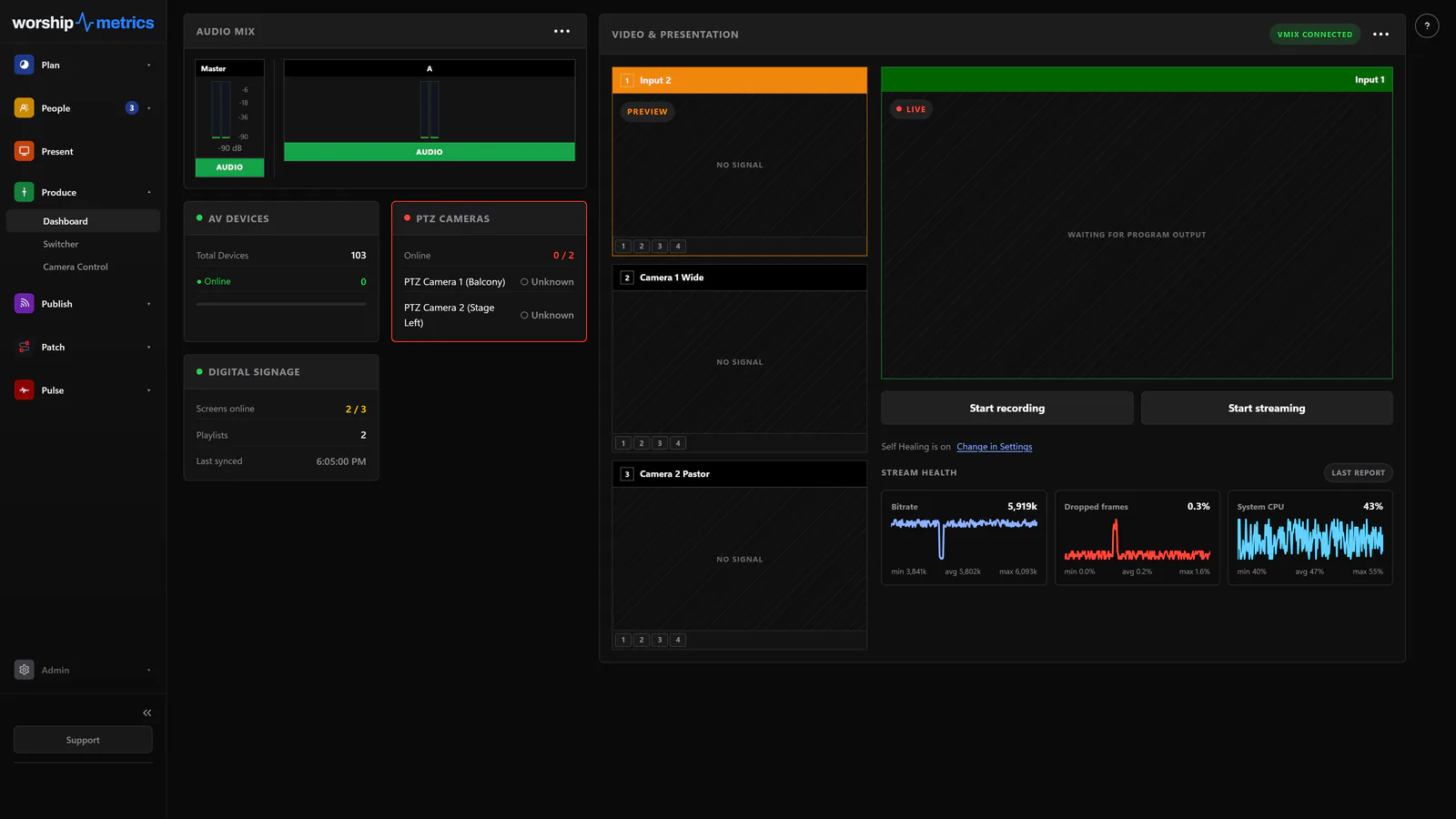
| Production dashboard Program and preview, audio meters, stream health | |||
| Start and stop streaming and recording OBS and vMix | |||
| Picture presets Tap a thumbnail to move the camera | |||
| Run it from your phone (desktop) Scan a code, no account needed | |||
| Publish Live stream, library & AI Reels | |||
| Live stream manager Set up, schedule and run your YouTube and Facebook streams in one place | Desktop | Desktop and browser | Desktop and browser |
| Hosted live streaming On your own page, never muted by a copyright bot | — | — | |
| Stream everywhere at once Send one stream and we deliver it everywhere, easing the load on your computer | — | — | Up to 10 |
| Live stream chat With moderation and prayer requests | — | — | |
| Branded live stream page Plus a player for your website | — | — | |
| Branded video library Sermons, series and highlight reels on your own page and link | — | ||
| Your own domain Your live stream page and library at watch.yourchurch.org | — | — | |
| After-service stream report | — | — | |
| Cloud recordings Every service recorded automatically | — | — | |
| AI Reels Your services' best moments, ready for social | On your computer | On your computer or onlineUp to 20 hours of recordings a month | On your computer or onlineUp to 20 hours of recordings a month |
| AI social posts Titles, descriptions and hashtags, written for you | — | ||
| Digital signage Custom displays on any screen with a browser | 1 screen | Unlimited | Unlimited |
| Patch Your gear & how it connects | |||
| Gear list and Signal Map Every device, every cable, and how it all connects | |||
| Network device discovery (desktop) Finds the gear on your church network for you | |||
| Gear catalog Thousands of models | |||
| IP addresses Every device's IP in one list, discovered by network scan (desktop) | |||
| Device manuals Links to manuals & spec sheets for common gear | |||
| Wiring diagrams and patch sheets Printable PDFs with every cable labeled | |||
| AI import of system drawings & schematics From a PDF or photo | — | Up to 10 sheets a month | Up to 25 sheets a month |
| AI looks up new gear Fills in ports and specs | Up to 5 models a day | ||
| Pulse Monitoring, alerts & support | |||
| System Health Watches every device on your network, all week | |||
| Tech Manager computer health CPU, memory, disk space, displays and sound devices | |||
| Remote fixes Change display resolution, speakers and mics without being there | |||
| Health log Records anything plugged in, unplugged or changed, on every Tech Manager computer | |||
| Alerts by email, text and desktop Texts after you confirm your number | |||
| Luminos AI chat Free: for verified churches | 5 conversations a month | Unlimited* | Unlimited* |
| AI phone support (910-WORSHIP) Answers any hour, with your system in view | — | 2 hours a month | 5 hours a month |
| Email tickets to a person Talk to a person by phone: add Care | Answered on weekdays | Answered on weekdays | Answered on weekdays |
†More translations coming soon. Prices in US dollars. Founding prices: sign up by December 31, locked for 12 months. Over an allowance, we contact you first. A live service is never cut off.
*Unlimited for your church's own use, for help with your church's audio, video, lighting, streaming and WorshipMetrics.
| Support Help with the WorshipMetrics platform and your whole media system. Add a person when you want one. | Included Comes with every plan. $0 | Care A person on your side every weekday. +$199/mo | Sunday Assurance Care, plus a person on call during your Sunday services. +$499/mo Call us to sign up |
|---|---|---|---|
| Help with your whole media system Cameras, switcher, sound, stream and screens, not just WorshipMetrics | |||
| Help center and guided tours | |||
| Luminos AI chat | From your plan | From your plan | From your plan |
| AI phone support (910-WORSHIP) | From your plan | Plan + 5 hours a month | Unlimited* |
| Email tickets | Answered on weekdays | Front of the lineWeekdays | Front of the line7 days a week |
| Talk to a person by phone Our AI phone line connects you to a person | — | Weekdays 9 to 6 CT | Weekdays 9 to 6 CTPlus Sundays |
| Remote help from a person Calls, screen shares and fixes, counted in 15-minute blocks | — | Up to 4 hours a month | Up to 6 hours a monthSunday on-call doesn't use these hours |
| Sunday on-call A person standing by, with remote view of your system | — | — | Sundays5 am to 2 pm CT |
| Saturday system check We check your system before services | — | — | |
| Extra service days Christmas Eve, Easter and more | — | — | 2 a yearBook 2 weeks ahead |
We help with your whole media system as best we can, remotely; hardware repairs and on-site work are not included. Hours are when our team is working, all in Central time. US holidays are off. Unused hours don't roll over. Each add-on covers one campus.
*Unlimited for your church's own use, for help with your church's audio, video, lighting, streaming and WorshipMetrics.
Upgrading your system?
Livestream Systems from $4,995, with 1 year of Max included.
Good $4,995 · Better $8,995 · Best $17,995 as reference prices for the system, each with a project manager, remote setup, a 3-year warranty, and a year of WorshipMetrics Max (a $1,188 value). On-site installation and training are quoted after a free consultation.
What real churches actually buy
Every combination makes sense.
Monthly prices shown at founding rates.
| Church | Plan | Monthly | Compare against |
|---|---|---|---|
| 75-person church, volunteer-run | Free | $0 | Figuring it out alone |
| Church that wants help and room to grow | Pro | $39 | One more volunteer who knows the system |
| 200-person church that streams | Max | $79 | Often less than they pay today for streaming alone |
| Growing church that cannot risk Sunday | Max + Sunday Assurance | $578 | $1,500+/mo part-time hire |
Build on the rock
Make what you own work. Upgrade on purpose.
When Sunday keeps breaking, the reflex is another purchase — a new switcher, another converter, one more box on the rack. But most Sunday problems aren't equipment problems. They're visibility, training, and support problems, and every new box quietly makes those worse. WorshipMetrics fixes the root cause on the equipment you already own. And when it really is time for new equipment, we design, install, and support one complete livestream system instead of another box.
The band-aid cycle
- Something fails on a Sunday, so the church buys another box — and the system grows a little more complex
- Every new box brings its own cables, configs, and quirks — one more thing only one volunteer understands
- The root cause — nobody can see the whole system, and nobody is supporting the team — never gets fixed
- Churches feel it: 38% now call system complexity a core operational challenge, up 15 points in two years†
The solid foundation
- Your existing cameras, switcher, and console — documented, monitored, and controlled in one place
- The encoder is Tech Manager on a PC you already own, or OBS or vMix set up for you — no new hardware required
- Root causes surface in the Signal Map and alerts — with AI and real people standing behind them
- Streaming, planning, presentation, and support built on that foundation — not bolted on beside it
“…a wise man, which built his house upon a rock.”
Matthew 7:24. The rain fell and the winds blew, and that house stood — because of what it was built on, not what was added to it. That's the whole idea here: not more gear. A foundation under the gear you have.
† Source: Church Production Magazine, “Then vs. Now: How Church Production Is Shifting,” Research Series, June 2026.
Why support is part of the product
910-WORSHIP. Answered any hour of the week.
Every WorshipMetrics plan is backed by AI support that answers around the clock, for our platform and for the media system around it, with people who run church production behind it. The support add-ons add a person who knows your church and already knows your system.
That means real channels: tickets, chat, and a phone line at 910-WORSHIP, answered any hour by our AI phone assistant, which brings in a person when your team needs one.
The encoder you already own
Tech Manager is the encoder — no $1,500 box on the rack.
Max runs from a PC your church already owns. Tech Manager encodes and sends your service itself from a capture card, your ATEM's USB output, or Present's picture, and Present can show any NDI source on your network. Or it sets up OBS or vMix to send it if your team already uses them. Multi-destination delivery, cloud recordings, and stream health on your dashboard, running as software on a computer you already have.
FAQ
Common questions about WorshipMetrics pricing
What's a viewer-hour?
One person watching for one hour on your live stream page or your website player. Two people watching a one-hour service is two viewer-hours. People watching on YouTube or Facebook don't count. Max includes 1,000 viewer-hours a month, which covers about 200 people watching an hour-long service every Sunday. If you go over, your service keeps running and we contact you first.
Is the Free plan really free forever?
Yes. No credit card, no trial timer, no expiration. Every module is on Free, with unlimited team members, system monitoring and alerts, Present, switcher and PTZ camera control from Tech Manager, streaming to YouTube and Facebook from your church computer, AI chat support and 10 GB of storage.
What does "help with your whole media system" include?
The media gear a typical church uses for its services and live stream, not just WorshipMetrics: cameras (PTZ cameras, camcorders and camera control); video (switchers like ATEM, vMix and OBS, projectors, TVs, LED walls, stage and confidence screens); audio (mixers, wireless mics, in-ear monitors, Dante and the stream mix); lighting (consoles and lighting cues triggered from your slides); the computers that run your slides, stream and Tech Manager; streaming and recording (encoders, YouTube, Facebook and your website player); and the switches and Wi-Fi your media gear runs on. We help remotely, as best we can. Not included: hardware repairs, on-site work, buying or licensing other companies' products, and your church's office IT, phones or building network.
What happens to our files if we downgrade or cancel?
Your account moves to the plan you choose, or to Free, and nothing is deleted right away. Paid features pause. If you're over the new plan's storage, everything stays for 30 days so you can download it or come back. We'll email you when it starts, a week before, and the day before. After 30 days, files over the new limit are removed, starting with the oldest.
How does founding pricing work?
Churches that sign up by December 31, 2026 pay $39 a month for Pro and $79 a month for Max instead of $49 and $99. Your founding price lasts 12 months while you stay subscribed, then moves to the regular price. Canceling ends it. Support add-ons are at their regular price.
Can we pay annually? What about refunds?
Yes. A year costs 10 months' price, so 2 months are free. Pro and Max start with a 30-day free trial. After the trial, monthly plans aren't refunded for the current month, and annual plans aren't refunded for the current year. Support add-ons aren't refundable. You can cancel anytime to stop future charges.
What AI support comes with each plan?
Luminos AI chat in the app: 5 conversations a month on Free (for verified churches), unlimited* on Pro and Max. AI phone support on 910-WORSHIP: 2 hours a month on Pro and 5 hours on Max; it isn't part of Free. Care adds 5 more hours a month on top of your plan (so Pro + Care is 7 hours, Max + Care is 10), and Sunday Assurance makes phone support unlimited*. *Unlimited for your church's own use, for help with your church's audio, video, lighting, streaming and WorshipMetrics.
What does "unlimited" mean?
Unlimited is for your church's team getting help with your own media system. Requests outside that scope are declined right away, with a note saying so, and we may limit automated or abusive use. If something was blocked by mistake, email support@worshipmetrics.com.
What does "verified church" mean?
Your church verifies its phone number in Settings. It takes about a minute and keeps free AI chat for real churches.
Will our stream get muted for copyright?
We don't run copyright filters on your stream, so a song won't cut your audio the way YouTube or Facebook can. Your church's streaming license (such as CCLI Streaming) still applies, and streams you send to YouTube or Facebook follow their rules.
What counts toward storage?
Everything you keep with us: service recordings, media, slides, songs and uploads. Storage is shared across the whole platform, and Max can add more at $39 per TB a month.
How do we get our own domain on Max?
Use a subdomain your church owns, like watch.yourchurch.org. Your own domain, set up by our team within one business day. Your live stream page and video library then live at that address.
What do we need for SDI or HDMI output through Blackmagic?
A Blackmagic DeckLink or UltraStudio device on the computer running Tech Manager. It adds SDI or HDMI outputs, which helps when you need more screens than your computer's graphics card can drive. Key and fill (for overlaying lyrics on your video) needs SDI. NDI and regular screen outputs need nothing extra.
Is switcher and camera control free?
In Tech Manager, yes, on every plan: OBS, vMix and Blackmagic ATEM switchers, plus your PTZ cameras. Pro and Max add OBS and vMix switcher control from any browser, and PTZ camera control from a browser (beta).
Do we need a Planning Center account?
Only for Planning Center sync. WorshipMetrics works on its own, and sync brings in your existing plans, people and teams if you use Planning Center.
How do text alerts work?
Texts go to US mobile numbers after you confirm yours. Message and data rates may apply.
Running more than one campus?
Every plan covers every campus for one price per church, and allowances are shared across campuses. Support add-ons cover one campus each.
Is Reels included?
Yes. Reels, our AI clipping tool, finds your services' best moments and makes clips right on your church computer in Tech Manager, on every plan. Pro and Max also run Reels online from anywhere and write the titles, descriptions and hashtags for you.
Do I need to buy a hardware encoder to stream?
No. Your encoder is a PC your church already owns. Tech Manager can encode and send the stream itself from a capture card, your ATEM's USB output, or Present's picture, and Present can show any NDI source on your network. Or it can set up OBS or vMix to send it for you.
Will prices change?
Prices are in US dollars, and taxes may apply. If we ever change a price, we'll tell you at least 30 days before it affects your bill.
What happens to my data if I cancel?
Your data stays exportable. We will help you make sure your ministry can keep what it needs.
Before you decide
You should know who you are handing your Sunday to.
There is no call center behind this price. WorshipMetrics is a pastor, an engineer, and an AV educator who have spent their careers in church production — and Paul is still first on call when a 910-WORSHIP call needs a person.
-

Paul Richards
Educator & Onboarding
Twelve years helping churches stream, at PTZOptics. Author of Helping Your Church Live Stream.
-
Seth Haberman
CTO & Digital Pastor
Worship leader, camera operator, and the engineer who builds what he has already had to run.
-

Rev. Andrew Esqueda
Pastor & Visionary
An active senior pastor with a real congregation and a real Sunday to get through every week.
Why churches buy what they buy
Churches stopped shopping on price. They started shopping on whether it holds.
Church Production Magazine asked churches what they weigh when evaluating production technology, and compared it with two years ago. The order changed.
- 73%
- weigh reliability when evaluating technology — up 23 points, now the leading criterion
- 65%
- weigh ease of use for volunteers, up 15 points
- #3
- where cost now ranks. Two years ago it was the number one criterion
We price the platform to be reachable and the free plan to be genuinely useful. But the thing we actually optimize for is the thing churches now rank first — that it works on Sunday, and that a volunteer can run it.
Source: Church Production Magazine, “Then vs. Now: How Church Production Is Shifting,” Research Series, June 2026.
Every module, free forever. Start today.
Bring your whole team in on Free. When you want more help, more room or streaming, Pro and Max are one step away, and founding prices are locked for 12 months if you sign up by December 31.