About | Our Story | Pricing | support@worshipmetrics.com | 910-WORSHIP (910-967-7447) · 7 days a week

WorshipMetrics Livestream Systems

Español

Livestreaming systems built for Sunday morning.

Three livestream systems, Good, Better and Best, designed by church production people for reliability, affordability, and volunteer-friendly operation. Every system includes 1 year of WorshipMetrics Max, a $1,188 value.

Best-price tip: map your current system first, so we can reuse what already works.

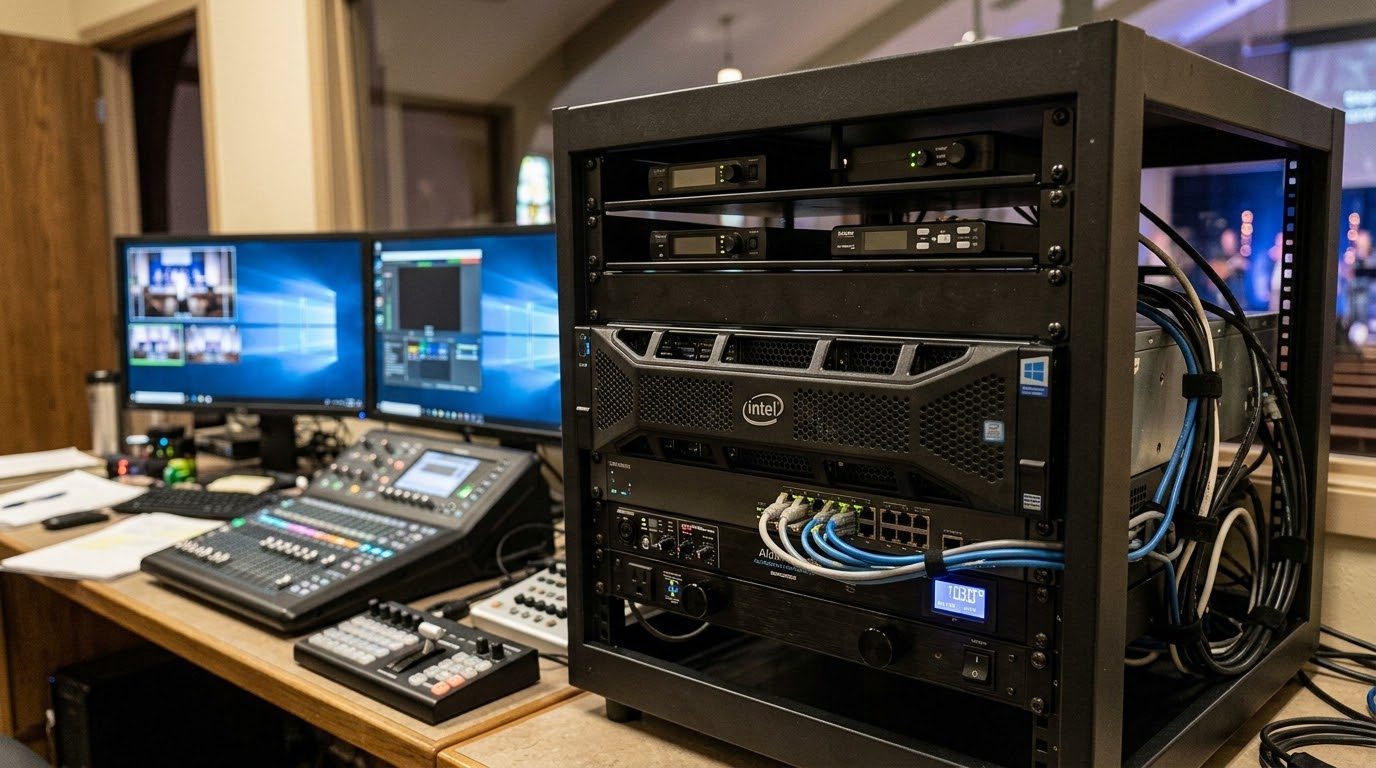
A WorshipMetrics livestream system in a rack beside the church booth's mixer, monitors and camera controller

Starting points, not prescriptions

Every church is different. Your room, your team, your budget and the gear you already own all shape the right system. Our Livestream Systems are reference systems: where we'd start if we walked into your sanctuary today. Each one is a tested combination of computer, capture hardware and software that we know works together.

Use them as a guide. Build to the spec yourself, buy the system built and tested from us, or mix in equipment you already have. Either way, a WorshipMetrics consultation is free, and we'll help you figure out what actually fits.

Cameras feed the livestream system, which sends the livestream online and video to the screens in the room. Camera Camera Camera Livestream System vMix / OBS + Magewell Livestream YouTube · Facebook · web In the room IMAG · lobby · overflow

Three reference systems to start from

Each one is a tested starting point, priced for the system itself. We adjust it to your room, your team and the gear you already own, and quote add-ons like PTZ cameras in your consultation.

Good

Essentials

Churches of roughly 100-400 seats, 2-4 cameras, one volunteer running the stream.

Starting at

$4,995

Reference price · system only

  • Up to 4 cameras (HDMI, SDI or network/NDI)
  • Streams to YouTube, Facebook and your website at the same time, and records every service
  • Runs OBS (free) out of the box; vMix optional
  • Rack-mounted computer with professional Magewell capture
  • Monitored by WorshipMetrics, so we can spot problems before Sunday

Why this setup: Most small churches need dependable, not fancy. This is the simplest system we'd trust every week: proven parts, free software, and room to add cameras later.

Built for volunteers: rack-mounted, table-clear, with room for a team.

See details
  • Intel Core Ultra 5
  • NVIDIA RTX 5060
  • 32GB RAM
  • 1TB system + 2TB recording drives
  • Magewell Pro Capture Quad (HDMI or SDI)
  • 4U rackmount
  • Windows 11 IoT Enterprise LTSC

Pairs well with: 3 NDI PTZ cameras (1080p), a PoE switch and a joystick. Quoted in your consultation.

Most popular

Better

Studio

Churches of roughly 500-2,000 seats with a production team, IMAG screens and multiple camera angles.

Starting at

$8,995

Reference price · system only

  • Up to 8 cameras, with instant replay on 4
  • Sends video to your projectors/IMAG, confidence monitors and lobby, not just the stream
  • vMix production software included; OBS also installed
  • Professional SDI camera inputs for long, reliable cable runs
  • WorshipMetrics monitoring and remote support

Why this setup: Once a church has screens in the room, the computer has to do more than stream. This tier adds the inputs, outputs and processing headroom a weekly production team needs.

Built for volunteers: rack-mounted, table-clear, with room for a team.

See details
  • Intel Core Ultra 7
  • NVIDIA RTX 5070 Ti
  • 64GB RAM
  • 2x 2TB drives
  • 8 Magewell SDI inputs
  • 4U rackmount
  • Windows 11 IoT Enterprise LTSC

Pairs well with: 4 PTZ cameras (4K, 25x zoom), a PoE switch and a joystick. Quoted in your consultation.

Best

Broadcast

Large and multi-campus churches, broadcast-minded teams, 4K production.

Starting at

$17,995

Reference price · system only

  • 12+ cameras, including 4K
  • Six or more outputs: IMAG, lobby, overflow rooms, recording
  • Workstation-class processor and error-correcting memory for long service days
  • Built-in remote management, so we can restart or repair it without a site visit
  • vMix Pro, WorshipMetrics monitoring and priority support

Why this setup: For churches where the stream is a ministry of its own, downtime isn't an option. This tier is built like broadcast equipment, with server-grade parts and remote recovery.

Built for volunteers: rack-mounted, table-clear, with room for a team.

See details
  • Intel Xeon W
  • NVIDIA RTX 5080
  • 64GB ECC RAM
  • 1TB + 4TB drives
  • 8 HD SDI + 4K SDI Magewell inputs
  • Dual 10GbE
  • 4U rackmount with remote management

Pairs well with: 6 PTZ cameras (4K, 25x to 31x zoom), a PoE switch and a joystick. Quoted in your consultation.

Reference prices are for planning only and may change. Final pricing is provided after a consultation. Product names and specifications may be updated as hardware changes.

Compare side by side

Feature GoodEssentials BetterStudio BestBroadcast
Reference price Starting at, system only $4,995$8,995$17,995
Software included OBS (vMix optional)vMix + OBSvMix Pro + OBS
Cameras supported Up to 4Up to 812+
Outputs to the room 1IMAG + confidence6+
WorshipMetrics monitoring IncludedIncludedIncluded + priority support
Warranty 3 years3 years, advance replacement3 years, advance replacement

Prices are reference prices to help you plan. Your final quote depends on your room, what you already own, and what you want the system to do. We'll walk through it with you in a free consultation.

Reference prices are for planning only and may change. Final pricing is provided after a consultation. Product names and specifications may be updated as hardware changes.

Free to read and print

Parts lists

Here's what goes into each system, at a high level. Build it yourself, hand it to your integrator, or use it to compare quotes. We're glad to help either way.

Good

Essentials

The computer
  • Intel Core Ultra 5
  • NVIDIA RTX 5060
  • 32GB RAM
  • 1TB system + 2TB recording drives
  • Magewell Pro Capture Quad (HDMI or SDI)
  • 4U rackmount
  • Windows 11 IoT Enterprise LTSC
Software
OBS (vMix optional), plus WorshipMetrics Tech Manager for monitoring
Cameras (suggested add-on, quoted separately)
3 NDI PTZ cameras (1080p), a PoE switch and a joystick
Power and protection
Rackmount UPS battery backup and rack power strip
The booth (recommended)
  • 2 matched, calibrated operator monitors on arms
  • Quiet, washable keyboard and mouse
  • Cable tray, hook-and-loop straps and labels
  • Printed booth binder with the wiring diagram
  • Room for 1 more volunteer: a tablet for cameras

Better

Studio

The computer
  • Intel Core Ultra 7
  • NVIDIA RTX 5070 Ti
  • 64GB RAM
  • 2x 2TB drives
  • 8 Magewell SDI inputs
  • 4U rackmount
  • Windows 11 IoT Enterprise LTSC
Software
vMix + OBS, plus WorshipMetrics Tech Manager for monitoring
Cameras (suggested add-on, quoted separately)
4 PTZ cameras (4K, 25x zoom), a PoE switch and a joystick
Power and protection
Rackmount UPS battery backup and rack power strip
The booth (recommended)
  • 3 matched, calibrated operator monitors on arms
  • Quiet, washable keyboard and mouse
  • Cable tray, hook-and-loop straps and labels
  • Printed booth binder with the wiring diagram
  • 2 to 3 small stations: cameras, slides and a stream monitor

Best

Broadcast

The computer
  • Intel Xeon W
  • NVIDIA RTX 5080
  • 64GB ECC RAM
  • 1TB + 4TB drives
  • 8 HD SDI + 4K SDI Magewell inputs
  • Dual 10GbE
  • 4U rackmount with remote management
Software
vMix Pro + OBS, plus WorshipMetrics Tech Manager for monitoring
Cameras (suggested add-on, quoted separately)
6 PTZ cameras (4K, 25x to 31x zoom), a PoE switch and a joystick
Power and protection
Rackmount UPS battery backup and rack power strip
The booth (recommended)
  • 4 matched, calibrated operator monitors on arms
  • Quiet, washable keyboard and mouse
  • Cable tray, hook-and-loop straps and labels
  • Printed booth binder with the wiring diagram
  • 3 or more small stations for a full production team

High-level lists for planning. Exact models are confirmed in your consultation and may change as hardware changes. Already own some of this? Map your current system and we'll tell you what to reuse.

How it all connects

All three systems are wired the same way. Cameras, slides and audio come in on the left, the computer does the work in the middle, and the stream and your screens go out on the right. What changes from Essentials to Broadcast is how many cameras and screens it can handle.

  • Video (SDI / HDMI / DisplayPort)
  • Network (Ethernet / NDI / Dante)
  • Audio
  • USB / control
  • Internet
  • Power

What plugs in

  • SDI / HDMI cameras

    Wired cameras; SDI runs long distances without trouble

    Plugs into the capture card by SDI or HDMI

  • ProPresenter computer

    Lyrics, slides, scripture, sermon notes

    Into the capture card by HDMI, or over the network by NDI

  • Network PTZ cameras

    NDI|HX PTZ: video, audio, control and power on one cable

    Plugs into the PoE network switch

  • Camera joystick

    Pan, tilt, zoom and presets for the camera operator

    Plugs into the PoE network switch

  • PoE network switch

    Powers the cameras and carries their video and control signals

    Connects to the network card by Ethernet

  • Sound board (audio console)

    Your mix for the stream and recording

    By USB, Dante over the network, or inside the SDI signal

  • Stream Deck Option

    One-button scenes for volunteers

    Plugs into a USB port

  • UPS battery backup Option

    Keeps everything running through a power blip

    Powers the whole system

Inside the computer

  • Capture card (Magewell)

    Turns camera and slide signals into video: 4 · 8 SDI · 12+ with 4K

  • USB ports

    Audio from the sound board, Stream Deck buttons

  • Network card

    NDI cameras, Dante audio, internet. Dual 10GbE on Broadcast

  • Processor + memory (CPU, RAM)

    Core Ultra 5 / 7 or Xeon W, 32-64GB; error-correcting memory on Broadcast

  • Production software: vMix or OBS

    Switching, graphics, lyrics, instant replay, recording

  • WorshipMetrics Tech Manager

    Watches temperatures, dropped frames and stream status

  • Graphics card (NVIDIA RTX)

    Encodes the stream and drives the monitors and screens in the room

  • Recording drives

    System drive plus 2-4TB for every service

  • Remote management Best · option

    Lets our team restart or repair it without a site visit

Where it goes

  • Livestream

    YouTube, Facebook and your website at once

    Sent out over the internet

  • Lobby TVs + overflow rooms Option

    Over the network through Magewell NDI converters

    Sent over the network by NDI

  • WorshipMetrics cloud

    Health alerts on your phone, Camera Control from anywhere

    Tech Manager reports over the internet

  • Operator monitors

    Multiview of every camera plus the controls

    From the graphics card by HDMI or DisplayPort

  • Projector / IMAG screens

    The live picture on the screens in the sanctuary

    From the graphics card by HDMI or DisplayPort

  • Confidence monitor Better & Best

    Lyrics and notes for the people on stage

    From the graphics card by HDMI or DisplayPort

  • Service recordings

    A full-quality copy to archive or edit later

    Saved on the recording drives

  • WorshipMetrics support team Best

    Remote recovery when something freezes

    Connects over the internet

Badges show parts that come with a specific tier or are optional add-ons. Already have some of this gear? It probably fits right in. Map your current system against it and we'll show you what to reuse.

Connected through the cloud

Your whole team, one connected system.

The system doesn't stay locked in the booth. It's connected to the WorshipMetrics cloud, so everyone who serves on Sunday works with it from a phone or a laptop, with 1 year of WorshipMetrics Max included. Hover or tap a role to see how they use it.

THE PEOPLE The pastor ON A LAPTOP The worship leader ON A PHONE The band ON THEIR PHONES The AV lead BOOTH OR ANYWHERE Social media FROM HOME Church operations THE OFFICE Church leadership THE DASHBOARD worshipmetrics THE TECHNOLOGY · ALL CONNECTED Livestream System vMix or OBS, cameras & switcher Slides & lyrics On the screens and the stream Songs & chord charts Set lists, keys & stage display Volunteer schedule Who's serving, and who said yes AV status & alerts Every device, watched 24/7 Digital signage Lobby and hallway screens Recordings & Reels Captioned clips for social media Metrics In-person & online attendance Tap a role to see how they use the cloud.

IP video

Built for NDI

WorshipMetrics fully supports NDI, and we highly recommend it. NDI cameras, encoders and decoders send video over an affordable network: one cable per camera for video, control and power, no video router, and any source to any screen. It saves money on cabling, routing and video mixing.

How NDI saves churches money →

Mac churches

A place for your Mac

We like Macs, and WorshipMetrics supports them. Keep your Mac for ProPresenter, sending slides to the system over NDI or HDMI, or as a volunteer station, with a Mac version of Tech Manager on the way. For the core livestreaming system, we recommend Windows: it runs vMix, takes multi-input capture cards and drives the screens in the room.

Where Macs fit, and where Windows is better →

Why we built it this way

Every choice in these systems comes back to two things churches tell us they need: it has to work every Sunday, and it has to fit the budget.

Software switching, not a closed box.

A Windows computer running vMix or OBS does what a hardware switcher does, plus graphics, lyrics, recording, replay and multi-platform streaming, and it grows with you through software updates instead of replacement. vMix and OBS are used by thousands of churches, so help and training are easy to find.

Built on proven reference designs.

We start from the hardware vMix itself tests and recommends, then add what churches need on top. You get known-good performance, not guesswork.

Locked down for Sunday.

Each system runs a long-term-support edition of Windows that takes security fixes but skips surprise feature updates. We install, tune and test everything before it ships, then burn it in under a real multi-camera load.

Magewell capture: the professional standard.

Magewell capture cards are built for continuous 24/7 operation and handle video processing on the card itself, leaving the computer free to run your production. They work with virtually every streaming and production app, so you're never locked in.

Outputs for the room, not just the stream.

Better and Best systems feed your projectors, IMAG screens, lobby TVs and overflow rooms, because in-person worship matters as much as online.

Watched over by WorshipMetrics.

Every system reports its health to WorshipMetrics: temperatures, dropped frames, stream status. We can often spot a problem and help fix it before your team ever notices.

Want to know how the monitoring works? See AV monitoring and Self Healing.

Volunteer-friendly tips

A booth anyone can walk into

A church booth is shared, public equipment, run by different volunteers every week, in the dark, during worship. The system is only half of it. Here's how we recommend setting up the space around it so it's easy to learn, quiet, durable and welcoming.

Buy commercial grade for shared gear

Many hands, every week, for years. Commercial-grade gear lasts longer, cleans up and looks professional. Cheap consumer gear often gets replaced before it pays for itself.

Consumer vs. commercial grade →

Match and calibrate your monitors

Mixed makes and sizes show color differently, so cameras can't be matched. Use one model, calibrated to the video standard, with the menu buttons locked.

Why monitors don't match →

Put the equipment in a rack

Rack-mounted gear stays put: no tugged cables or snapped ports from a bump. The equipment goes in the rack, and the table stays open for volunteers.

What to rack →

Mount monitors on arms

Table space is the most valuable space in the booth. Arms or stands lift screens to eye level and leave room to work and to welcome a second person.

Quiet, washable keyboards and mice

Healthcare-grade keyboards and mice wipe clean between services. Skip loud, clicky keyboards that carry across a quiet sanctuary during prayer.

What to look for →

Label cables, keep the binder

Label both ends, bundle with hook-and-loop straps, and keep a printed wiring diagram in a binder. The Signal Map keeps the paper and digital copies in sync.

Cable management →

Plain-word buttons and a checklist

"Pastor Wide," not "Scene 4." A laminated one-page Sunday checklist with start-up, shutdown and what to do if the stream stops.

Sunday checklist →

Make room for one more

Always an open chair, plus a few smaller stations next to the main computer, so young people and new volunteers can be part of the team. Donate old gear to the AV Club.

Make room for one more →

Available with every system

The Volunteer-Friendly Booth Kit

Everything around the computer that makes the booth easy to learn, quiet during worship and hard to break.

  • Matched, color-calibrated operator monitors on arms
  • Quiet, washable healthcare-grade keyboard and mouse
  • Cable tray, hook-and-loop straps and cable labels
  • Printed booth binder: wiring diagram from the Signal Map and the Sunday checklist
  • Hooded task lights that don't spill into the room
  • Small rack or under-desk cabinet, if you don't have one

Ask about it in your consultation, or pick and choose. See it in each parts list.

All twelve tips: the volunteer-friendly booth.

Suggested add-on

PTZ cameras

Most churches need PTZ cameras that look great without costing thousands of dollars each. They aren't part of the reference systems, but they're the add-on we suggest most. Tell us about your room and we'll recommend models with professional image quality, smooth and quiet movement, and the connections you need (SDI, HDMI, USB and network), then quote them in your consultation.

NDI|HX3 cameras carry video, audio, camera control and power over a single network cable, which makes installation simpler and cheaper. Already have cameras you love? Keep them. Our systems work with any camera that has HDMI, SDI or NDI output.

Why NDI cameras? See why we recommend NDI PTZ cameras. Setting one up? See our PTZ camera guides, or control your cameras from anywhere with Camera Control.

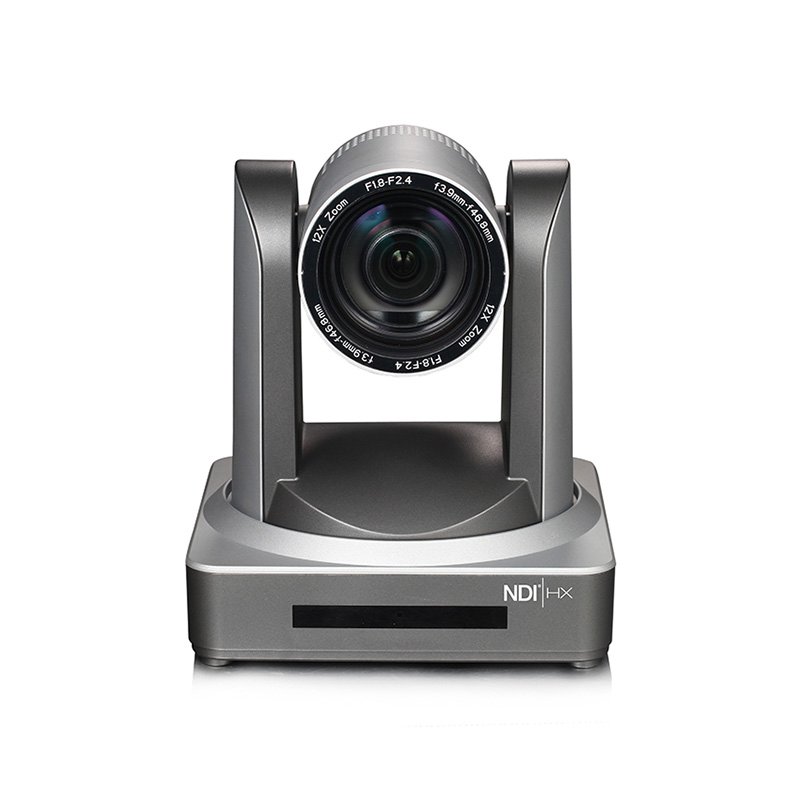
NDI|HX PTZ camera with 12x zoom lens
  • NDI|HX3 certified models
  • SDI + HDMI + USB + network outputs
  • Power over Ethernet
  • Quiet motors with presets
  • Works with the cameras you already own

Free consultation

Already have cameras or a computer? Start there.

You don't need to replace everything. Many churches already own good cameras, an audio console or a capable computer. Tell us what you have, and we'll design around it: adding only what's missing, reusing what works, and showing you an upgrade path you can grow into over time.

The best way to get the best price: map what you already have.

Before we talk, outline your current setup against our system diagram. Once we can see what plugs in, what does the work and where it goes, we can tell you exactly what to reuse, what to improve, and what to modernize. You only pay for what's actually missing.

Every WorshipMetrics consultation is free. We'll talk through your room, your team and your budget, and recommend a system that actually fits, whether that's one of our Livestream Systems, a modified version, or simply advice on getting more out of what you already own.

What happens in a consultation

  1. 1

    Map your current system

    Use the checklist below to tell us what you have: room size, services, current gear, team and budget.

  2. 2

    We recommend a system

    What to reuse, what to upgrade, and what to add: a Livestream System, a tailored version, or a modernization plan built around your equipment.

  3. 3

    You decide

    Build it yourself with our parts list, or have us build, test and ship it ready for Sunday, with a project manager seeing it through.

Map your current system

Go down the same list as the diagram. Mark what you have, what you need, or "Not sure." Add a model or a count if you know it; guesses are fine. Your map is attached to your consultation request automatically.

What plugs in
  • Cameras

  • Lyrics / slides computer

  • Sound board

  • Camera joystick or controller

  • Stream Deck or control panel

  • Battery backup (UPS)

The production system
  • Streaming computer

  • Capture card or adapters

  • Hardware switcher

  • Streaming software

  • Network / internet in the booth

Where it goes
  • Livestream

  • Projectors / IMAG screens

  • Lobby or overflow TVs

  • Confidence monitor for the stage

  • Recording every service

How an upgrade runs

One project manager, start to finish

A new livestream system is a change for the whole church, not just the booth. So every church that upgrades with us gets a dedicated project manager, and we offer training for the people who'll use the system, not only the person who plugs it in.

Our side

Your project manager

Assigned to your church when the upgrade begins. Your project manager plans the timeline with you, coordinates the build, shipping and installation, and is your one point of contact until the system is handed over.

Your side

An on-site contact

We ask each church to name one on-site contact. That person works with your project manager, takes the system handoff and joins any training you choose, so someone in the building knows how it all fits together.

Handoff

Setup, then handoff

Remote setup is included. Before we call it done, we walk your on-site contact through the finished system, its documentation and the Sunday checklist. On-site installation and training for your team are quoted separately.

Training for everyone who uses it

WorshipMetrics touches more than the booth, so training does too. It's quoted separately, so you choose what your team needs, and each group learns the part of the platform they'll actually use.

Volunteers

Running the booth on Sunday: start-up, cameras, slides, the stream, and what to do if something stops.

Band members

Their side of the service: the songs and setlist in the plan, and the stage display with lyrics and chords.

Leadership staff

Service plans, and the in-person and online attendance after each Sunday, without having to ask the booth.

Operations

Volunteer scheduling, the people directory, the system documentation, and the alerts that tell the team when something needs attention.

The goal is simple: when the project wraps up, everyone feels good about the system, on day one and as it grows with your church.

Options and add-ons

Volunteer-Friendly Booth Kit

Matched, calibrated monitors on arms, a quiet washable keyboard and mouse, cable tray and labels, task lights and a printed booth binder.

Ask about pricing

Volunteer stations

Small add-on stations next to the main computer: a tablet for cameras, a laptop for slides, a stream-monitor screen.

Ask about pricing

Rackmount UPS battery backup

Keeps the stream alive through a power blip.

Ask about pricing

Remote access module

Lets our team fix a frozen system from anywhere. Built into Best.

Ask about pricing

Stream Deck control panel

One-button scenes for volunteers.

Ask about pricing

PTZ cameras

A great add-on for any system. We'll suggest models that fit your room and quote them in your consultation.

Ask about pricing

Setup and training

Remote setup included; on-site install and volunteer training quoted separately.

Ask about pricing

Extras

Not every upgrade needs a new system. These are the pieces we reach for most, mostly from Magewell, the same company that makes the capture cards in our systems. Many of them drop straight into the setup you already have.

NDI to HDMI decoder

Magewell Pro Convert NDI to HDMI

Turns the program feed on your network into HDMI for any TV or projector, so overflow monitors and displays can show your stream output.

Good for

  • Overflow rooms
  • Lobby and foyer TVs
  • Cry room and kids' check-in
Works with what you have Ask about pricing

Streaming encoder

Magewell Ultra Stream (HDMI or SDI)

A small box that streams straight to YouTube, Facebook or your website without a computer. A super affordable upgrade: put it after a switcher you already own, or keep it as a backup stream path.

Good for

  • Stream from an ATEM or switcher you own
  • Backup stream if the computer fails
  • A second room or youth service
Works with what you have Ask about pricing

Single HDMI to USB adapter

Magewell USB Capture HDMI

Plugs one HDMI camera or computer into any PC or laptop by USB, with no card to install. An SDI version is available too.

Good for

  • Add one more camera
  • Get slides into a laptop
  • A portable or youth-room kit
Works with what you have Ask about pricing

NDI encoder

Magewell Pro Convert (HDMI or SDI to NDI)

Puts any HDMI or SDI device on your network, so it reaches the production computer over one Ethernet cable instead of a long video run.

Good for

  • ProPresenter or a second computer
  • A camera far from the booth
  • A feed from another room
Works with what you have Ask about pricing

All-in-one switcher

Magewell Director Mini

Switches, streams and records a small service from one touchscreen box. A simple setup for a chapel, youth room or second venue.

Good for

  • Youth and kids' services
  • Small chapels
  • Weddings and funerals
Ask about pricing

Audio

USB audio interface

Gets a clean stream mix out of an older analog sound board and into the computer.

Good for

  • Analog boards without USB
  • A separate mix for the stream
Works with what you have Ask about pricing

Network

PoE network switch

Powers network PTZ cameras and carries their video and control on one cable each. We size it to the cameras you add.

Good for

  • Adding NDI cameras to an existing system
Works with what you have Ask about pricing

Camera control

PTZ camera joystick

Lets a volunteer pan, tilt, zoom and recall presets by feel instead of with a mouse.

Good for

  • Live camera operators
  • Recalling preset shots fast
Works with what you have Ask about pricing

Not sure which one you need? Map your current system and we'll point you to the right piece.

Magewell and product names are trademarks of their owners. Reference prices are for planning only and may change. Final pricing is provided after a consultation. Product names and specifications may be updated as hardware changes.

Questions churches ask

Are these fixed packages?

No. They're reference systems: tested starting points. We'll adjust any system to fit your church, and the consultation is free.

Can I use the cameras and equipment we already have?

Yes. Our systems accept any camera with HDMI, SDI or NDI output, and we'll build around your audio console and other gear.

Are the prices final?

They're reference prices to help you plan. Your quote depends on your room, existing gear and goals. The best way to get the best price is to map your existing system against our diagram, so we can reuse what works and only quote what's missing.

Can you modernize the system we already have instead of replacing it?

Often, yes. Map your current setup with our system checklist and we'll show you what to reuse, what to upgrade and what to add. Sometimes a single extra, like a Magewell Ultra Stream encoder or an NDI decoder for the overflow room, is all a church needs.

Can we build it ourselves?

Yes. Each Livestream System has a high-level parts list right on this page, free to read and print. If you'd rather not build it, we'll build, test and ship it ready to plug in.

Who will we work with during the upgrade?

A dedicated project manager, assigned to your church for the whole upgrade. We also ask you to name one on-site contact, who takes the system handoff. Remote setup is included, and on-site installation and training for each group who'll use WorshipMetrics (volunteers, band members, leadership staff and operations) are quoted separately.

Do we need vMix, or can we use OBS?

The Good system runs free OBS out of the box. Better and Best include vMix for multi-camera production, replay and room outputs. Both come installed.

Why Windows instead of a hardware switcher?

A software system does more (graphics, lyrics, recording, replay, multi-platform streaming), costs less to expand, and improves with updates.

Do the systems include cameras?

No. Each system is the production computer, capture, software and monitoring, and it works with any camera that has HDMI, SDI or NDI output, including the ones you already own. PTZ cameras are a great add-on: we'll suggest models that fit your room and budget, look for NDI|HX3 support so one network cable carries video, control and power, and quote them in your consultation.

Is the WorshipMetrics software included?

Yes. Every Livestream System includes 1 year of WorshipMetrics Max, a $1,188 value: livestreaming to every destination and recording, plus monitoring, Tech Manager, and the rest of the platform. AV monitoring and the Signal Map stay free forever after that.

What happens if something breaks before a service?

Every system is monitored by WorshipMetrics and covered by a 3-year warranty. Better and Best get advance replacement, and remote access lets us fix many problems without a visit.

Do your systems support NDI?

Fully. Every Livestream System takes NDI cameras through a PoE switch, sends video to lobby and overflow screens through NDI decoders, and when you add PTZ cameras, we suggest NDI|HX3 models. NDI lets one network cable carry video, control and power, which saves money on cabling, routing and mixing.

We're a Mac church. Can we still use this?

Yes. Keep your Mac for ProPresenter, sending slides to the system over NDI or HDMI, or as a volunteer station; a Mac version of Tech Manager is on the way. We recommend a Windows computer for the core livestreaming system because it runs vMix, takes multi-input capture cards and drives the screens in the room.

Will this work with ProPresenter and our sound board?

Yes. Lyrics and graphics come in over NDI or capture, and audio comes from your console by USB, Dante or SDI.
Book a free consultation

Tell us about your church and what you already have. We'll reply within 1–2 business days. Prefer to talk now? Call 910-WORSHIP.

Tip: map your current system first and it's attached here automatically. It's the fastest way to the best price.

Reference prices are for planning only and may change. Final pricing is provided after a consultation. Product names and specifications may be updated as hardware changes.

Call 910-WORSHIP 7 days a week