 Produce · Integration
OBS, fully integrated.
The free streaming tool your church already trusts, wrapped in the layer it always needed: scene control, streaming and recording, and program monitoring — in the booth, and on Pro and Max in the cloud for your whole team. And because we can see your OBS settings, our support can troubleshoot the smallest change, 100% online.
Local control is free on every plan. OBS Studio is a free, open-source project of the OBS Project; WorshipMetrics connects through its built-in WebSocket server.
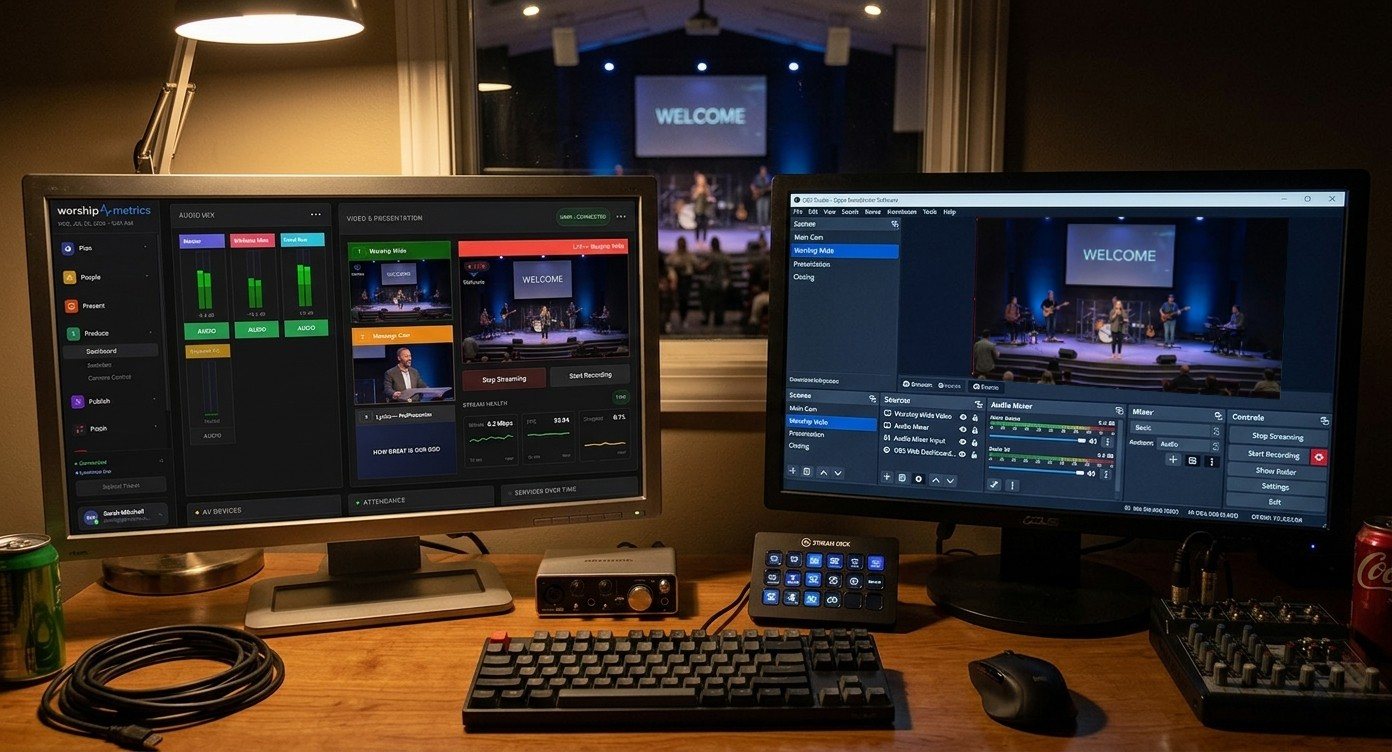
What the integration covers
Everything a Sunday asks of OBS, in one panel.
Deep integration over the WebSocket server built into modern OBS — not a remote-desktop hack.
Scene control
Switch OBS scenes from the panel — with live thumbnails of what's available and an enlargeable program view of what's on air, so the cut lands on the right scene every time.
Streaming & recording control
Start and stop the stream and the recording remotely on Pro and Max — and let a second person confirm the red light is actually on before the prelude ends.
Program monitoring
On Pro and Max, see what OBS is putting out from any authorized account — in the booth, in the lobby, or from home — without a webcam pointed at the booth monitor.
WebSocket v5, built in
The integration speaks obs-websocket v5, the protocol modern OBS ships with — no third-party plugins to hunt down, no fragile scripts to maintain.
Slides that drive OBS
Present can fire OBS over the same WebSocket: a slide going live switches the scene, so one volunteer advancing lyrics quietly runs the video too.
Health, watched
OBS connection state and encoder health sit in your live system record beside everything else — feeding the monitoring, the alerts, and the support that knows your setup.
One panel, your whole team
Four eyes on the record button beat two.
The OBS controls live in the Switcher panel — in the booth, and on Pro and Max in the cloud and in every authorized member's WorshipMetrics account. That changes what's possible on a Sunday morning:
- A second person confirms the recording is running — from any seat, any campus, any couch
- Scenes checked before the service: what's live and what's queued, visible in thumbnails
- A veteran volunteer covers the switch remotely when the scheduled operator is out
- You decide who can touch OBS — control stays inside your team's accounts, and every remote action is logged
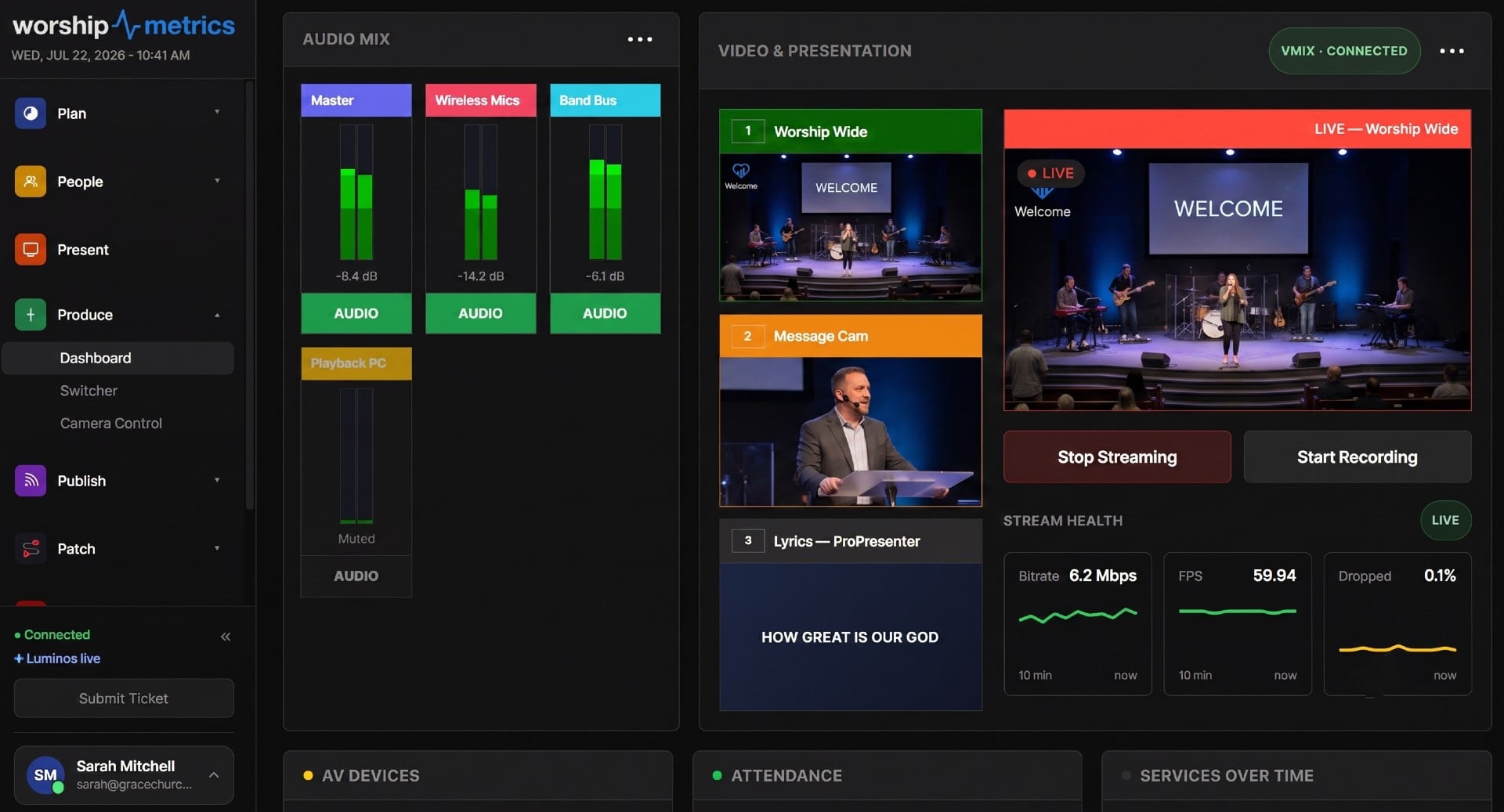
One production dashboard for the whole booth — it drives OBS, vMix, and Blackmagic ATEM alike.
The bigger headline
Our OBS support is 100% online — because we can see your settings.
OBS puts a lot of power in a lot of menus — which is wonderful until a volunteer changes one of them on a Saturday night. Tech Manager's live OBS connection puts your scenes, connection state, and settings in front of Luminos in the app, Journey on 910-WORSHIP (Pro and Max), and the production humans behind them.
So support starts from your real configuration, not a guessing game — and the smallest settings change gets found and fixed without anyone driving to the church.
What that looks like on a call
- “Your Worship Wide scene lost its camera source — it's showing the fallback.”
- “The stream is up, but recording never started — want me to walk your volunteer through it?”
- “Your encoder settings changed Tuesday — that's why the stream looks soft.”
- “Everything checks out. You're ready for Sunday.”
How it connects
Enable the WebSocket. Point Tech Manager at it. Done.
Connect on your network
Enable OBS's built-in WebSocket server, and Tech Manager connects on the booth's own network — scenes, status, and control flow immediately, free on every plan.
One secure outbound link
Tech Manager makes a single outbound connection to WorshipMetrics. No port forwarding, no VPN — the same link that powers your monitoring and alerts.
Your team, from anywhere
On Pro and Max, everyone you authorize opens the same Switcher panel from their own account — with every action logged.
OBS is also a first-class streaming source: resilient SRT and RTMPS ingest straight from OBS, with cloud delivery to every destination on Max and reusable stream keys so OBS is configured exactly once.
FAQ
The OBS integration, answered.
Does WorshipMetrics replace OBS?
No — it completes it. OBS is the most-loved free streaming tool in church production for good reason, and it stays your engine. WorshipMetrics connects over the WebSocket server built into modern OBS and adds what OBS doesn't have: cloud control for your whole team on Pro and Max, monitoring and alerts, and support that can see the system.
What can my team control remotely?
On Pro and Max: scene switching with live thumbnails and a program view, and streaming and recording start/stop — from the same Switcher panel the booth uses, in any authorized member's WorshipMetrics account.
Do I need to install an OBS plugin?
No. The integration uses obs-websocket v5, which ships inside modern OBS — you enable the WebSocket server in OBS's own settings, point Tech Manager at it once, and you're connected.
Who gets access to OBS?
That's yours to decide. Remote control lives inside your church's WorshipMetrics team — only people you've invited can open the panel. Every remote action lands in your support history, so nothing happens silently.
Is the OBS integration free?
Local control — running OBS from Tech Manager in the booth — is free on every plan, forever. Cloud control, the same panel from anywhere for your whole team, comes with Pro ($49/mo) and Max ($99/mo).
How does remote OBS support work?
Because Tech Manager holds a live connection to OBS, our support — Luminos in the app, Journey on 910-WORSHIP (Pro and Max), and the humans behind them — sees your actual connection state, scenes, and settings when you ask for help. Troubleshooting starts from your real configuration, not a guessing game.
Run vMix instead? There's a dedicated page on the full vMix integration — and Blackmagic ATEM control is built into Tech Manager. If the OBS stream or recording ever stops unexpectedly, Self Healing tells you at once and offers a one-tap restart.
WorshipMetrics Livestream Systems
Need a dedicated OBS machine?
The Essentials Livestream System runs OBS out of the box on a long-term-support edition of Windows that skips surprise feature updates, with Magewell capture for up to four cameras.
Your OBS, backed by a team that can see it.
Connect OBS to Tech Manager tonight and the whole platform lights up around it — control, monitoring, alerts, and support that already knows your system.
From the Knowledge Base
OBS questions churches actually ask.
Modernize your AV · Instant tech support
Download Tech Manager free — and put a tech support number in the booth.
Tech Manager connects your church's AV system to WorshipMetrics: documented, monitored around the clock while it runs (it starts with the computer), and backed by a number your team can call the moment anything acts up. Our AI support sees your actual system — so issues get solved before frustration starts.
New to us? Call and we'll put you in touch with the team. How phone support works →
Tech support, any time
910-WORSHIP(910) 967-7447
AI phone support any hour on Pro and Max · a person on the line with Care or Sunday Assurance.