First, the two-minute recovery playbook
The stream is down, the service is still going, and someone just texted “is the stream supposed to be off?” Work this list in order — each step takes seconds:
- Check the encoder first. Is OBS/vMix still running and still “streaming”? A crashed encoder is the most common cause and the fastest fix — restart the stream output, not the whole machine.
- Check the encoder’s connection status. Dropped frames climbing? Bitrate at zero? That’s network, not software. Move to step 3. Bitrate healthy but platform shows offline? That’s downstream — step 4.
- Check the network path. Can the booth machine load any website? If not: check the switch/router the encoder hangs off. If the building’s internet is down entirely, your recovery is a phone hotspot on the encoder — lower the bitrate to 2,500 Kbps first.
- Check the platform. If the encoder says it’s sending and the destination says nothing is arriving, restart the stream output to force a fresh connection. If one destination is down but others are live, it’s that platform’s problem — let it go and carry on.
- Post once, calmly. One message on the platform where your congregation watches: “We had a technical issue — the stream is back, and the full service will be posted after.” Then stop managing comments and finish the service.
What you should not do mid-service: reboot the booth machine on a hunch, re-type stream keys, or change multiple settings at once. Every uncontrolled change makes the post-service diagnosis harder.
After the service: find the real cause
A dropped stream always has a story, and the story is in the data — if anything was recording it. The questions that matter:
- What did the bitrate history look like in the ten minutes before the drop? A slow decline points to network congestion; a cliff points to a crash or disconnect.
- Was the encoder under load? CPU spikes from a scene change, an update running in the background, a thermal throttle?
- Did anything else on the network change — a backup kicking off, a room full of phones hitting guest WiFi?
- Has this happened before, on a pattern? Third Sunday, cold mornings, the week someone “tidied” the rack?
If your answer to these is “we have no idea,” that’s not a diagnosis problem — it’s a monitoring problem.
The real fix: find out before the congregation does
Churches that recover from stream drops in seconds instead of scrambling all have the same architecture:
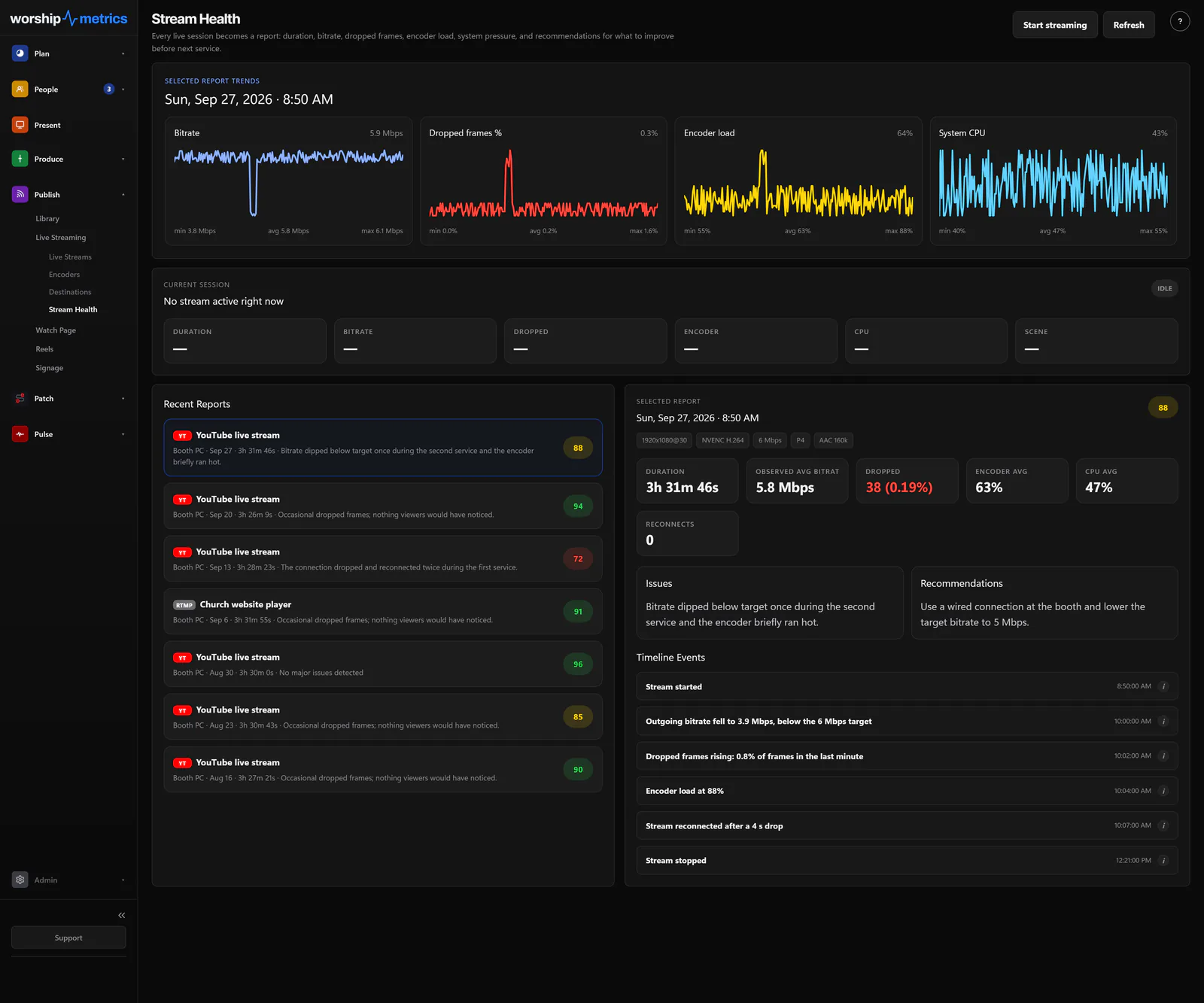
- Continuous stream-health monitoring — bitrate, dropped frames, and encoder load watched in real time, with history you can look back on
- Alerts that fire on degradation, not just failure — you want the “bitrate is sagging” warning while there’s still time to act
- One feed out via restreaming — so a single recovery action restores every destination at once (see restreaming for churches)
- Automatic recording upstream — so even a rough stream night still produces a clean archive to post
- A human to call — because the worst version of this story is being alone with it at 9:07am
This is exactly the architecture WorshipMetrics live streaming provides on Max: the stream runs through the platform, so the platform sees the drop the moment it happens, and alerts you immediately. On Pro and Max, 910-WORSHIP’s AI answers any hour with your system in view. Add Sunday Assurance to have a person on call during your services.
The congregation-text alarm system is free, but it costs you a little credibility every Sunday it fires. Replace it with monitoring, and the next drop becomes a footnote instead of a story.
How to Choose a Church Live Streaming Platform (2026 Guide)
NextRestreaming for Churches: One Feed In, Every Platform Out
Related Articles

Bitfocus Companion + ATEM Mini: A Stream Deck Panel for Your Church Switcher
A Stream Deck running Bitfocus Companion turns a Blackmagic ATEM into plain-word buttons with colors that show what's live, and the same panel can run PTZ cameras, projectors, and more. Here's how to connect Companion to an ATEM and build a volunteer page.

Lyrics Over the Camera on an ATEM Mini: Luma Keys, Chroma Keys, and the Slides Computer
To put song lyrics over the camera shot on a Blackmagic ATEM Mini, feed the slides computer into an ATEM input and key it over the camera. Here's how luma and chroma keys work for lyrics, how to design slides that key cleanly, and who should run it.

ATEM Mini + OBS for Church: Hardware Camera Switching with OBS for Graphics and Streaming
Many churches use an ATEM Mini as a camera switcher and send its output into OBS over USB as a webcam. The ATEM gives volunteers real buttons; OBS adds lyrics, graphics, recording, and streaming. Here's how to set it up, split the jobs, and avoid the common sync and quality problems.