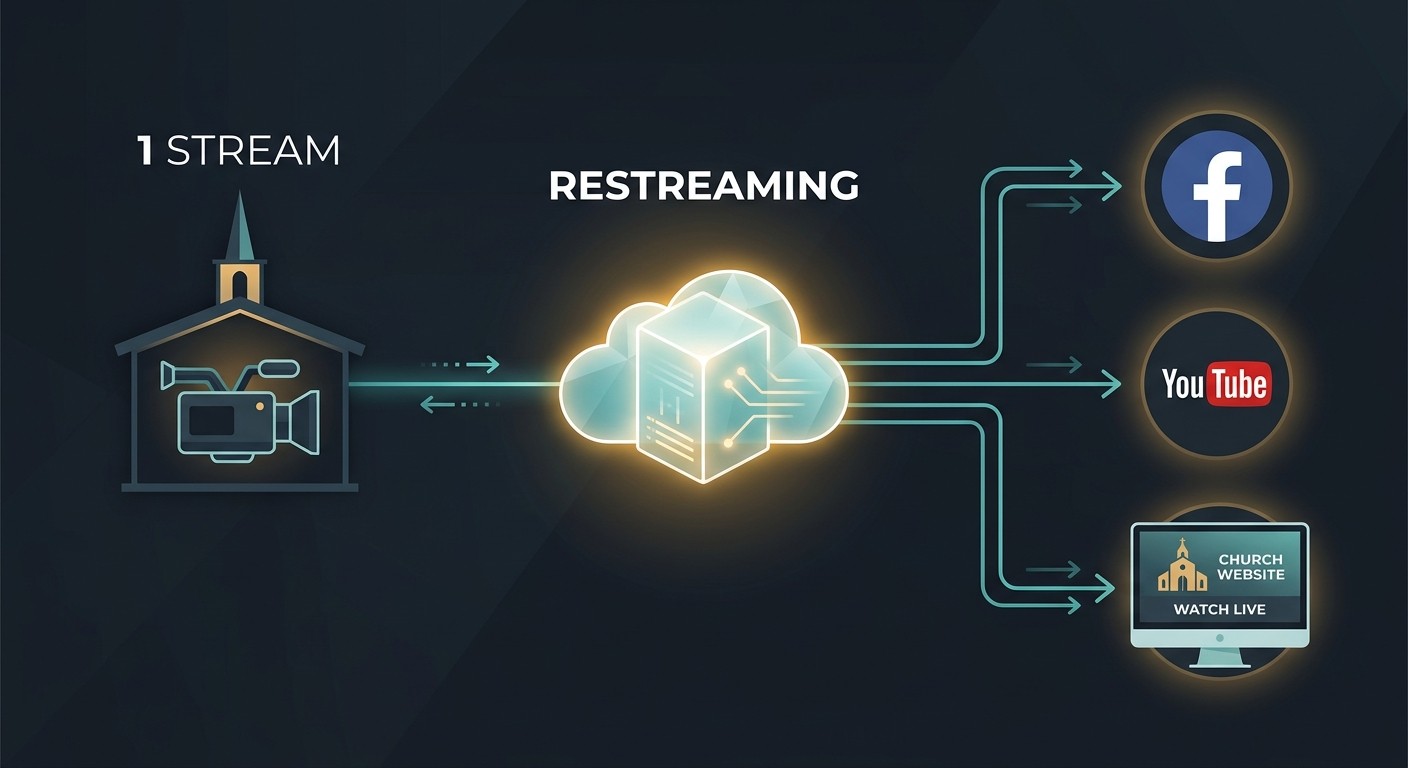
What restreaming actually is
Restreaming means your encoder sends one stream to a single service, and that service redistributes copies to every destination you’ve configured — YouTube, Facebook, your website player, a denominational portal, anywhere that accepts RTMP.
The alternative — streaming to each platform directly from the booth — multiplies everything: upload bandwidth, encoder load, stream keys to manage, and failure points to monitor. Restreaming collapses all of it back to one.
Why the bandwidth math favors restreaming
A solid 1080p church stream runs 4,500–6,000 Kbps. Streaming directly to three platforms means pushing three copies up your internet connection — 13,500–18,000 Kbps of sustained upload, on the same network your lobby screens, staff phones, and guest WiFi are using at 9am Sunday.
With restreaming, your building only ever uploads one copy. The fan-out happens in the cloud, where bandwidth is effectively unlimited. For most churches, this single fact settles the architecture decision — especially on uploads under 50 Mbps.
Two things still matter locally:
- Measured, sustained upload speed at service time — not the number on the ISP bill
- Network isolation — the encoder should not compete with guest WiFi (see our guide to church network design for AV and streaming)
What to look for in a restreaming setup
Destination changes shouldn’t touch the encoder. Adding your denomination’s portal for one special service, or dropping a platform that isn’t reaching anyone, should be a click on a dashboard — not a Sunday-morning settings change in OBS. If it touches the encoder, it will eventually break the encoder config.
The stream should be watched, not just relayed. A relay that goes down silently is worse than no relay, because you’ll keep broadcasting into a dead pipe. Your restreaming layer should monitor bitrate and frame drops in real time and alert you the moment quality degrades.
Recording should happen upstream. If the recording is captured by the restreaming service — before the copies fan out — you get one clean archive per service automatically, regardless of which destinations were on that week.
Your website deserves a first-class player. Restreaming to YouTube and embedding YouTube on your site works, but it wraps your service in another platform’s branding, ads, and “up next” recommendations. A platform-native embed keeps your congregation on your site.
The operator experience on Sunday
The real test of a restreaming setup is what your volunteer does during the service. The answer should be: nothing.
Presets configured in advance. Destinations toggled during the week. One “start streaming” action in the booth. Monitoring and alerts running on the platform side, with a human on call if something goes sideways. If your current workflow has the operator juggling browser tabs to confirm each platform is live, the architecture is asking too much of them.
How WorshipMetrics does it
On Max, WorshipMetrics live streaming is built restream-first: point your encoder at one ingest, and destinations, automatic recordings, live clipping, and stream-health monitoring all happen on the platform side. Alerts fire the moment anything degrades. On Pro and Max, 910-WORSHIP’s AI answers any hour with your system in view. Add Sunday Assurance to have a person on call during your services.
If you’re currently paying for a separate restreaming service alongside planning, presentation, and chat tools, see what the platform replaces — the consolidation usually pays for itself before you get to the support line.
Your Church Live Stream Dropped Mid-Service. Now What?
NextWhich AV Signals Survive a Network Switch (and Which Die at the Port)
Related Articles

Bitfocus Companion + ATEM Mini: A Stream Deck Panel for Your Church Switcher
A Stream Deck running Bitfocus Companion turns a Blackmagic ATEM into plain-word buttons with colors that show what's live, and the same panel can run PTZ cameras, projectors, and more. Here's how to connect Companion to an ATEM and build a volunteer page.

Lyrics Over the Camera on an ATEM Mini: Luma Keys, Chroma Keys, and the Slides Computer
To put song lyrics over the camera shot on a Blackmagic ATEM Mini, feed the slides computer into an ATEM input and key it over the camera. Here's how luma and chroma keys work for lyrics, how to design slides that key cleanly, and who should run it.

ATEM Mini + OBS for Church: Hardware Camera Switching with OBS for Graphics and Streaming
Many churches use an ATEM Mini as a camera switcher and send its output into OBS over USB as a webcam. The ATEM gives volunteers real buttons; OBS adds lyrics, graphics, recording, and streaming. Here's how to set it up, split the jobs, and avoid the common sync and quality problems.