Finding the moment is the hard part
Ask anyone who has clipped sermons by hand and they will tell you the same thing: the editing is not the bottleneck. The bottleneck is the scrubbing. Somewhere in a 75-minute service is a 45-second moment that would genuinely encourage someone scrolling on a Tuesday — but finding it means re-watching the whole service, and most volunteer teams simply do not have that hour on a Monday.
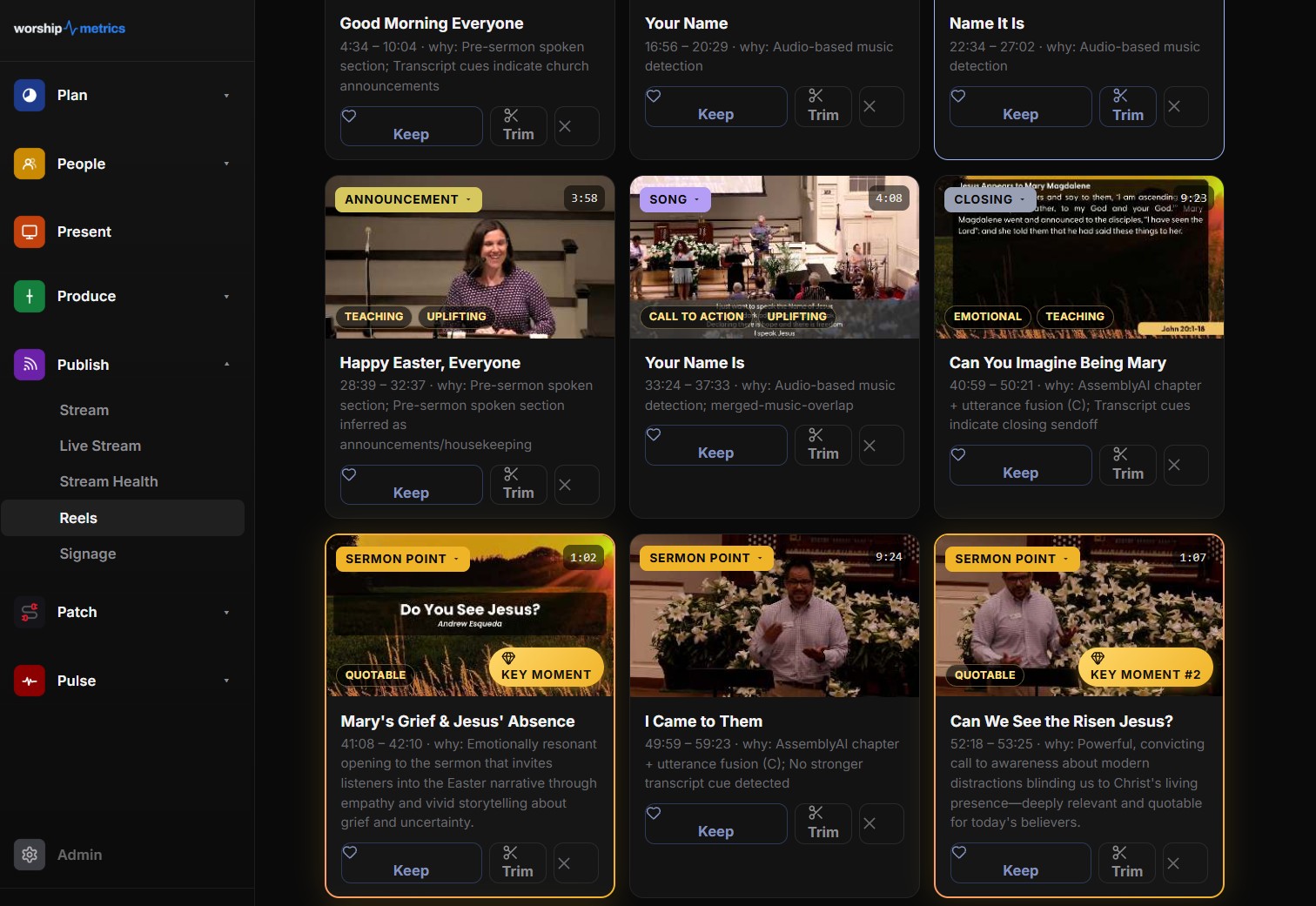
That is the problem the WorshipMetrics Reels pipeline is built to solve. It watches the whole service so you do not have to, and it hands your team a ranked list of candidate moments instead of a blank timeline. This article walks through how the pipeline actually works, stage by stage: transcription tuned for church vocabulary, AI categorization and scoring, and rendering into the formats social platforms expect. We will also cover the local privacy mode, where your media never leaves the booth computer.
If you want the editorial side — which moments travel well and how to think about pacing and framing — our companion guide on clipping sermons for social media covers the craft. This article is about the machinery.
Stage one: transcription that speaks church
Everything downstream depends on an accurate transcript, and generic speech-to-text has a rough time with church language. Off-the-shelf models routinely mangle “Habakkuk,” “propitiation,” “Ebenezer,” and your pastor’s name — and a transcript that gets the key nouns wrong produces clips with captions you cannot post.
The cloud pipeline (cloud Reels, on Pro and Max) transcribes services with AssemblyAI (the universal-2 model by default, with universal-3-pro supported), and it does more than turn audio into text:
- Speaker labels distinguish the preacher from the worship leader from the announcements host, which matters later when the AI decides what kind of moment it is looking at.
- Auto chapters and highlights give the scoring stage a rough map of the service before any deeper analysis begins.
- Language detection handles services and segments that are not in English.
- A church-vocabulary word boost — up to 80 terms — primes the model with the words it is most likely to get wrong: every book of the Bible from Genesis to Revelation, phrases like “altar call,” and your own pastor and church names.
That last item is the quiet hero of the pipeline. Word boosting is a standard speech-recognition technique — you tell the model which unusual words to expect, and it weights them more heavily when the audio is ambiguous. Applied to sermons, it is the difference between a caption that reads “Book of Philemon” and one that reads “book of Fair Lemon.” Captions get burned into the final video, so transcript accuracy is not cosmetic; it is the finished product.
Stage two: ten categories, one score, one hook
With a clean transcript in hand, the pipeline hands candidate segments to Claude, Anthropic’s AI model, for a scoring pass. This is where “transcription” becomes “editorial judgment at scale.” For each candidate clip, the model assigns three things.
A category. Every clip lands in one of ten canonical categories: music, scripture reading, sermon point, prayer, guest speaker, altar call, welcome, announcement, farewell, or general spoken segment. Categorization sounds mundane, but it is what keeps your feed from filling up with announcement clips. A sermon point and a welcome segment are both “someone talking on stage” to a generic algorithm; the category tells the pipeline — and you — which is which.
A shareability score from 0 to 100. The score estimates how well a moment stands alone: does it land without five minutes of context, does it open strongly, would it make sense to someone who has never visited your church? Clips arrive ranked, so your team reviews the top of the list instead of scrubbing a timeline. On top of the score, each clip can carry up to two quality badges — Quotable, Emotional, Teaching, Call to Action, or Uplifting — which work as a fast visual filter when you are choosing between several strong candidates.
An eight-word hook line. Every clip gets a short, punchy caption suggestion — the kind of line that goes in the first second of a vertical video or the text of the post itself. You can rewrite it, of course, but starting from a draft beats starting from a cursor.
The important thing to understand about this stage is what it does not do: it does not post anything. The AI proposes; your team disposes. Think of it as a diligent volunteer who watched the whole service, flagged twelve moments, ranked them, and left sticky notes explaining why — and then handed the stack to a human.
Stage three: three formats, captions burned in
A chosen moment still needs to become a video file that looks right on a phone. The rendering stage produces clips in the three aspect ratios that cover essentially every platform:
| Format | Resolution | Where it lives |
|---|---|---|
| Vertical 9:16 | 1080 × 1920 | Reels, Shorts, TikTok, Stories |
| Horizontal 16:9 | 1920 × 1080 | YouTube, website embeds, sermon pages |
| Square 1:1 | 1080 × 1080 | Feed posts |
All three render at 30 fps with burned-in captions on by default — four caption style presets, with adjustable position, scale, and sync offset so you can nudge timing if the audio and text drift. Since the overwhelming majority of social video is watched muted, burned captions are not a nice-to-have; they are the reason anyone stops scrolling. (Captions matter for your live audience too — see our guide to live captions and accessibility for that side of the story.)
Branding is applied at render time rather than in an editor: six lower-third styles, five font presets, your brand color and logo, a logo watermark, and optional intro/outro panels — or your own custom intro and outro videos if you have them. The result is that every clip leaving the pipeline looks like it came from your church, not from a template.
Finished renders can post straight to YouTube, Facebook and Instagram, go to TikTok drafts, or download, and each format is its own publish item — so the same sermon moment can go out as a vertical Short and a 16:9 widescreen clip side by side, without exporting twice.
The local privacy path: media never leaves the booth
Some churches are simply not comfortable uploading full service video to a cloud service — pastoral care moments, baptism testimonies, and congregational prayer requests can all end up on a recording. For those teams, the Reels pipeline has a second, fully supported path that runs on the booth computer itself.
In local mode, the WorshipMetrics Tech Manager desktop app transcribes the service using Whisper running entirely on your machine — a faster-whisper engine with selectable model sizes (base, small, medium, large-v3, and turbo), with FFmpeg bundled so there is nothing extra to install. The desktop app also runs its own audio and visual analysis locally, including on-screen text recognition, to help identify candidate moments.
Here is the key design decision: only clip text is sent to the cloud — never audio, never video. The short transcript excerpts go to the same scoring endpoint the cloud pipeline uses, so local-mode churches get the identical Claude categorization, shareability scores, badges, and hook lines. One scoring brain, two privacy postures. Rendering happens locally too, in the same three formats (9:16, 1:1, and 16:9), with optional caption burn-in, branded intro/outro, and a choice of render styles — highlights, cinematic, or teaching.
Which path should you choose? A rough guide:
- Cloud mode (Pro and Max) fits churches that already stream and record through the platform on Max — the recording is already there, and clips appear with no booth computer involved after Sunday.
- Local mode fits churches with strict media-handling policies, limited upload bandwidth, or a conviction that raw service video should stay on premises. The trade-off is that the booth PC does the transcription and rendering work, so it helps to have a reasonably capable machine.
Neither mode is a second-class citizen; they share the scoring pipeline by design.
Where the source video comes from
The pipeline needs a service recording to work on, and if you stream through WorshipMetrics on Max you already have one: every service records automatically, and finished recordings land in your library without anyone pressing a button. Clips your operator cuts live during the service — “grab the last 30 seconds of that” — automatically register as Reels source videos too, so a moment flagged in the booth on Sunday morning is waiting in the pipeline Sunday afternoon.
If you are still building out your streaming foundation, our church live streaming platform guide covers the recording and delivery side, and the restreaming guide explains how one feed from the booth reaches every platform your congregation uses.
How WorshipMetrics handles this
The Reels pipeline described here is Worship Clips, part of the WorshipMetrics platform. Services recorded through live streaming on Max flow into it automatically; churches that prefer to keep media on premises run the local-Whisper path inside the Tech Manager desktop app, with only clip text ever reaching the cloud. Either way, the goal is the same: your team spends Monday choosing between good moments instead of hunting for them.
Connecting Planning Center to WorshipMetrics: Token, Sync, and What Imports
NextNDI Alpha-Channel Slides: A Clean Lyrics Key Without Chroma
Related Articles
A Content Engine That Stays Personal: More Clips, Better Titles, Better Thumbnails
Keeping up online means more content than most church teams can make by hand. Clipping every service, with AI help on titles, descriptions, and thumbnails, turns one sermon into a week of posts. Here's how to build a church content engine that stays personal, controllable, and true to your voice.
Which Sermons Resonate? What Clip Metrics Tell Pastors
When you clip every service, each clip becomes a small signal: what people watched, finished, shared, and came back to. Here's how pastors can read sermon clip metrics to learn what's connecting with their congregation and community, without letting the numbers write the sermon.
Which Worship Songs Does Your Congregation Love? Song Insights From Clips
Worship leaders usually choose songs by feel, familiarity, and theme. Clip metrics add another view: which songs people play again and again, at church and online. Here's how to read worship song insights to plan stronger sets, and the licensing to check along the way.