The volume problem
To stay visible online, churches need a steady flow of content: clips, posts, thumbnails, titles, descriptions. Platforms reward accounts that show up consistently. (See how social media algorithms work.)
Most church teams can’t produce that by hand. So they post occasionally, fall behind, and disappear from people’s feeds.
The answer isn’t to manufacture content. It’s to get more out of the content you already make, every single week.
One sermon, a week of content
Every Sunday, your church produces something no one else can: your pastor’s message to your people. Clip it, and one sermon becomes:
- Several short clips, each one complete thought
- Three formats each: vertical for Reels, Shorts, and TikTok; square for feeds; horizontal for YouTube
- A title, description, and tags for each
- A thumbnail for each
That’s enough for a full week of posts, every week, from one service. (See a sermon clip posting schedule.)
Why more clips means more reach
- More chances to be found. Every clip is another way into your church: another thumbnail in a feed, another result in a search.
- More consistency. Steady posting keeps your church in front of people all week.
- More to share. Members can pass along the moment that spoke to them. (See your congregation as digital missionaries.)
- More to learn from. Every clip is a signal about what resonates. (See which sermons resonate?.)
Where AI helps
AI is good at the busywork that slows teams down:
Finding moments. Instead of re-watching a 75-minute service, your team starts from a shortlist of suggested moments.
Drafting titles, descriptions, and tags. A good title makes the difference between a clip people stop for and one they scroll past. AI drafts a starting point; your team edits it into your church’s voice. (See sermon clip hooks and titles.)
Thumbnails. Styled thumbnails with your branding help clips stand out on YouTube and in feeds.
Formatting and captions. Every clip rendered in each format, with captions burned in.
Where people stay in charge
A content engine only works for a church if it stays personal and controllable:
- The content is real. Every clip is your pastor’s own words from your own service. Nothing is invented.
- People choose the moments. AI suggests; your team decides.
- People edit the words. Titles and descriptions should sound like your church, not a marketing agency.
- People approve every post. An adult approves before anything is published. (See a church social media policy template.)
- Sensitive moments stay private. Prayer requests and pastoral moments never become clips. (See privacy for sermon clips.)
That’s the difference between a content machine and a content ministry.
Avoid the clickbait trap
Better titles and thumbnails are good. Misleading ones aren’t. If a thumbnail or title promises something the clip doesn’t deliver, people scroll away and stop trusting you. Keep titles honest and specific, and let the message do the work.
How Reels does it
Reels (formerly Worship Clips) in WorshipMetrics is built to be this engine:
- Connect your YouTube livestream or upload a recording
- AI suggests the strongest moments, in the language your pastor preached
- Clips render captioned and branded in vertical, square, and horizontal
- Draft a title, description, and tags for each clip, then edit them
- Styled, branded thumbnails
- Publish directly to YouTube with scheduling, or download for other platforms
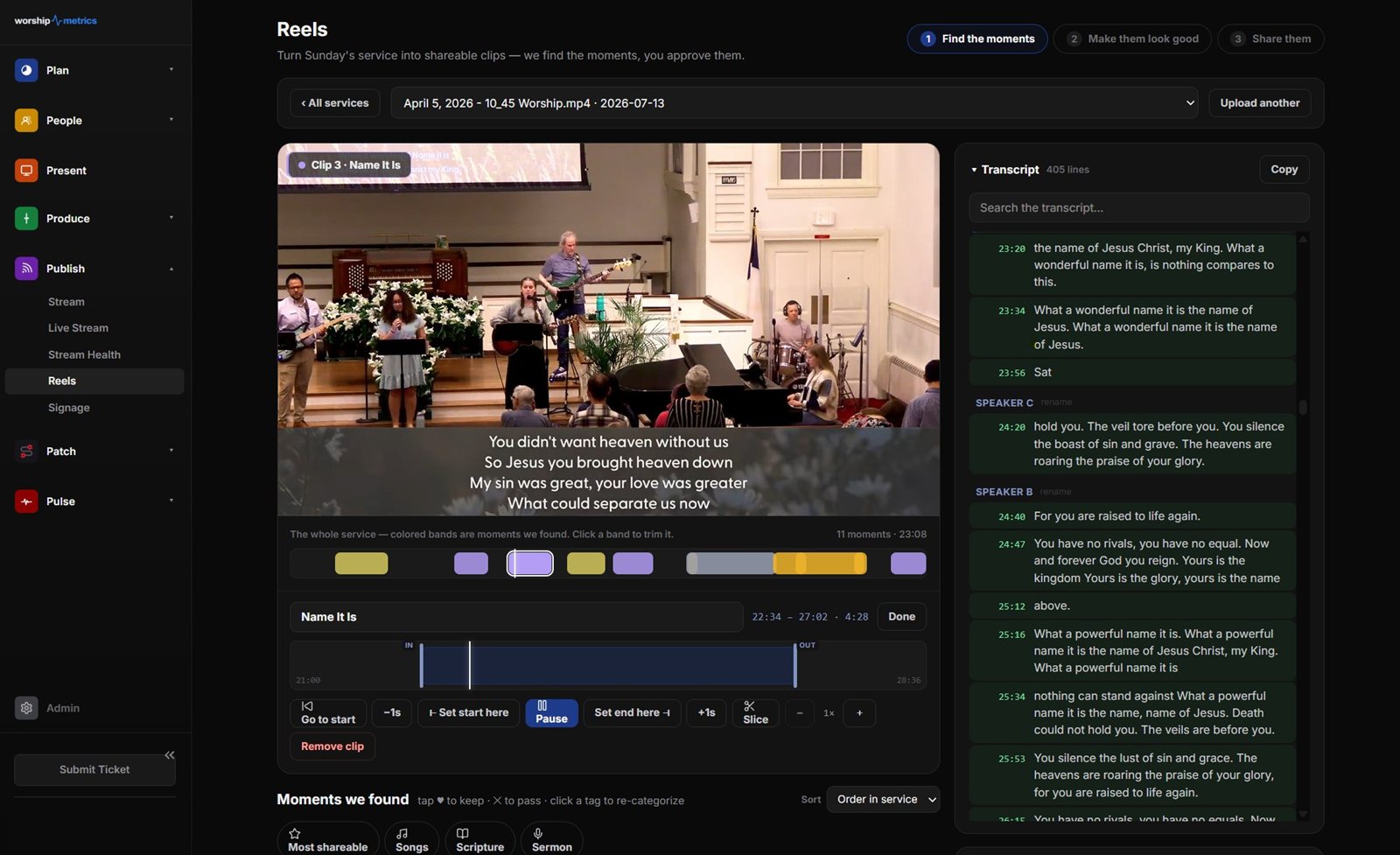
It’s free and unlimited in Tech Manager on your church’s computer, and cloud Reels with Pro or Max lets volunteers, often students, run it from home. (See the Youth Clip Team.)
More on the social media for churches page.
Related questions
- How can a small church create more social media content?
- Clip every service. One sermon can produce several short clips, each formatted for different platforms, with a title, description, and thumbnail. That's a week of posts from content you already made.
- Can AI write titles and descriptions for church clips?
- Yes. WorshipMetrics Reels can draft a title, description, and tags for each clip. Your team edits them so they sound like your church and approves every clip before it's posted.
- Won't AI make our church's content feel generic?
- Not if people stay in control. The content is still your pastor's own words from your own service. AI helps with the busywork, like drafting titles and formatting clips, and your team decides what represents your church.
Who Should Run Your Church's Social Media?
NextThe Monthly Media Insights Review for Church Leadership
Related Articles
Which Sermons Resonate? What Clip Metrics Tell Pastors
When you clip every service, each clip becomes a small signal: what people watched, finished, shared, and came back to. Here's how pastors can read sermon clip metrics to learn what's connecting with their congregation and community, without letting the numbers write the sermon.
Which Worship Songs Does Your Congregation Love? Song Insights From Clips
Worship leaders usually choose songs by feel, familiarity, and theme. Clip metrics add another view: which songs people play again and again, at church and online. Here's how to read worship song insights to plan stronger sets, and the licensing to check along the way.
Bilingual Church? How to Share Sermon Clips in Two Languages
If your church preaches in two languages, or holds separate services for each, your social media has to serve both. Here's how bilingual and multilingual churches can plan sermon clips: one account or two, captions, interpreted services, and reaching both generations.