 Plan Services, songs, and attendance, with the team scheduled.
 People Your directory, volunteers, and team chat in one place.
 Present Lyrics, scripture, slides, and stage display, free in any browser.
 Produce One dashboard for the switcher, PTZ cameras, and the stream.
 Publish Stream Sunday, keep every sermon on your watch page, clip it.
 Patch Every device, cable, and signal path, mapped and printable.
 Pulse Know the moment the stream or a device drops.
PTZ camera controller · Free in the booth, any browser on Pro and Max
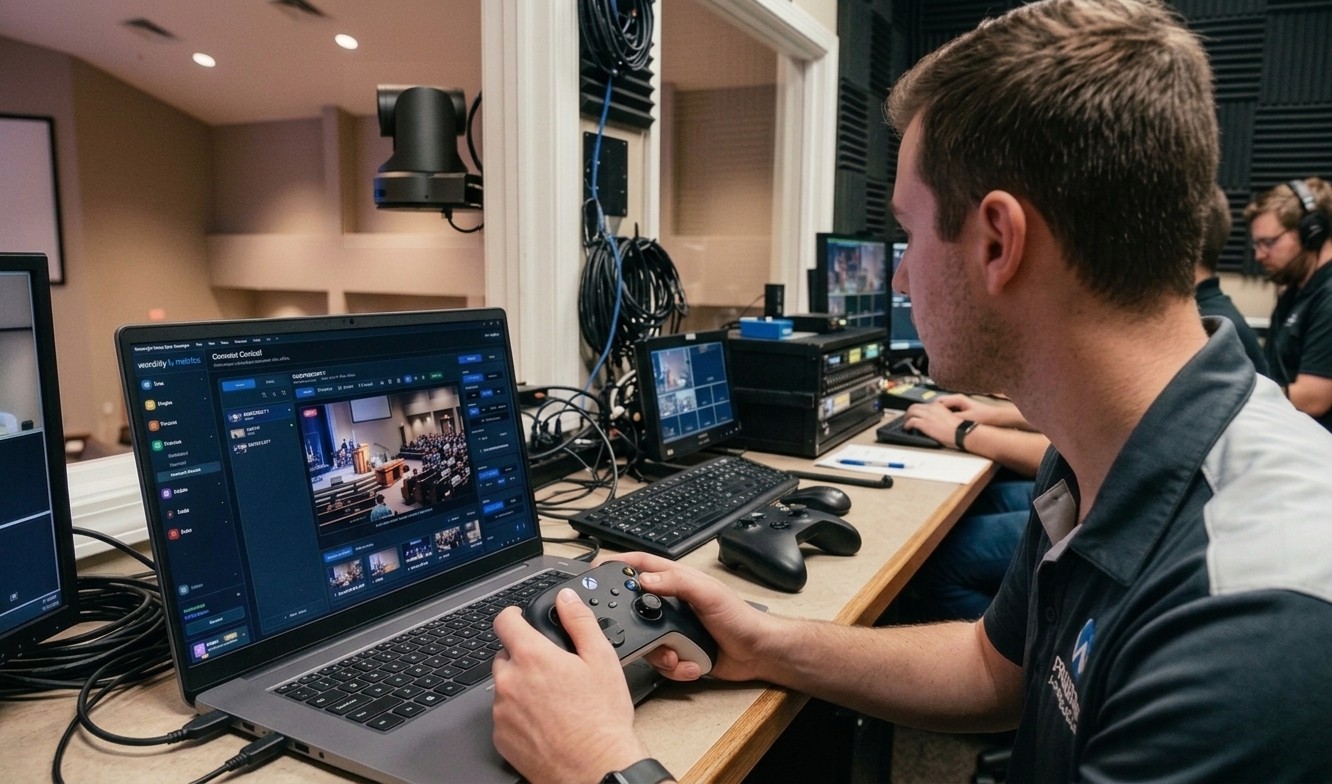
A PTZ camera controller for the price of a game controller.
Plug an Xbox controller into the booth computer and drive every PTZ camera in the building: analog pan and tilt, zoom on the triggers, focus on the bumpers, presets on A, B, X and Y. WorshipMetrics Tech Manager is the free software in between, and it shows the live picture while you drive.
Free on Windows and Mac, with the PTZ cameras you already own. Driving from any browser comes with Pro or Max, in beta.
$0
Tech Manager, the software in the booth, on every plan
$20–$65
A wired Xbox-compatible controller, or an official Xbox Wireless Controller
$275–$6,100
A hardware PTZ joystick, from budget IP models to broadcast panels
Why it works
A game controller is a very good PTZ joystick.
Proportional, like a pro joystick
Push the right stick a little and the camera creeps, which is what an on-air reframe needs. Push it all the way for the top speed you set. Direction snaps to straight lines and clean diagonals.
Volunteers already know it
A teenager who has never touched a PTZ camera has spent hundreds of hours on a game controller. Thumbsticks and triggers are muscle memory, not a new layout to learn.
Cheap enough for spares
Put one at every camera seat and keep one in the drawer. If one gets dropped or walks off, it's a lunch-money replacement, not a purchase order.
Wired or wireless
Plug it in with a USB cable, or pair it over Bluetooth. Either way it connects to the computer you're driving from.
More than a joystick
PTZ controller software that shows you the shot.
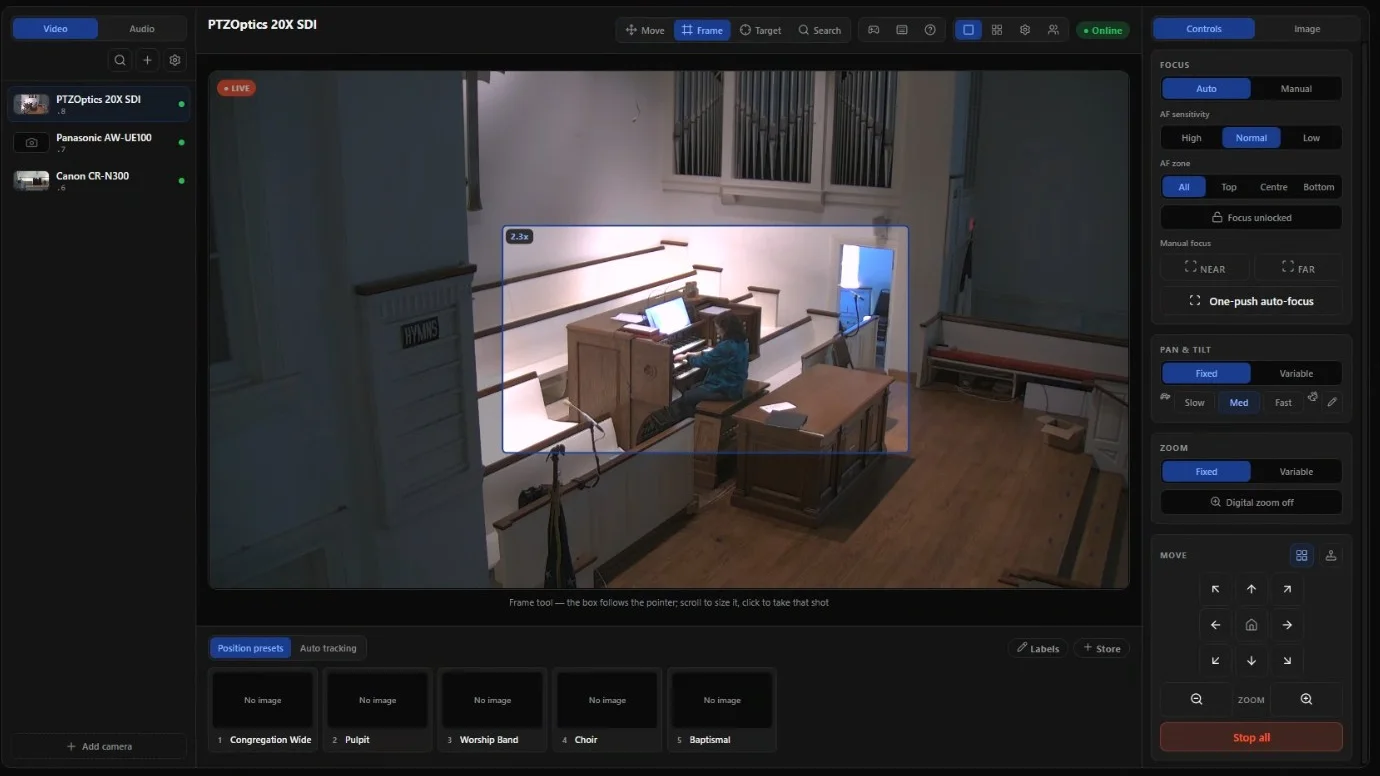
A hardware joystick sends commands and that's it. Camera Control puts the camera's picture, your presets and the aiming tools in front of you while you drive.
The live picture while you drive
Each camera's video is right there on screen, so you frame the shot you see, not the one you hope for.
Presets with pictures
Nine per camera, each tile showing the shot it recalls. The controller's A, B, X and Y recall the first four.
Point at the shot
Click a spot to centre it, or size a box around a person and click to frame them. Faster than steering for most reframes.
Every brand in one place
VISCA over TCP or UDP, ONVIF, and Panasonic AW and Canon XC over their own network control. One controller, mixed cameras.
From any browser
On Pro and Max (beta), a volunteer drives from a laptop in the back row or from home, with a controller plugged into that laptop.
Built for a team
One person drives a camera at a time, everyone sees who it is, and Take control hands it over. A dropped connection stops the camera.
No operator at all this week? Auto-tracking keeps the pastor in the shot. Everything else Camera Control does is on the Camera Control page.
Compared with a hardware joystick
What the extra money buys, and what it doesn't.
| Compared | WorshipMetrics + a game controller | Hardware PTZ joystick |
|---|---|---|
| Price | Free software and a $20–$65 controller | $275 to over $6,000 |
| The picture while you drive | Every camera live on screen, as big as your monitor | A small preview screen on many models, or none |
| Presets | Nine per camera, each with a picture of the shot. Four on the buttons, all nine on the keyboard | Usually 100 to 255, recalled by number |
| Picking a camera | Click it on screen | A camera-select button |
| Zoom | Triggers or left stick, at the speed you set | Often a twist or rocker on the stick, variable speed |
| Mixed camera brands | VISCA over TCP and UDP, ONVIF, Panasonic AW and Canon XC, detected per camera | Mostly VISCA over IP; some add NDI, ONVIF or Pelco. Sony's and Panasonic's panels are built for their own cameras |
| From another room or from home | From any browser on Pro and Max (beta) | Only on the cameras' network |
| Needs a computer | Yes: Tech Manager, or a browser | No |
| A second camera seat | Another $20–$65 controller | Another joystick |
Budget IP joysticks
$275–$550
AVKANS, Tenveo, FoMaKo
Church and pro AV joysticks
$849–$1,440
PTZOptics, BirdDog, Marshall, Lumens, AVer
Broadcast panels
$1,800–$6,100
Skaarhoj, Sony, Panasonic
Typical US street prices, October 2026.
Where a hardware joystick still wins
- Camera-select buttons. One press to jump to camera 3, without looking at a screen. With a game controller you pick the camera on screen.
- No computer in the loop. A joystick talks straight to the cameras, so it keeps working if the booth PC is off.
- A zoom you twist or rock. Many joysticks put variable-speed zoom on the stick itself. On a game controller, zoom runs at one set speed.
- A seat built for one job. For a trained operator who drives live shots all service, a big, heavy stick on the desk is hard to beat.
Already have a joystick? Keep it.
A hardware joystick talks to the cameras directly, so it keeps working next to Camera Control. Use it at the main camera seat and give a game controller, a laptop or a tablet to everyone else.
One thing to know: WorshipMetrics doesn't read hardware joysticks, so a move from the joystick doesn't show up as “who's driving” in Camera Control. Agree on who has which camera before the service.
Read the full joystick comparison →What you need
Probably just the controller.
PTZ cameras on your network
Any camera that takes VISCA over IP or ONVIF, which is nearly all of them, plus Panasonic AW and Canon XC heads.
Tech Manager at the church
The free WorshipMetrics desktop app for Windows and Mac, on a computer on the cameras' network. It does the talking to them.
An Xbox or compatible controller
USB or Bluetooth. To drive from another computer, use Chrome or Edge on Pro or Max.
See the PTZ cameras Tech Manager works with.
FAQ
PTZ controllers, answered.
What is a PTZ controller?
A PTZ controller sends pan, tilt and zoom commands (plus focus and presets) to PTZ cameras, usually over the network using VISCA over IP, ONVIF or NDI, or over serial cables. It can be a hardware joystick or keyboard, or software on a computer driven by a mouse, keyboard, touch screen or game controller.
Can I control a PTZ camera with an Xbox controller?
Yes. WorshipMetrics Camera Control reads Xbox and compatible controllers by USB or Bluetooth: the right stick pans and tilts (faster the further you push), the left stick and triggers zoom, the bumpers focus, and A, B, X and Y recall presets 1 to 4. It works in Tech Manager on Windows and Mac, free, and in Chrome or Edge on Pro and Max.
Is there free PTZ controller software?
Yes. Tech Manager, the WorshipMetrics desktop app for Windows and Mac, controls your PTZ cameras from the booth on every plan, including Free, with a game controller, keyboard, touch or mouse. Driving the same cameras from any browser comes with Pro ($49 a month) and Max ($99 a month), in beta.
Are PTZ camera controllers universal?
Not quite. Most PTZ cameras speak VISCA over IP, but brands differ on the port and the packet format, and some lines use ONVIF or their own network control. Camera Control works out which VISCA form each camera uses, and also speaks ONVIF and the Panasonic AW and Canon XC protocols, so mixed brands sit in one list.
How can I control my PTZ cameras remotely?
Inside the building, any controller on the cameras' network works. From outside it, WorshipMetrics on Pro and Max relays your moves through Tech Manager on the church computer, with a live picture, so the cameras never face the open internet. Plug the game controller into the computer you're using.
Do I need a hardware PTZ joystick?
Most churches don't. A game controller gives the same proportional pan and tilt for a fraction of the price, and the screen shows the picture and your presets. A hardware joystick still earns its price for a trained operator who drives live shots all service and wants camera-select buttons and a zoom on the stick.
Can I keep using the joystick we already have?
Yes. A hardware joystick talks to the cameras directly, so it keeps working next to Camera Control. WorshipMetrics doesn't read hardware joysticks, so a move from the joystick doesn't show as who's driving in Camera Control.
Which game controllers work?
Xbox controllers and compatible ones. A wired Xbox-compatible controller is the cheapest way in on Windows. On a Mac, an Xbox controller over Bluetooth is the dependable connection. Connect it to the computer you're driving from and press any button once so the app can see it.
Spend the joystick money on another camera.
Install Tech Manager on the booth computer, add your PTZ cameras, plug in a controller, and drive.
From the Knowledge Base