 Plan Services, songs, and attendance, with the team scheduled.
 People Your directory, volunteers, and team chat in one place.
 Present Lyrics, scripture, slides, and stage display, free in any browser.
 Produce One dashboard for the switcher, PTZ cameras, and the stream.
 Publish Stream Sunday, keep every sermon on your watch page, clip it.
 Patch Every device, cable, and signal path, mapped and printable.
 Pulse Know the moment the stream or a device drops.
Every church that adds PTZ cameras runs into the same line item: something to drive them with. Search for a PTZ controller and you’ll find joysticks from about $275 to more than $6,000.
Before WorshipMetrics, I ran PTZOptics, which makes joysticks as well as cameras, so I’m not going to tell you a joystick is a waste of money. A good one is a pleasure to use. But for most churches, the first controller doesn’t need to be one. A $20 to $65 game controller, with the right software, does most of the job, and the money you save can go toward another camera.
Here’s what you get at each price, what a game controller does well, where a joystick still wins, and how to decide.
What the money buys
US street prices as of October 2026:
Game controller: $20 to $65. Wired Xbox-compatible controllers from PowerA or 8BitDo cost $20 to $28. Microsoft’s Xbox Wireless Controller is about $49 on sale and $65 at list. You get two analog sticks, two analog triggers, two bumpers and four buttons. It needs software on a computer.
Budget IP joystick: $275 to $550. The AVKANS PowerJoy, Tenveo KB200PRO and FoMaKo KC608 Pro, mostly sold on Amazon. VISCA over IP and serial, PoE, a small screen and camera-select keys. Some add NDI.
Church and pro AV joystick: $849 to $1,440. The PTZOptics JOY-G4 ($999) and SuperJoy ($1,299), BirdDog KBD ($1,295), Lumens VS-KB21N ($1,235), Marshall VS-PTC-300 ($1,240) and AVer CL01. A better stick, a preview screen on many models, NDI and ONVIF on some, and hundreds of presets. PTZOptics’ new MiniJoy is on pre-order at $849.
Broadcast panel: about $1,800 to $6,100. Skaarhoj’s PTZ panels, the Sony RM-IP500 and the Panasonic AW-RP60 and AW-RP150. Built for full-time camera operators. Sony’s and Panasonic’s panels are made for their own cameras.
Prices move, so check before you buy.
What a game controller does well
It’s proportional. With WorshipMetrics Camera Control, the further you push the right stick, the faster the camera moves, up to the speed you set for that camera. A light touch gives the slow creep you want for an on-air reframe. That’s the one thing people assume only a joystick can do, and an analog thumbstick does it well.
Every button has a job. Triggers zoom, bumpers focus, and A, B, X and Y recall your first four presets. The button map fits on an index card.
Your volunteers already know it. A teenager who has never seen a PTZ camera has spent hundreds of hours with thumbsticks and triggers. There’s nothing new to learn about the hardware, only which shots to take.
It’s cheap enough to put everywhere. Three camera seats with SuperJoys cost about $3,900. Three budget IP joysticks cost about $900. Three wired controllers cost about $84, and you can keep a spare in the drawer.
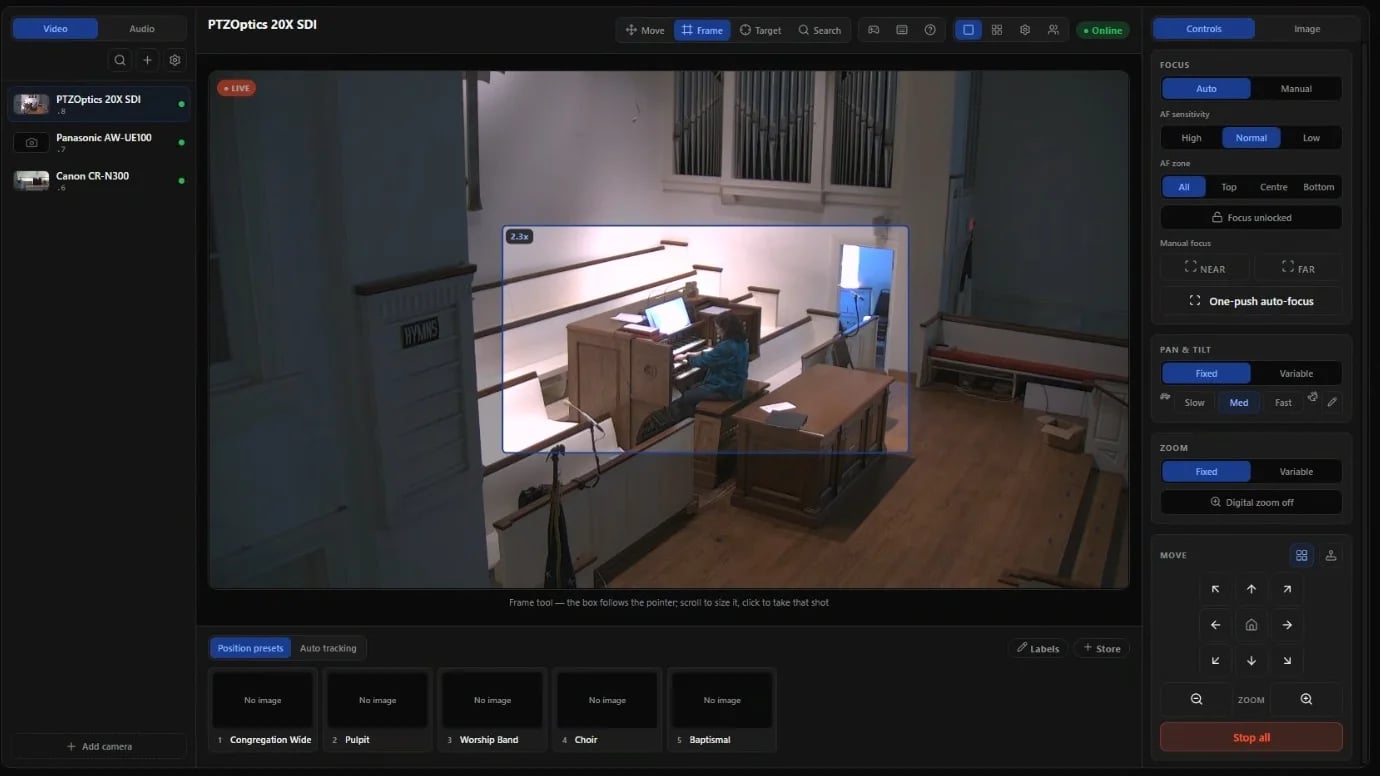
The screen does the rest. A joystick sends commands. Software can also show you each camera’s live picture, presets as pictures of the shot instead of numbers, and click-to-frame tools that are faster than steering. On a church budget, that screen matters more than the stick.
Where a hardware joystick still wins
I’d still put a hardware joystick in some booths:
- Camera-select buttons. One press jumps to camera 3 without looking at a screen. With a game controller, you pick the camera on screen and then drive it.
- No computer in the loop. A joystick talks straight to the cameras, so it works even when the booth computer is off or rebooting.
- Zoom on the stick. Many joysticks twist or rock to zoom at a variable speed. A game controller zooms at one set speed.
- A trained operator driving live shots all service. For someone who does camera work every week with a director calling shots, a heavy stick built for one job is worth the money.
- Serial cameras. Joysticks still speak RS-232 and RS-422. Software like Camera Control drives cameras over the network.
If your church already owns a joystick, keep it. It talks to the cameras directly, so it keeps working next to software control. Just agree on who’s driving which camera, because the software can’t see the joystick’s moves.
The software matters more than the stick
A game controller is only as good as the software reading it. Several tools can do it:
- WorshipMetrics Tech Manager reads Xbox and compatible controllers on Windows and Mac, free. It works with mixed camera brands (VISCA over TCP or UDP, ONVIF, Panasonic AW and Canon XC), shows each camera’s live picture, and keeps presets as pictures. On Pro and Max, the same controls run in Chrome or Edge, so a volunteer can drive from home (beta).
- OBS has a free community plugin, PTZ Controls, that maps a gamepad’s sticks to pan, tilt and zoom inside OBS.
- vMix has PTZ control in its 4K and Pro editions, with a shortcut template for an Xbox USB controller.
- NDI Studio Monitor on Windows can use a USB joystick or gamepad to drive NDI cameras.
- Camera makers’ apps, like PTZOptics Hive and Panasonic’s free PTZ Control Center, support game controllers too, built around their own cameras.
They’re all reasonable. The questions to ask are whether one app covers every camera brand you own, whether it shows you the picture while you drive, and whether more than one person can help, from the booth or from home.
How to decide
One or two cameras, rotating volunteers. Buy a $28 wired controller, store good presets, and put your best four shots on A, B, X and Y. Most weeks, nobody will need to steer at all.
Three or four cameras with a camera seat. Put a game controller at each seat. If your camera operator wants buttons to switch cameras without looking, add one budget IP joystick at the main seat.
A larger production with a trained operator and a director. Put a pro joystick at the main camera seat, and give everyone else a game controller, a laptop or a tablet. Your tech director can still help from home on a Saturday.
Whichever you choose, spend on cameras and lenses before controllers. A great joystick can’t fix a camera that’s too far away or a shot that’s too dark.
Try it this Sunday
Tech Manager is free on Windows and Mac. Install it on the booth computer, add your PTZ cameras, plug in an Xbox controller and press a button. This step-by-step guide walks through setup, the button map and what to do if the controller doesn’t respond. And if nobody can run cameras this week, auto-tracking can keep the pastor in the shot.

Paul Richards is a co-founder of WorshipMetrics, where he leads education and customer success. He was previously CEO of PTZOptics. Read our story.