 Plan Services, songs, and attendance, with the team scheduled.
 People Your directory, volunteers, and team chat in one place.
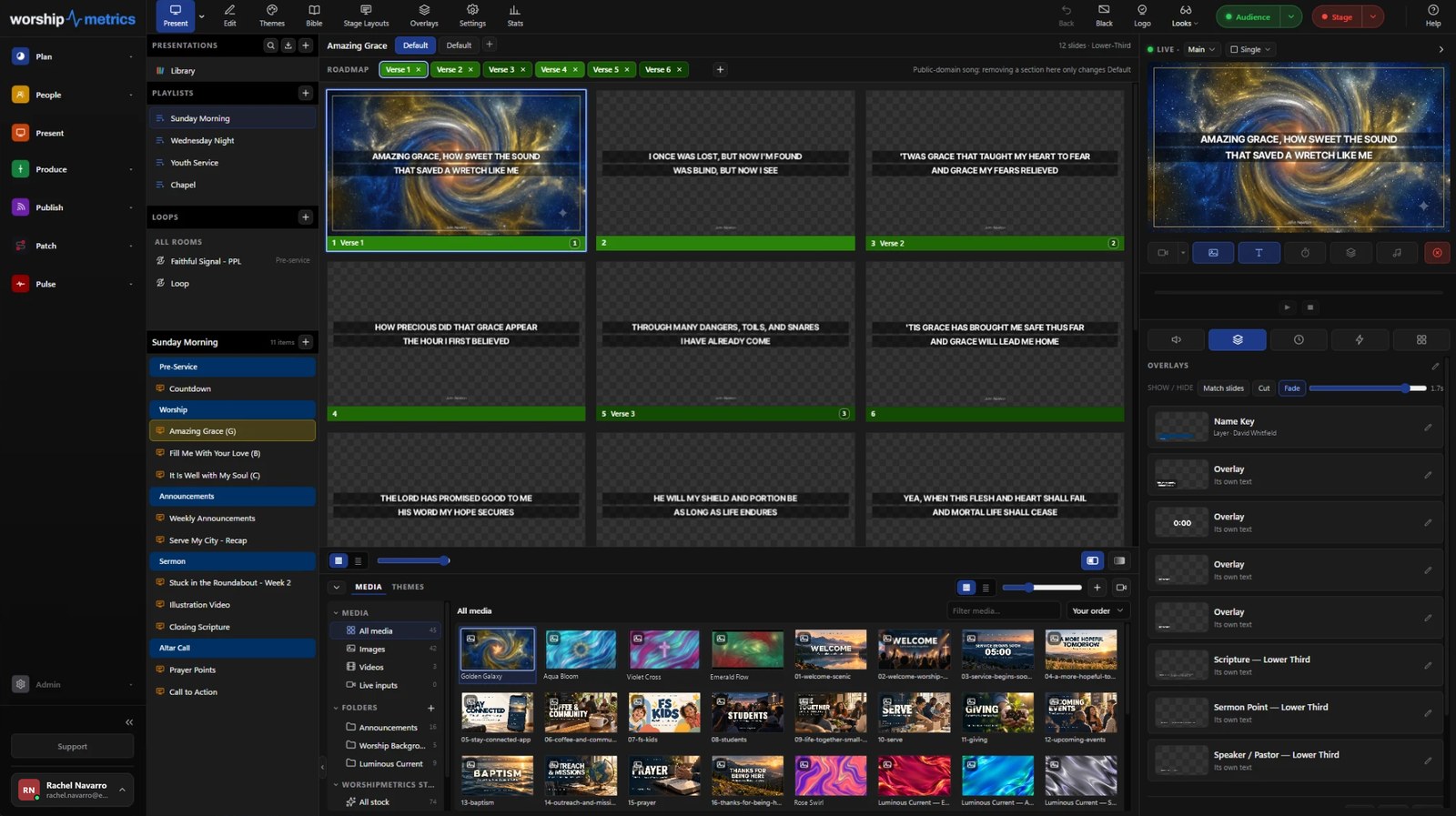
 Present Lyrics, scripture, slides, and stage display, free in any browser.
 Produce One dashboard for the switcher, PTZ cameras, and the stream.
 Publish Stream Sunday, keep every sermon on your watch page, clip it.
 Patch Every device, cable, and signal path, mapped and printable.
 Pulse Know the moment the stream or a device drops.
The hardest part of changing presentation software isn’t learning a new screen. It’s the library. Every song your team has built over the years, split into verses and choruses, with the notes the worship leader left on the bridge. Nobody wants to spend a month of Saturdays retyping all of it.
You don’t have to. WorshipMetrics Present, our free church presentation software, imports ProPresenter 7 files directly, and it runs in a browser. We made a short video of the whole thing. It’s about four minutes, and the steps are written out below it.
What comes across
Your ProPresenter 7 presentations become Present presentations, and the parts your team actually worked on make the trip:
- Your slides, with the text the way the file has it: its fonts, sizes, colors and text boxes. Present doesn’t swap in a look of its own.
- Song sections. The groups you labeled Verse, Chorus and Bridge come in as named sections, in the same order.
- Arrangements. Each arrangement becomes its own order of sections, and the one that was selected in ProPresenter is the one that’s selected in Present.
- Speaker notes, on the slides they were written for.
- Backgrounds, pictures and videos, when you bring the media files along (more on that below).
- Chords. Chords placed on a slide in ProPresenter become that slide’s chord chart, which Present shows on the stage display for the band, not on the audience screen.
- Themes and playlists. A theme comes in as a new theme group, so it never replaces the look you already use. A playlist links to the presentations you import with it, or to ones you’ve already brought over.
How to bring it across
- Gather the files. Each ProPresenter 7 presentation is its own
.profile, so you can move the whole library or just this Sunday’s set. A.proBundleis ProPresenter’s export with media: the presentation and the pictures and videos it uses, together in one file. That’s the easiest way to keep backgrounds with their slides. - Open Present and drop them in. Drag the files onto the Presentations list, or use the import button at the top of it. If you’re using plain
.profiles, drop the pictures and videos they use in at the same time, and Present matches them up by file name. - Look before you import. Before anything is saved, Present shows what each file will become and lists, in plain words, anything it can’t carry. Nothing disappears without being on that list.
- Import. Your presentations, themes and playlists are in, and the media is in your media bin like anything else you upload.
To bring a theme, drag in the file named Theme inside that theme’s folder. A playlist is the Library file in your Playlists folder, or a .proPlaylist you exported. And if you import the same file twice, Present adds a copy rather than overwriting the first one, because someone on your team may have already edited it.
What stays behind
We’d rather you know this before Sunday than find out during it. Some things in a ProPresenter file don’t have a match in Present yet, and the import lists every one of them with a count:
- Audio cues, live video cues and web page cues
- Transitions set on a single slide (Present uses one transition for all of them)
- Rotated boxes, which come in upright, and box outlines, shadows and gradient fills
- Props and timeline triggers
Timer cues come across when Present already has a timer with the same name. One more exception is about licensing, not technology: slides and chord charts bought from MultiTracks (SlidePro and ChartPro) are licensed for use in ProPresenter, so Present doesn’t import them.
Coming from an older version? ProPresenter 4, 5 and 6 files go into the song library through Songs, along with ChordPro, OpenLyrics and OpenSong files. Migrating Your Song Library from ProPresenter walks through that side, with a checklist for a migration weekend.
Run both for a few Sundays
Present is free forever, with unlimited users, no credit card and no trial clock. So there’s no reason to switch everything at once. Import your library, build next Sunday’s service in Present, and keep ProPresenter in the booth until your team is ready.
While you’re trying it, here’s what else comes with it: lyrics, scripture and slides from any browser, chord charts on the stage display, and slides that fire triggers for your lights, sound and OBS. Your pastor can fix a typo in Saturday night’s sermon slides from home, and it’s waiting in the booth on Sunday morning.
If price is part of why you’re looking, Is ProPresenter Free? has the current numbers, and WorshipMetrics vs ProPresenter puts ProPresenter Cloud and Present side by side.
Try it with your own files
Start free, open Present, and drop in a few of the songs you’re singing this Sunday. You’ll know in ten minutes whether your library is going to make the trip. More on what you get for free is on the free church presentation software page.
If you have a big library and want a hand moving it, call us at 910-WORSHIP.
ProPresenter is a trademark of Renewed Vision. WorshipMetrics is not affiliated with or endorsed by Renewed Vision.

Paul Richards is a co-founder of WorshipMetrics, where he leads education and customer success. He was previously CEO of PTZOptics. Read our story.