 Plan Services, songs, and attendance, with the team scheduled.
 People Your directory, volunteers, and team chat in one place.
 Present Lyrics, scripture, slides, and stage display, free in any browser.
 Produce One dashboard for the switcher, PTZ cameras, and the stream.
 Publish Stream Sunday, keep every sermon on your watch page, clip it.
 Patch Every device, cable, and signal path, mapped and printable.
 Pulse Know the moment the stream or a device drops.
For ProPresenter teams · Updated October 2026
WorshipMetrics vs ProPresenter
ProPresenter is the presentation software most church production teams know best. WorshipMetrics Present is free and runs in a browser: bring your ProPresenter 7 shows, put chord charts on the stage display, run several screens from one tab, and let a second operator take slides from anywhere.
WorshipMetrics Present
$0
Free forever. No seats, no watermark, no trial clock.
ProPresenter 7 import, chord charts on the stage display, several screens from one browser tab, and operators who join from anywhere.
ProPresenter, first seat
$289/yr
Billed yearly. Seats 2 to 4 are $189 each, 5 to 10 are $149. Or $29/mo per seat.
From renewedvision.com/propresenter on October 25, 2026.
Free forever, no credit card. Run it beside ProPresenter for as long as you like.
What your production team gets
What the booth relies on, in a browser tab.
Your ProPresenter 7 library
Drop in .pro files, a .proBundle or an exported playlist, with the pictures and videos they use. Presentations, themes and playlists come across, and before anything is saved, each file says what it will become and what Present can't carry. ProPresenter 4–6 files come in through Songs.
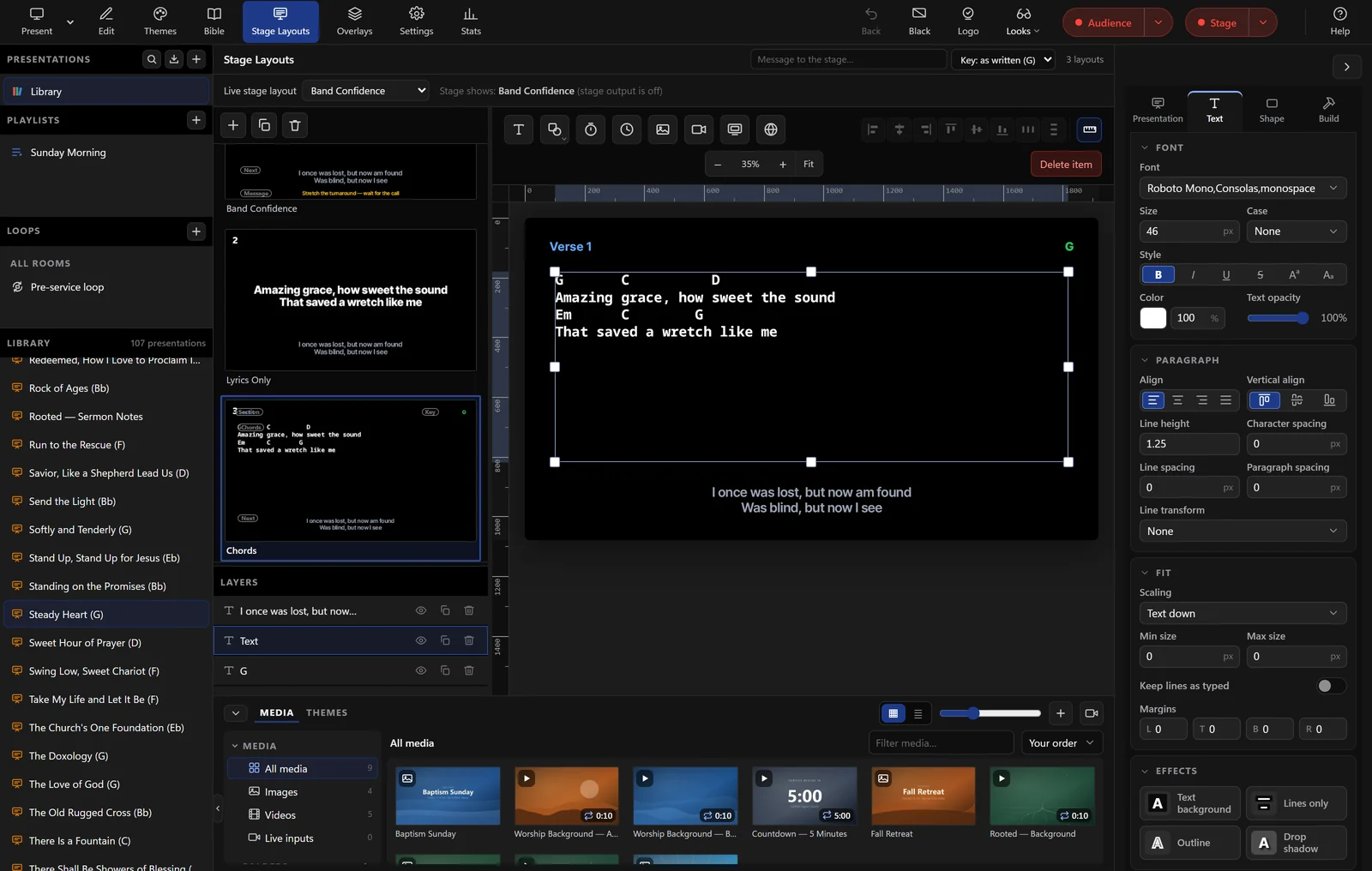
Chord charts on the stage display
The band sees the current and next lines, notes, timers, stage messages and the chord chart, transposed to the key you're playing in. The stage layout is its own design, never a mirror of the projector.
Several screens from one tab
Projector, stage display, lobby and a words-only feed for the switcher, each with its own look and resolution, from one tab in Chrome or Edge. Tech Manager adds NDI with a transparent background, and SDI through Blackmagic DeckLink.
Run the slides from anywhere
Open a room in the booth, and a second operator joins from a browser across the room or across town. Every slide they take goes to the booth's screens, on every plan.
What it costs
The prices, side by side.
| WorshipMetrics | ProPresenter | |
|---|---|---|
| Presentation software | Present: free forever, on every computer | $29/mo per seat, or $289/yr for the first seat |
| A booth computer and a backup | $0 | $478/yr, or $58/mo |
| Booth, backup and a youth room | $0 | $667/yr, or $87/mo |
| Five computers that present | $0 | $1,005/yr, or $145/mo |
| More than 10 computers | $0 | An Enterprise plan, priced by their sales team |
| Computers that only edit | Free, with the full editor in any browser and clean output | Free as a Local Editor, or a Cloud Editor seat to edit synced shows (two included, then $5/mo or $29/yr each). Both watermark their output |
| Cloud storage | 10 GB on Free, 500 GB on Pro, 1 TB on Max | 50 GB included. 200 GB for $49/yr, 1 TB for $149/yr, 3 TB for $249/yr |
| Free trial | Not needed: Present is free. 30 days on Pro and Max | 14 days |
ProPresenter prices are from renewedvision.com/propresenter on October 25, 2026, in US dollars. Prices change, so check with Renewed Vision. Present is free on every WorshipMetrics plan, on every computer. See all WorshipMetrics plans.
What the booth needs
The slides, and everything around them.
For WorshipMetrics, the plan each feature starts on.
| Feature | WorshipMetrics | ProPresenter |
|---|---|---|
| Runs on | Any computer with Chrome or Edge, plus the free Tech Manager app in the booth | Mac and Windows app |
| ProPresenter 7 presentations, themes and playlists | Import, free | Native |
| Stage display | Free, with chord charts in the key you're playing in | Flexible layouts, timers and stage messages |
| Several outputs, each with its own look | Free, from one browser tab | Looks for every screen |
| NDI and SDI output | Free, with Tech Manager | Included |
| Edit from any computer | Any browser, nothing to install | ProPresenter 22 and a Cloud seat on each computer |
| Clean output on every computer | Every computer, every plan | Presenter seats only. Editor seats are watermarked |
| Run the slides from another computer | Free. Join the room from any browser, anywhere | The Remote app in the room, or Network Link between computers on site |
| Bible translations | 9 included (7 English, 2 Spanish) | 125 available |
| Planning Center | Free sync of plans, people and teams | Playlists sync with Planning Center Services |
| Service planning and volunteer scheduling | Free | — |
| Switcher and PTZ camera control | Free (desktop) | — |
| Monitoring and alerts for every device in the booth | Free | — |
Reflects ProPresenter's public website as of October 25, 2026 and may not capture every plan or recent change. Verify details with Renewed Vision. All trademarks belong to their respective owners.
ProPresenter Cloud
ProPresenter Cloud and the Present cloud.
Cloud, new in ProPresenter 22, syncs one workspace across every computer signed in to your organization, and it's a real step forward for ProPresenter teams. It's included with every subscription, with 50 GB of storage and two Cloud Editor seats. Here's how it compares with Present.
WorshipMetrics Present
ProPresenter Cloud
Where you edit
Present: In a web browser on any computer. Nothing to install
ProPresenter Cloud: In the ProPresenter app, version 22 or later (in public beta when we checked), installed and signed in on each computer. There is no web editor
Who can edit
Present: Unlimited users, each with their own sign-in
ProPresenter Cloud: Each computer that uses Cloud needs a seat: a Presenter seat, or one of the two Cloud Editor seats included. More Cloud Editor seats are $5/mo or $29/yr each
Output from an editing computer
Present: The same clean output on every computer and every plan
ProPresenter Cloud: Watermarked on Cloud Editor seats. Clean on Presenter seats
Price
Present: Free forever
ProPresenter Cloud: Included with a ProPresenter subscription
Editing together
Present: Edits show up live for everyone, with each person's name on the slide they're editing, and version history to go back to
ProPresenter Cloud: Changes show up on the other computers in near real time
What stays in sync
Present: Presentations, playlists, and media (videos up to 250 MB), plus the songs behind them, with the arrangement and key from the service plan
ProPresenter Cloud: The whole ProPresenter workspace: presentations, media, libraries, playlists, macros, actions, themes, stage layouts, timers, and props
Storage
Present: 10 GB on Free, 500 GB on Pro, 1 TB on Max
ProPresenter Cloud: 50 GB shared across the organization, with paid upgrades up to 3 TB
If the internet drops
Present: An open Present window or Tech Manager session keeps running with its media cached, and sends your edits when the connection returns. Opening Present fresh needs the internet
ProPresenter Cloud: Each computer keeps its own copy of the show, so it keeps running
Running the show from somewhere else
Present: Anyone on your team can join the live room from a browser anywhere and run the slides on the booth's screens, on every plan. Cloud Control on Pro and Max adds vMix and OBS switching
ProPresenter Cloud: Not part of Cloud. Remote desktop to the booth computer still works, and the ProPresenter Remote app runs the show from a phone or tablet in the room
Around the slides
Present: Service plans, volunteer scheduling, live streaming, and AV monitoring, on the same sign-in
ProPresenter Cloud: Presentation software, with a Planning Center integration for service plans
ProPresenter details are from renewedvision.com on October 25, 2026 and may change, so check with Renewed Vision. ProPresenter is a trademark of Renewed Vision.
Where ProPresenter shines
ProPresenter has led church presentation for more than two decades. It's a native Mac and Windows app with deep production features: Looks for every screen, NDI and SDI with alpha key, Network Link across booth computers, 125 Bible translations, Planning Center sync, and the ProPresenter Remote app. Support is open 7 days a week. Cloud now syncs the whole workspace, macros and stage layouts included, and every computer keeps its own copy of the show when the internet drops.
Where WorshipMetrics is different
Present is free, with no seats: every computer gets the full editor in a browser and clean output, so the pastor's laptop, the youth room and a backup booth PC cost nothing. Your ProPresenter 7 presentations, themes and playlists come with you. And it's the same sign-in your team uses to plan the service, schedule volunteers, move the cameras, stream, and watch every device in the booth.
Switching
Try it beside ProPresenter.
Bring your shows
Drop your .pro files, or a .proBundle with its media, into Present. Themes and playlists come too, and ProPresenter 4–6 files come in through Songs.
Set up your screens
Pick a monitor for each output and give each its own look. Build a stage layout with chords, and add Tech Manager in the booth when you need NDI or SDI.
Run both for a few Sundays
Present is free with no trial clock, so keep ProPresenter running until your team is ready. Planning, cameras and monitoring in WorshipMetrics work alongside either one.
Questions
WorshipMetrics vs ProPresenter, answered.
How much does ProPresenter cost?
New users subscribe: $29 a month per seat, or yearly, $289 for the first seat, $189 each for seats 2 to 4, and $149 each for seats 5 to 10. More than 10 seats is an Enterprise plan through Renewed Vision's sales team. Every subscription includes ProPresenter Cloud with 50 GB of storage and two Cloud Editor seats. WorshipMetrics Present is free, with no seats.
Is ProPresenter free?
No. You can download it and build presentations as a free Local Editor, but its output is watermarked, so it isn't meant for live services. There's a 14-day free trial.
What is ProPresenter Cloud, and what does it cost?
Cloud, new in ProPresenter 22 (in public beta on October 25, 2026), syncs a whole workspace, including presentations, media, playlists, themes, macros, stage layouts and timers, across every computer signed in to your organization. It's included with every subscription, with 50 GB of storage and two Cloud Editor seats. More Cloud Editor seats are $5/mo or $29/yr each, and more storage is 200 GB for $49/yr, 1 TB for $149/yr, 3 TB for $249/yr. You edit in the ProPresenter app; there's no web editor.
Can we bring our ProPresenter library?
Yes. ProPresenter 7 presentations (.pro and .proBundle), themes and playlists import straight into Present with the pictures and videos they use, and the import lists anything it can't carry before it saves. ProPresenter 4–6 files come in through Songs.
What happens if the internet drops?
Present runs in Chrome or Edge, and opening it needs the internet. Once it's open, a Present window or Tech Manager session keeps running with its media cached, and sends your edits when the connection is back. ProPresenter keeps a full copy of the show on each computer, which is a real strength in a booth with shaky internet.
Can we keep ProPresenter and still use WorshipMetrics?
Yes. Keep ProPresenter for slides and use WorshipMetrics to plan the service, schedule volunteers, control cameras, stream, and watch every device in the booth. Present is there whenever your team wants to try it.
Your slides, on every screen, from any browser.
Bring your ProPresenter shows into Present and run it beside ProPresenter for a few Sundays. It's free, with no seats and no trial clock.