The short answer: yes — and it changes what “the vMix seat” means
vMix runs on one PC, so churches naturally assume it’s a one-person instrument: whoever sits at that keyboard runs the service, and everyone else watches. With WorshipMetrics connected, that stops being true. The booth’s switching surface becomes something your team shares — locally for free on every plan, and from anywhere on Pro and Max — while vMix itself stays exactly where it is, doing exactly what it does.
Concretely, here’s what a second (or third, or fifth) person gets, on any device they sign into:
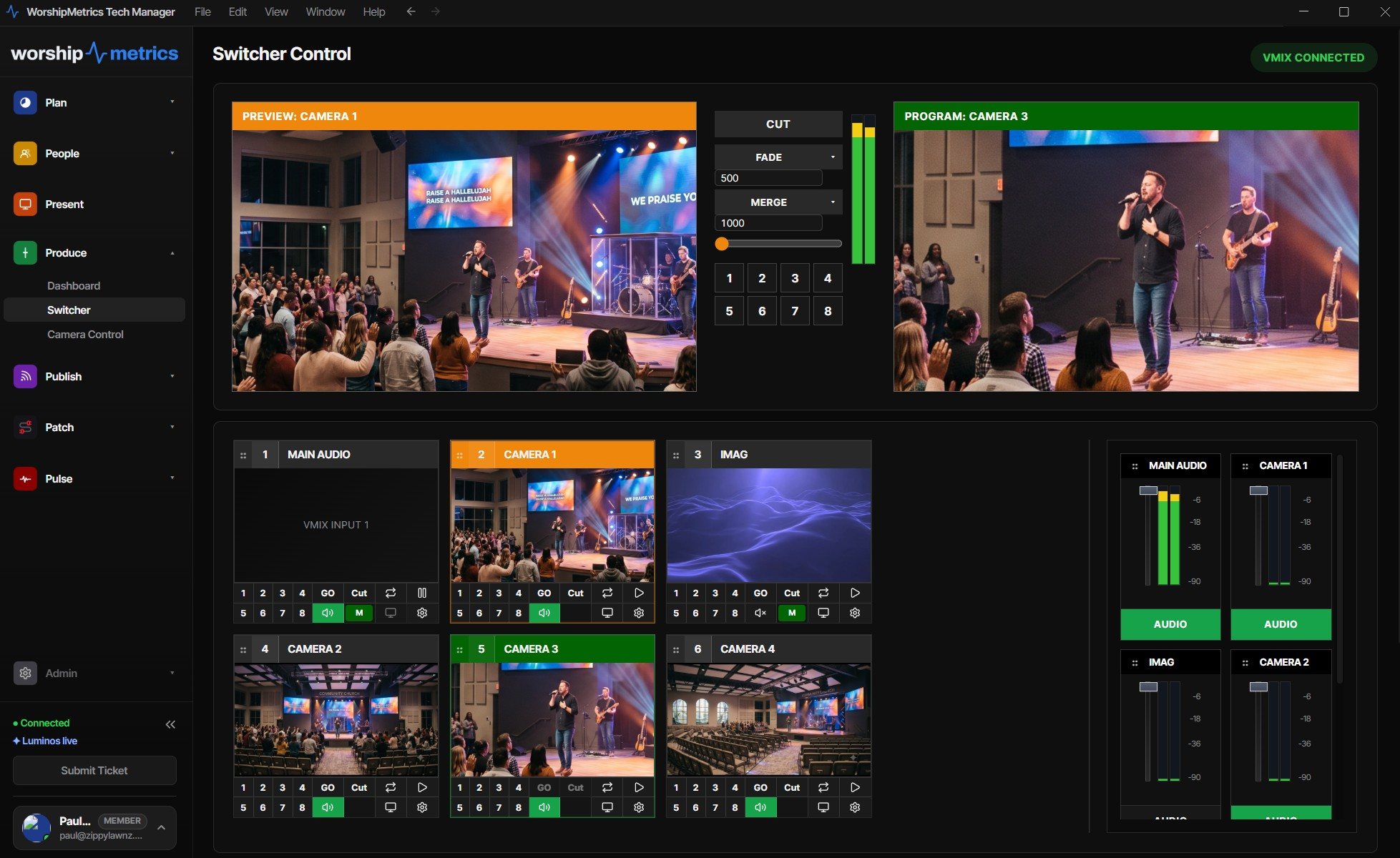
- Preview and program, live — thumbnails of every input beside an enlargeable program view, so anyone with access sees exactly what’s on air and what’s queued next. No more describing the screen over the phone.
- The full switch — cut, fade, wipe, zoom, and stinger transitions with adjustable duration, a hands-on T-bar, and preview/program switching across every input, through vMix’s own HTTP and TCP APIs.
- The everyday moves — play and pause inputs, toggle overlays 1–4, manage bus audio mute and volume.
- Honest audio meters — master and bus levels streamed at ~30 fps over a persistent TCP connection: the same numbers vMix shows, live in the panel.
- Stream and recording control — start and stop both from the panel, which means a second person can confirm the red light is actually on before the prelude ends.
And the two facts that make a tech director comfortable handing any of this out: there’s no port forwarding and no VPN (one secure outbound connection from the booth, the same link that powers monitoring), and every remote action is logged to your support history. You decide who can switch; the system remembers who did.
What churches actually do with a shared surface
The feature list matters less than the Sundays it changes. Four patterns come up constantly:
The confirmation seat. The cheapest insurance in church production: someone — at the back of the room, at home, at another campus — glances at the panel and confirms the stream is live, the recording is rolling, and the right input is in program. Thirty seconds, every week, and an entire category of “we didn’t notice until Monday” disappears.
The remote mentor. Your veteran operator is at a wedding; a nervous newcomer is in the booth. The veteran opens the panel, watches preview and program through the service, and texts one line: “you’re doing great.” When needed, they talk the newcomer through a transition — or make the switch themselves. We told this story from the newcomer’s side in the first-Sunday stream operator diary, and from the church’s side in can volunteers run the livestream when the tech director is out of town?
The sick-Sunday save. The scheduled operator wakes up with the flu. A veteran volunteer takes the whole service remotely — real switching, not a locked-down viewer — while a warm body in the building handles the physical room. What used to be a cancelled stream is now a normal Sunday with an unusual seating chart.
The training split. This is the quiet superpower for growing teams: the trainee sits at the vMix keyboard where the tactile learning happens, while the trainer watches the same live surface from the next seat or the next town — seeing every preview choice before it hits program. Mistakes get caught in preview, which is exactly where mistakes are supposed to live. It’s the pattern that makes putting students on the switcher genuinely safe, and it’s how one operator’s knowledge stops bottlenecking and starts multiplying — the heart of the team your vMix system can carry.
What this doesn’t change
vMix keeps its scene collections, its inputs, its show file, its keyboard shortcuts — the operator’s craft transfers untouched, because WorshipMetrics speaks to vMix through its own APIs rather than replacing anything. The booth PC stays the engine; the panel extends its reach. And local control through Tech Manager costs nothing, forever, so the shared-surface habit can start today even on the Free plan — the cloud layer joins when the team is ready for it.
How WorshipMetrics handles this
Multi-person vMix control is the cloud control layer of WorshipMetrics riding on the vMix integration: the full switching surface mirrored to your team’s devices, scoped to accounts you invite, logged action by action, with no holes in the church firewall. One person still sits in the booth. The difference is that they’re no longer alone there — and the seat you bought vMix for becomes the first seat of a team.
Make the booth easier to run: How to make your church livestream easier for volunteers: the three-seat setup. See also two-computer vMix setup with slides over NDI · adding a camera operator to your vMix production.
Share the vMix PC with more volunteers: Splitting vMix roles for church volunteers. See also the vMix Web Controller for volunteers · from the Web Controller to WorshipMetrics.
Related questions
- Does remote vMix control require port forwarding or a VPN?
- No. Tech Manager makes one secure outbound connection from the booth to WorshipMetrics — the same link that powers monitoring. Nothing is exposed on the church network, and nobody opens a firewall hole.
- Who can control our switcher remotely?
- Only people you've invited to your WorshipMetrics team, signed in with their own accounts. You decide who has control, and every remote action lands in the same support history as everything else — nothing happens silently.
- What does multi-person vMix control cost?
- Local control — running vMix from Tech Manager in the booth — is free on every plan, forever. Cloud control, the same panel from anywhere for your whole team, comes with Pro ($49/mo) and Max ($99/mo).
Ministry BY Teenagers, Not Just TO Them
NextNeed Volunteers for Your vMix Livestream? Start with the Youth Ministry
Related Articles

Bitfocus Companion + ATEM Mini: A Stream Deck Panel for Your Church Switcher
A Stream Deck running Bitfocus Companion turns a Blackmagic ATEM into plain-word buttons with colors that show what's live, and the same panel can run PTZ cameras, projectors, and more. Here's how to connect Companion to an ATEM and build a volunteer page.

Lyrics Over the Camera on an ATEM Mini: Luma Keys, Chroma Keys, and the Slides Computer
To put song lyrics over the camera shot on a Blackmagic ATEM Mini, feed the slides computer into an ATEM input and key it over the camera. Here's how luma and chroma keys work for lyrics, how to design slides that key cleanly, and who should run it.

ATEM Mini + OBS for Church: Hardware Camera Switching with OBS for Graphics and Streaming
Many churches use an ATEM Mini as a camera switcher and send its output into OBS over USB as a webcam. The ATEM gives volunteers real buttons; OBS adds lyrics, graphics, recording, and streaming. Here's how to set it up, split the jobs, and avoid the common sync and quality problems.