The short answer: yes — if the booth doesn’t depend on one person’s presence
Every church with one deeply capable tech person eventually faces the same Sunday: that person is at a wedding, on vacation, or home sick, and a well-meaning volunteer is alone in the booth. Whether that morning goes fine has very little to do with the volunteer’s courage and everything to do with how the system was set up beforehand.
The honest answer to the question is yes — volunteers run streams solo every week at churches everywhere. The churches where it goes smoothly have quietly arranged three things: routine failures get caught instantly, help can see the system from anywhere, and knowledge lives in documentation instead of one person’s memory. Here’s what that looks like in practice, told the way it actually plays out.
9:15 a.m. — the stream hiccups, and the booth asks one question
Twenty minutes before the service, the building’s internet has a rough moment and the stream drops. In the old world, this is where the volunteer notices a “reconnecting” badge — or doesn’t — and starts texting the tech director.
In a booth running Tech Manager, the rule is simple: the moment the stream stops unexpectedly, a pop-up on the booth asks “Your stream stopped at 9:15 AM. Restart it?” — and the same offer lands in Alerts on the tech director’s phone. The volunteer taps Restart, or the director does it from the road; whoever taps first wins. About 20 seconds later the booth checks and reports that the stream is back.
The volunteer touches one button. Every offer and answer lands, timestamped, in the support history — who tapped, and from where — so the tech director can see on Monday exactly what happened at 9:15. Self Healing is deliberately boring: it notices instantly and proposes the well-understood fix; a person decides. No robot improvising.
9:40 a.m. — the tech director checks in from three states away
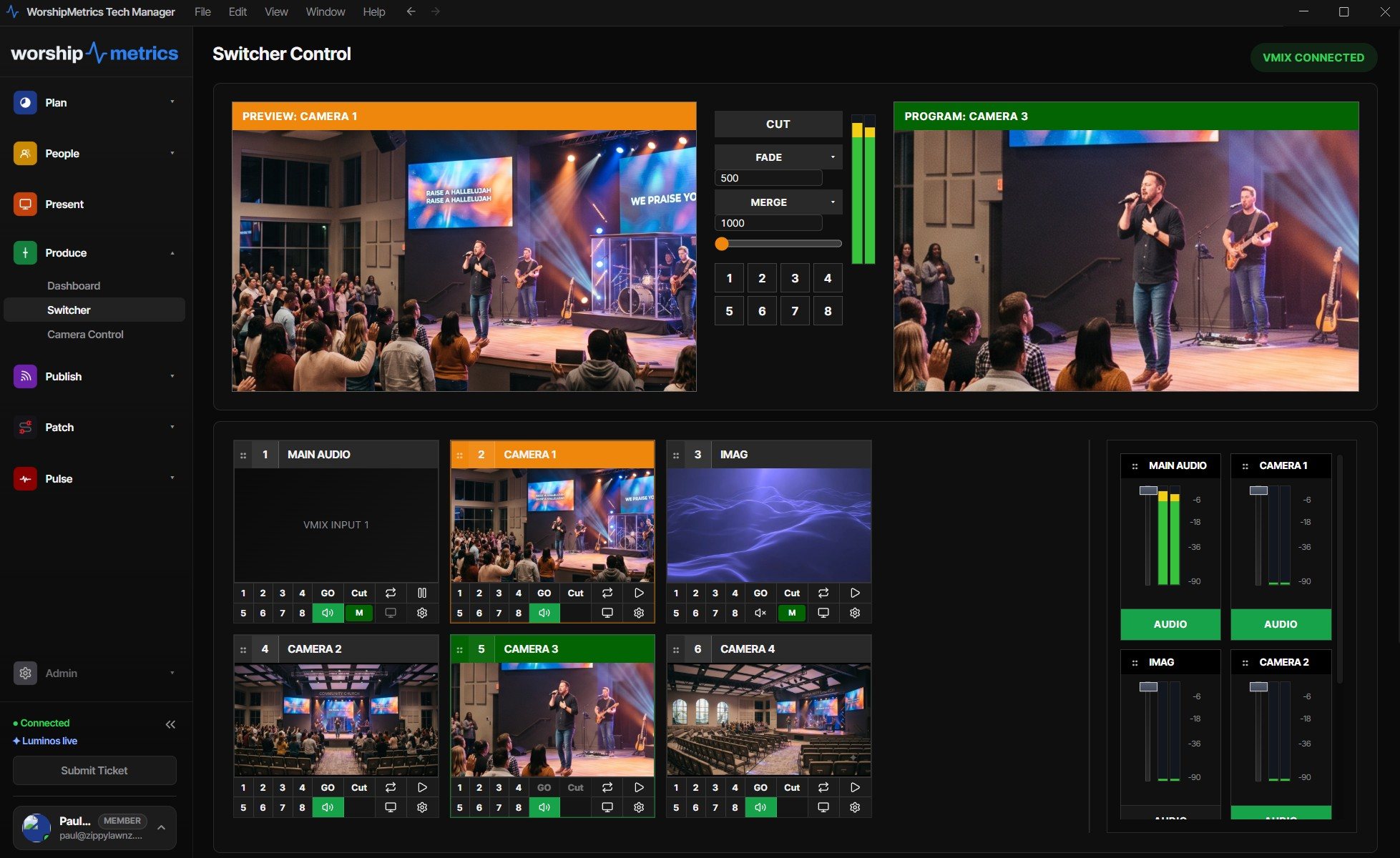
Here’s where the setup pays for itself. On the Pro and Max plans, cloud control mirrors the booth’s switcher state — what’s in preview, what’s in program, which scenes exist — live to any phone or laptop. The tech director, sitting in a hotel lobby, opens WorshipMetrics and sees exactly what the volunteer sees.
If the volunteer just needs reassurance, that’s a text: “you’re live, program looks right, you’re fine.” If they need more, the remote person can act: with vMix, the cloud panel is the full switching surface — cut, transition, overlays, bus audio; with OBS, remote scene switching plus stream and recording control. A trusted helper can talk a nervous volunteer through a transition, or simply make the switch themselves.
Two details matter for the church’s peace of mind. First, there’s no port forwarding, no VPN, and no hole in the church firewall — Tech Manager makes one secure outbound connection, the same one that powers monitoring. Second, only people you’ve invited to your team can connect, signed in with their own accounts, and remote actions land in the same support history as everything else. Nothing happens silently.
(Local switcher control in the booth — OBS, vMix, and Blackmagic ATEM — is free on every plan, including Free. The cloud layer comes with Pro at $49/mo and Max at $99/mo.)
10:05 a.m. — a cable question, answered by the map
Mid-service, the confidence monitor goes dark. The volunteer has no idea which cable feeds it — that knowledge has always lived in the tech director’s head.
Except it doesn’t anymore: the Signal Map documents every device, port, and labeled cable run, so “which cable feeds the confidence monitor” is a lookup, not a phone call. And because that documentation is what Luminos and remote support read, a call to 910-WORSHIP starts from your actual wiring — the person helping can point to the exact cable, not ask the volunteer to describe the back of the rack. System documentation ships free in Tech Manager, which makes it the single highest-leverage thing to set up before the Sunday someone’s alone.
For churches that want a professional in the loop every week, the Sunday Assurance add-on puts a production pro from the WorshipMetrics team on call every Sunday morning, able to see your system the moment you call.
The preparation that makes all of this work
None of the above is magic on the day; it’s setup done on a calm Tuesday:
- Install Tech Manager and leave Self Healing on. The safety net has to exist before it’s needed.
- Set up alerts on more phones than one. Drop alerts go to owners, admins, and operators by email automatically; push notifications take a minute per phone.
- Document the system while the person who knows it is available. The Signal Map turns tribal knowledge into a shared map — and it prints, so a paper copy can live in the booth.
- Invite the remote helpers now. Cloud control only helps if the trusted people already have accounts and access.
- Run a practice Sunday. Our guide to building a volunteer-proof AV setup and training volunteer AV teams cover the human side — automation handles the reflexes so training can focus on judgment.
How WorshipMetrics handles this
The whole point of the platform’s reliability stack is that Sunday shouldn’t hinge on one person’s attendance. Tech Manager catches the routine failures instantly, puts the fix one tap away, and logs every action; Pulse monitoring watches the fleet around the clock and alerts real phones when a human is needed; cloud control lets a trusted helper see preview and program — and switch, if it comes to that — from anywhere; and the Signal Map keeps the knowledge in the church, not in one volunteer’s head. The tech director still deserves the vacation. Now they can actually take it.
Related questions
- Can someone at home actually operate the switcher during the service?
- Yes, on the Pro and Max plans. With vMix, the cloud panel is the full switching surface — cut, transition, T-bar, overlays, and bus audio — mirrored live to any phone or laptop. With OBS, a remote helper can switch scenes and start or stop the stream and recording. Local control in the booth is free on every plan.
- Does remote help require port forwarding or a VPN?
- No. Tech Manager makes one secure outbound connection from the booth to WorshipMetrics — the same link that powers AV monitoring. Nothing is exposed on the church network, and nobody has to open a firewall hole.
- What if the stream drops and the volunteer doesn't notice?
- Two safety nets: the moment a stream stops unexpectedly, Tech Manager tells you and offers a one-tap restart — on the booth and on any team member's phone — and if a drop persists, the organization's owner, admins, and operators get an alert by email — plus push notifications on any phone that's set them up.
How Do Small Churches Schedule Volunteers Without the Weekly Text-Message Scramble?
NextDiary of a First-Sunday Stream Operator
Related Articles

Making a Complicated Church AV System Easy to Run, Without Hiring an AV Company
Many church AV systems aren't too old or too small. They're too complicated for a volunteer. A simple button panel built with Bitfocus Companion can hide that complexity behind plain-word buttons, and a church can often build it themselves. Here's when that works, when to call a professional, and how to start.

Your Church Livestream Team, Connected Even When They're Not at Church
A three-person livestream team only works if everyone shares the same plan, the same wiring diagram, and the same news when something breaks. Here's how WorshipMetrics connects the director, slides, and camera volunteers through the week: chat, alerts, documentation, AI help, scheduling, and cloud control for OBS and vMix.

The Three-Person Church Livestream Team: Director, Slides, and Cameras
A church livestream runs best with three clear jobs: a director on OBS or vMix, a slides operator, and a camera operator. Here's what each role does before, during, and after the service, what skills it takes, and how the three talk to each other.