Powerful messages, buried
Every week, your pastor says something that could change someone’s life. A sentence about grief. A story about grace. A clear answer to a question people are quietly asking.
Then the service ends, and the message disappears into a 75-minute livestream that almost nobody outside your church will ever watch. (See your best sermon moments are buried.)
The problem isn’t relevance. Your church has something to say. It just isn’t reaching people where they are. And where they are, for most people under 40, is a phone feed full of short video.
The path from a clip to a first visit
Online presence matters because of where it leads. Here’s how someone usually goes from stranger to guest:
1. They see a clip. Forty-five seconds of your pastor saying one true thing, shared by a friend or surfaced in their feed.
2. They see another, and another. One clip rarely changes anything. A steady rhythm of clips builds familiarity. (See how many touches before someone visits?.)
3. They watch a full message. Curiosity takes them to your channel or website, where the full sermon is waiting.
4. They check you out. They want to know what to expect: where to park, what to wear, what happens with the kids. (See the what to expect page.)
5. They walk in. And someone welcomes them, by name if possible.
6. They come back. Because the church noticed them the first time, and followed up. (See from anonymous to known.)
Most churches do some of these steps. The ones that grow do all of them, consistently, week after week.
Where churches get stuck
The weak link is almost always step 1 and 2: getting the clips out, every week. Clipping by hand takes hours: re-watching the service, finding moments, cutting, captioning, formatting for vertical. Most churches try it, keep it up for a month, and stop.
That’s where AI clipping tools come in. They read the service, suggest the moments, and handle the formatting. There are good general-purpose tools for this. (See AI sermon clip tools compared.) But a standalone clip tool only solves one step.
Why one connected platform matters
WorshipMetrics is built for churches, and it’s designed so each step of the path connects to the next:
| Step | In WorshipMetrics |
|---|---|
| The service | Tech Manager runs on your church’s streaming computer, and monitoring alerts the team if the stream or recording stops, so Sunday gets captured. |
| Streaming | Stream to YouTube and Facebook free from Tech Manager on your church’s computer. On Max, Streaming also sends one feed to your website player and everywhere else at once. |
| Clips | Your YouTube livestream connects to Reels (formerly Worship Clips), so Sunday’s service is ready to clip. AI suggests the moments, and clips render with captions and your branding in vertical, square, and horizontal. |
| Sharing | Publish directly to YouTube with scheduling, or download for Instagram, TikTok, and Facebook. |
| The visit | First-time guests check in with a QR code and land in People, your church directory, without anyone typing. Returning guests are recognized automatically. |
| Measuring | Service Metrics shows in-person and online attendance on one dashboard, so you can see whether online reach is turning into people in the room. |
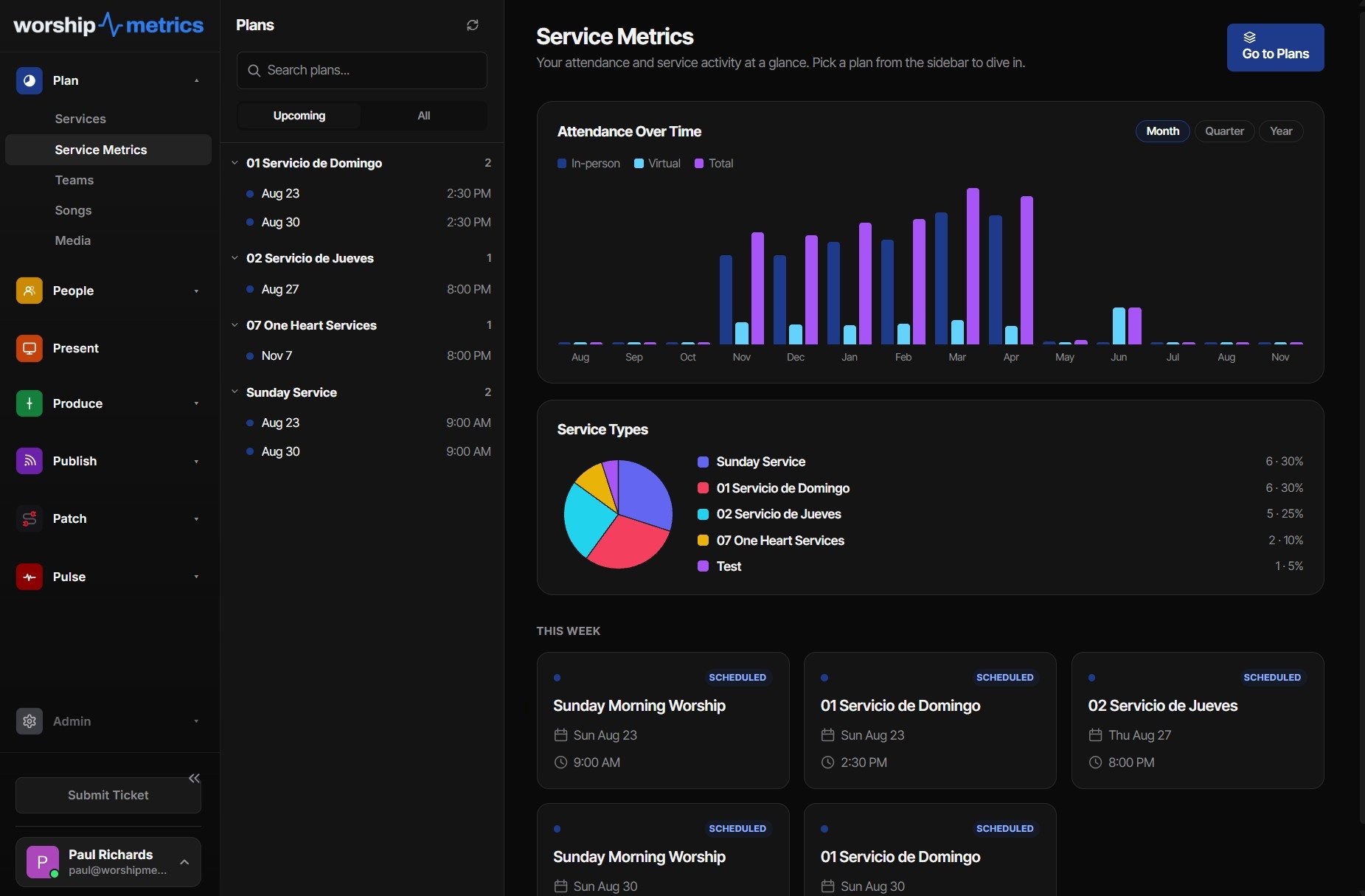
Each piece works on its own. Together, they turn “we should post more clips” into a system that runs every week.
Built for churches, ready to grow into
A general-purpose clip tool knows how to find a good moment in a podcast. A church platform knows that a sermon has scripture readings, worship, prayer, and altar calls; that services include moments that should never be posted; that volunteers come and go; and that Sunday morning can’t fail.
And you don’t have to adopt everything at once. Many churches start with one piece, like Present for lyrics and slides, or Reels free on the booth computer, and add the rest as they grow. (See why a church platform beats a standalone clip tool.)
Who does the work?
Clips don’t need a staff hire. In many churches, the best clip makers are young people: students and young adults who’ve grown up on short video and want to see their church reach their friends. With cloud Reels on the Pro plan, they can work from home in a spare hour. (See the Youth Clip Team.)
Sometimes it’s the pastor’s own son or daughter who gets it started. (See want to help your dad’s church grow online?.)
Start with this Sunday
- Pick two moments from this week’s sermon that would make sense to a stranger.
- Cut them into short, captioned, vertical clips.
- Post one on Tuesday and one on Thursday, each linking to the full message and a “plan your visit” page.
- Make sure someone is ready to welcome a first-time guest this weekend.
Then do it again next week. That’s how a buried message becomes a front door. See the whole picture on one page: grow your church online.
Next: the bigger picture on using social media well, from the vision to a policy template and a Christmas plan, on the Social Media for Churches page.
Related questions
- Can social media really bring people to church?
- It can, but rarely in one step. People usually see several clips, watch a full message, and look for signs that the church is safe and welcoming before they visit. A steady stream of short clips, each pointing to a clear next step, is what turns online attention into in-person visits.
- How do we grow our church's online presence?
- Start with the content you already make: your Sunday sermon. Cut the strongest moments into short clips, post two or three a week, link each one to the full message and a page for first-time visitors, and make sure someone welcomes people when they arrive.
- Why use a church platform instead of separate tools?
- Because the steps connect. When your livestream, clipping, presentation, check-in, and attendance live in one system, the service flows straight into clips, first-time guests land in your directory, and you can see whether online growth is turning into people in the room.
Are Your Clips Bringing People In? Measuring Online-to-In-Person Church Growth
NextCaptions for Sermon Clips: Why They Matter and How to Get Them Right
Related Articles
A Content Engine That Stays Personal: More Clips, Better Titles, Better Thumbnails
Keeping up online means more content than most church teams can make by hand. Clipping every service, with AI help on titles, descriptions, and thumbnails, turns one sermon into a week of posts. Here's how to build a church content engine that stays personal, controllable, and true to your voice.
Which Sermons Resonate? What Clip Metrics Tell Pastors
When you clip every service, each clip becomes a small signal: what people watched, finished, shared, and came back to. Here's how pastors can read sermon clip metrics to learn what's connecting with their congregation and community, without letting the numbers write the sermon.
Which Worship Songs Does Your Congregation Love? Song Insights From Clips
Worship leaders usually choose songs by feel, familiarity, and theme. Clip metrics add another view: which songs people play again and again, at church and online. Here's how to read worship song insights to plan stronger sets, and the licensing to check along the way.