They all promise the same thing
Every AI clip tool says roughly the same thing: upload a long video, get short clips. For a church, that’s appealing. Clipping sermons by hand eats hours, and most volunteer teams don’t have them.
But the tools are built for different people. Some are made for podcasters and creators, some specifically for churches, and some as part of a larger church platform. The right choice depends less on features than on where your team gets stuck.
Prices and plans change often. Figures below are from each vendor’s site as of October 2026. Check current pricing before you decide.
The quick comparison
| Tool | Built for | Strengths | Watch for |
|---|---|---|---|
| OpusClip | Creators and podcasters | Auto-reframing, highlight detection, direct posting to social platforms on paid plans | Free plan has watermarked captions and short media storage; cloud only |
| Pulpit AI | Churches | Turns one sermon into clips plus written content: summaries, discussion guides, devotionals | Plans are based on uploads per month (from $39/mo for 5) |
| Sermon Shots | Churches | Clips plus quote graphics and written content; brand kit; multi-language on higher plans | Monthly hours of upload; from about $53/mo billed annually |
| CapCut | Everyone | Long-video-to-shorts, subject tracking for vertical, auto captions; familiar to many students | General-purpose; cloud processing; Pro plan pricing varies by region |
| Submagic | Creators | Excellent styled captions in many languages | Plans limit videos per month and length; clipping features vary by plan |
| Descript | Editors | Edit video by editing the transcript; very flexible | A full editor with a learning curve, not a one-click clip tool |
| WorshipMetrics Reels | Churches running a booth | Built into a church production platform; free local workflow on the booth PC; transcribes and captions in dozens of languages | Direct publishing is to YouTube; other platforms by download |
The church-specific tools
Pulpit AI and Sermon Shots are made for churches. Their strength is breadth: from one sermon, they produce clips and written content, like small-group discussion guides, devotionals, blog posts, and recap emails. If your bottleneck is “we have nobody to write the midweek content,” these are worth a close look. Both are priced per church per month, based on how much you upload.
The general-purpose tools
OpusClip, CapCut, Submagic, and Descript are built for creators, podcasters, and businesses, but sermons look a lot like talks and podcasts, so they work well for many churches.
- OpusClip is strong at finding highlights and reframing wide video to vertical, and paid plans post directly to several social platforms.
- CapCut is free to start, and many students already know it, which matters if a teen is your clips volunteer.
- Submagic is known for eye-catching caption styles.
- Descript is a full editor where you edit video by editing text. Very powerful, but more of an editing tool than a clip machine.
The trade-off: they don’t know a sermon from a podcast. They won’t distinguish a scripture reading from an announcement, and they don’t think about church-specific concerns like prayer requests on the recording.
Where WorshipMetrics Reels fits
Reels (formerly Worship Clips) is different in one main way: it’s part of WorshipMetrics, the platform that also runs your booth, monitoring, presentation, and volunteer scheduling. So it starts from the service you already produced:
- Connect your YouTube livestream or upload a recording, and AI suggests moments from the service.
- You choose, trim, and adjust each clip, including the crop position for vertical.
- Clips render in vertical, square, and horizontal, with captions burned in and your church’s branding.
- Works in your church’s language. Services are transcribed in the dozens of languages AssemblyAI supports, with automatic language detection. (See sermon clips in any language.)
- Publish directly to YouTube, with scheduling, or download for anywhere else.
- A free local workflow runs in the Tech Manager app on your booth computer, so service video can stay on your own machine. Cloud Reels, for working from anywhere and team collaboration, comes with the Pro and Max plans. See pricing.
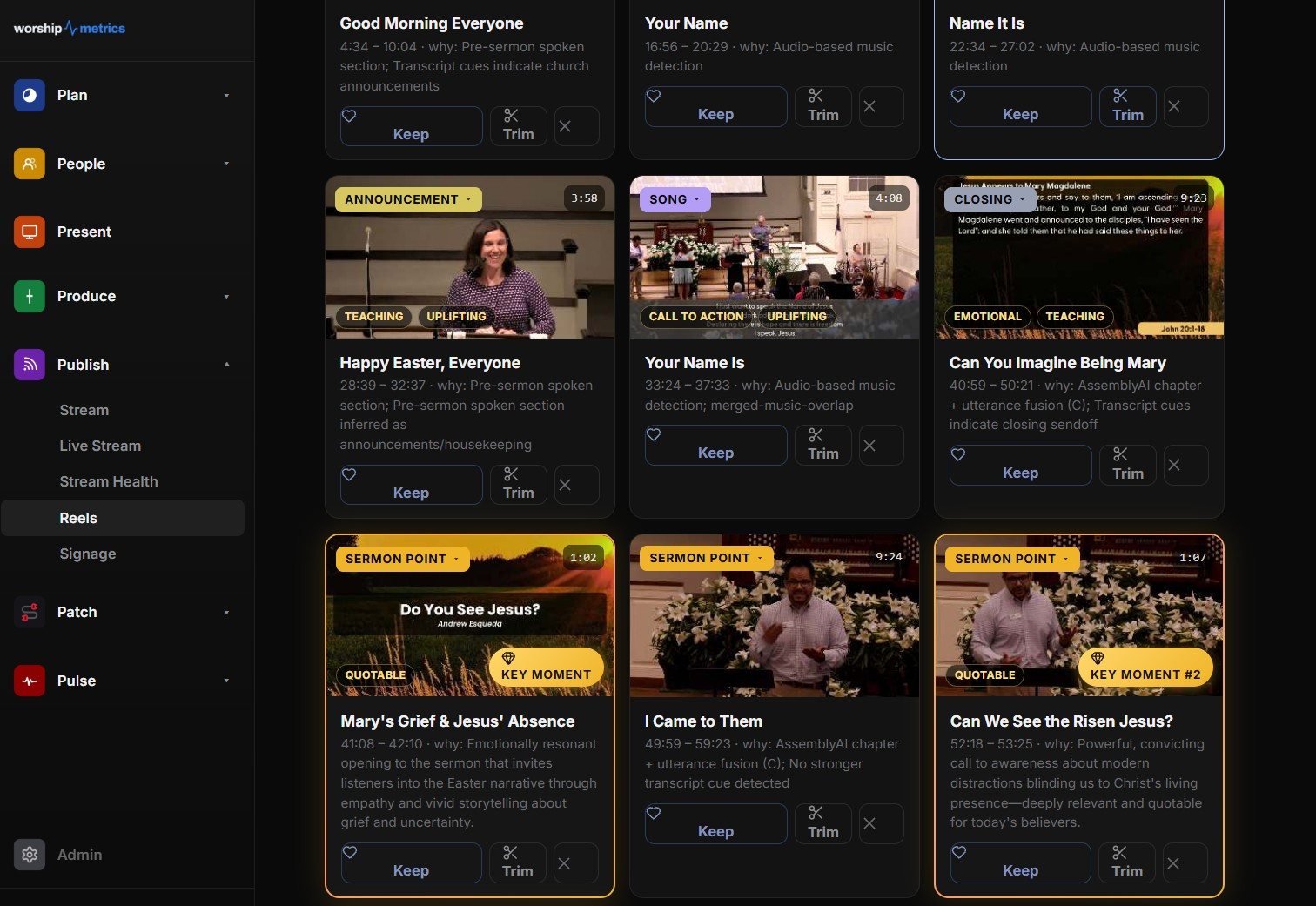
To be fair about it: if you want written content generated from every sermon, or direct posting to every social platform from one dashboard, other tools focus on that more. Reels is strongest for churches that want clips to come out of the same system that runs Sunday.
How to choose
Start from your bottleneck:
| If your problem is… | Look for… |
|---|---|
| ”Nobody has time to find the moments” | Strong AI moment detection with a reviewable shortlist |
| ”Nobody writes midweek content” | Sermon-specific tools that produce written content too |
| ”Our clips look amateur” | Good caption styles, brand kits, and reliable vertical framing |
| ”We can’t upload services to the cloud” | A tool that can process locally |
| ”Our volunteer already knows CapCut” | Maybe just CapCut, with a clear weekly routine |
| ”We’re juggling too many subscriptions” | A tool inside a platform you already use |
Then try two tools on the same sermon and compare the clips. Most offer a free trial or free tier. The one your volunteer will actually use every week is the right one.
Whatever you choose
- A person approves every clip. AI suggests; your team decides what represents your church. (See privacy for sermon clips.)
- Read the captions before posting. Every tool gets church vocabulary wrong sometimes. (See captions for sermon clips.)
- Check your music licensing before posting worship song clips. (See can churches post worship song clips?.)
- Post consistently. Two or three clips a week, every week, beats a burst that fades. (See a sermon clip posting schedule.)
Next: see how every step connects, from Sunday’s livestream to clips to a first-time guest walking in the door, on the Grow Your Church Online page.
Related questions
- What is the best AI tool for sermon clips?
- It depends on what you need. Sermon-specific tools like Pulpit AI and Sermon Shots also produce written content such as devotionals and discussion guides. General tools like OpusClip and CapCut are strong at reframing and social posting. WorshipMetrics Reels is built into a church production platform and can run free on the booth computer. Start from your team's bottleneck, not the feature list.
- Are there free AI sermon clip tools?
- Several have free tiers or trials, usually with limits such as watermarks, short storage, or a few uploads. WorshipMetrics Reels has a free local workflow in the Tech Manager desktop app. Check each tool's current terms, since free plans change often.
- Do general AI clip tools work for sermons?
- Often, yes. They're built for podcasts and talks, which are similar. Church-specific tools add things like recognizing scripture readings and altar calls, and some produce sermon discussion guides. Either way, a person should approve every clip before it's posted.
What Happens After Someone Watches Your Church's Clip?
NextA Christmas Social Media Plan for Churches: Six Weeks to Christmas Eve
Related Articles
A Content Engine That Stays Personal: More Clips, Better Titles, Better Thumbnails
Keeping up online means more content than most church teams can make by hand. Clipping every service, with AI help on titles, descriptions, and thumbnails, turns one sermon into a week of posts. Here's how to build a church content engine that stays personal, controllable, and true to your voice.
Which Sermons Resonate? What Clip Metrics Tell Pastors
When you clip every service, each clip becomes a small signal: what people watched, finished, shared, and came back to. Here's how pastors can read sermon clip metrics to learn what's connecting with their congregation and community, without letting the numbers write the sermon.
Which Worship Songs Does Your Congregation Love? Song Insights From Clips
Worship leaders usually choose songs by feel, familiarity, and theme. Clip metrics add another view: which songs people play again and again, at church and online. Here's how to read worship song insights to plan stronger sets, and the licensing to check along the way.