This article is general information, not legal advice. License terms change and vary by country and by song. Confirm the details with your licensing provider before you post.
Sermon clips are easy. Song clips aren’t.
A clip of your pastor preaching raises no music questions. A clip of your congregation singing does. The song was written by someone, published by someone, and sometimes recorded by someone, and each of those can carry rights.
That doesn’t mean churches can’t share worship moments. It means it’s worth knowing how licensing works before you post.
Two kinds of rights
- The song itself (the composition: words and music). When your band plays a song live, you’re performing the composition.
- The recording (the master). When you play a track, a backing track, or a commercial recording, you’re using someone’s recording too.
Church licenses mostly deal with the first. Recordings usually need separate permission.
What church streaming licenses are designed for
In the US, the most common option is CCLI:
- The Church Copyright License covers things like projecting lyrics and printing song sheets.
- The Streaming License is a supplement to it, designed for live-streaming and posting worship services that include covered songs played live, on church channels like your website, YouTube, and Facebook.
- Streaming Plus adds some authorized recordings, such as certain backing tracks and multitracks.
Other options include OneLicense, which focuses on sacred music from many Catholic and mainline publishers, and CCS WORSHIPcast, which covers a large catalog but only for a church-owned website, not social platforms. Each has its own catalog and rules.
CCLI also recommends listing your license numbers in the description of streams and videos, and requires reporting the songs you use. If your church already reports songs, that’s usually done through your planning software.
The short-clip question
Here’s the part most churches don’t know: a license designed for worship services may not clearly cover short, standalone song clips. CCLI guidance has described uploading whole services or song sections rather than songs “in chunks,” and uses outside the nature of a worship service may need permission from each copyright holder.
So a 30-second clip of the chorus, posted on its own as a Reel, is a gray area. Before making song clips a regular habit:
- Read your license’s current terms on the provider’s website.
- Ask your provider if your use isn’t clearly described.
- When in doubt, don’t post the song alone. There are good alternatives below.
Platforms match music automatically
Even with the right license, platforms run their own automated music matching:
- YouTube Content ID can match a live cover of a song and place a claim, which may block the video, run ads, or track it. If you hold the rights, you can dispute it.
- Facebook and Instagram can mute audio or remove videos with matched music, and repeated matches can cause problems for a Page.
CCLI itself notes that licenses won’t stop every copyright notice on social platforms. Plan for occasional claims, and keep your license numbers handy for disputes.
Safer ways to share worship moments
- Clip the moment, not the song. A worship leader’s prayer or spoken welcome between songs can carry the feeling of worship without the music.
- Public domain hymns. Older hymns are generally in the public domain, though modern arrangements, added verses, and recordings may not be.
- Original songs written by your own worship team, with their permission.
- Room sound under a spoken moment, kept brief and low.
- Point to the full service. Post a spoken clip and link the full worship set in your livestream archive.
Building song rules into your workflow
Make music part of your clip approval step:
- Is there music in this clip? If no, carry on.
- Is it played live, or is a track or recording involved?
- Is the song covered by our license, and is this use covered?
- If unsure, use a spoken moment instead.
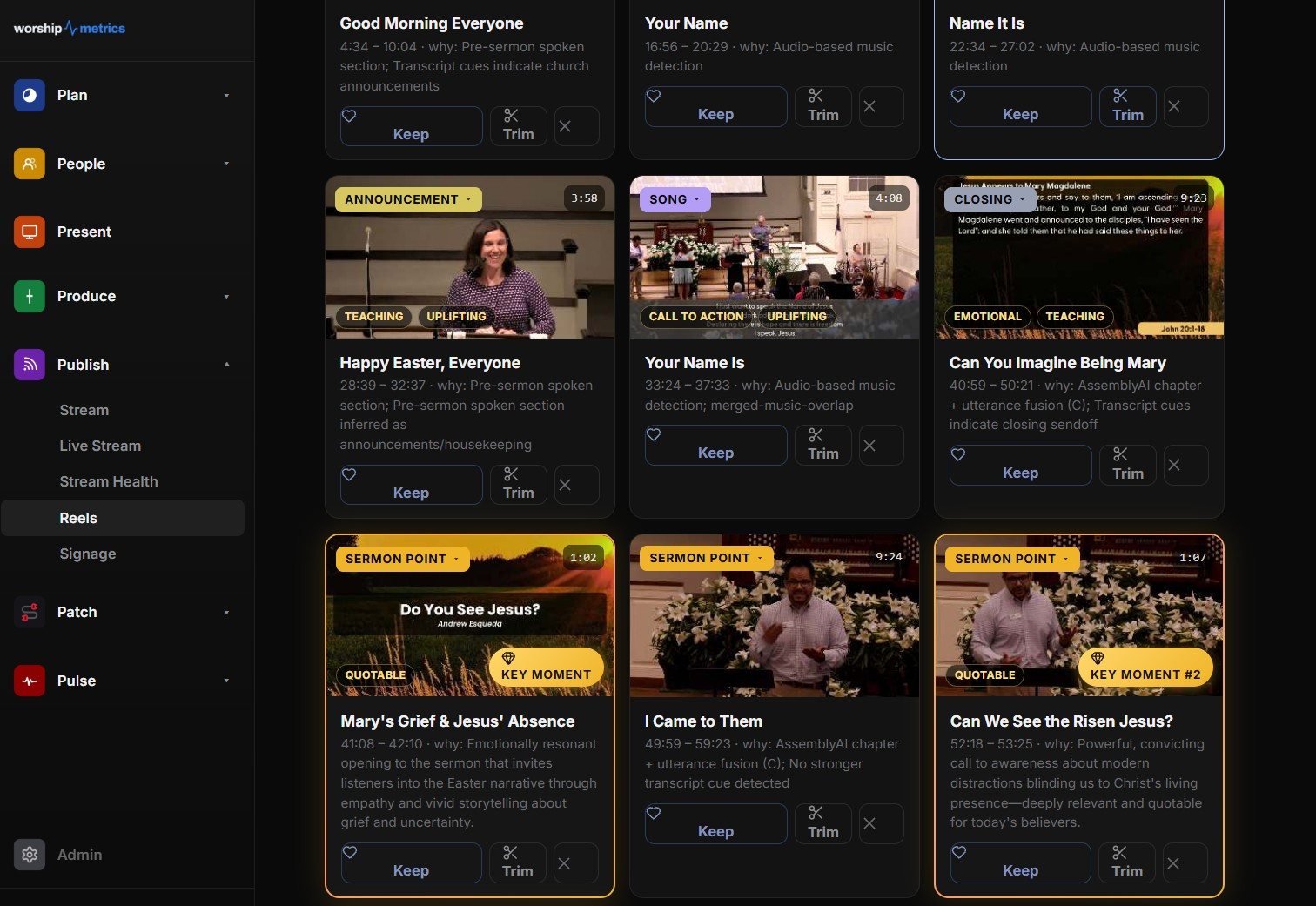
Reels (formerly Worship Clips) in WorshipMetrics identifies different kinds of moments in a service, including sermon points, scripture, and worship, so your team can see at a glance which suggestions contain music. Your team decides which clips to make; for music, that decision should follow your license.
For the rest of the workflow, see how to turn your YouTube livestream into Shorts and a sermon clip posting schedule.
Related: learn which songs your congregation loves most in song insights from clips.
Related questions
- Does a CCLI license let us post worship clips on social media?
- CCLI's streaming licenses are designed to cover live-streaming and posting worship services with covered songs on church channels, as a supplement to the Church Copyright License. Whether a short, song-only clip is covered is less clear, so check the current license terms or ask CCLI before posting standalone song clips.
- Can we use recorded tracks in our worship clips?
- Original recordings, backing tracks, and multitracks need their own permission. CCLI offers a higher streaming tier for some authorized recordings. Commercial recordings from Spotify or Apple Music aren't covered by church streaming licenses.
- Why did our licensed worship clip still get a copyright claim?
- Platforms like YouTube, Facebook, and Instagram use automated music matching that works separately from your license. A licensed church can still get claims or muted audio. On YouTube you can dispute a claim if you hold the rights.
Why Students Find Better Sermon Clips Than the Staff Do
NextThe Sermon Clip Night: A Youth Group Session That Teaches Students to Listen
Related Articles
A Content Engine That Stays Personal: More Clips, Better Titles, Better Thumbnails
Keeping up online means more content than most church teams can make by hand. Clipping every service, with AI help on titles, descriptions, and thumbnails, turns one sermon into a week of posts. Here's how to build a church content engine that stays personal, controllable, and true to your voice.
Which Sermons Resonate? What Clip Metrics Tell Pastors
When you clip every service, each clip becomes a small signal: what people watched, finished, shared, and came back to. Here's how pastors can read sermon clip metrics to learn what's connecting with their congregation and community, without letting the numbers write the sermon.
Which Worship Songs Does Your Congregation Love? Song Insights From Clips
Worship leaders usually choose songs by feel, familiarity, and theme. Clip metrics add another view: which songs people play again and again, at church and online. Here's how to read worship song insights to plan stronger sets, and the licensing to check along the way.