The service is already on YouTube
If your church streams to YouTube, every Sunday leaves behind a full recording on your channel. Most of those recordings get a few dozen views from members who missed the service, and then they sit there.
Meanwhile, YouTube Shorts reach people who would never press play on a 75-minute video. Someone scrolling on a Tuesday night might watch 45 seconds of your pastor making one clear point, and then look for more. Your livestream is the raw material. Shorts are how it reaches people outside your congregation.
Step 1: Pick moments that stand on their own
The hardest part isn’t editing. It’s finding the moment. A good Short:
- Makes sense without context. Someone who’s never been to your church should understand it.
- Holds one complete thought. It starts at the beginning of an idea and ends when the idea lands.
- Opens strong. The first sentence carries the point, not “so, as I was saying…”
- Has one main voice. Back-and-forth between speakers is hard to follow in a short clip.
Sermon points are the obvious source, but don’t stop there. A scripture reading, a prayer, a baptism (with consent), or the congregation singing a song everyone knows can all make strong Shorts. (Check the music rules first: see can churches post worship song clips?.)
Step 2: Frame it for vertical
Your livestream is horizontal, 16:9. Shorts are vertical, 9:16. Cropping a wide shot to vertical keeps only the middle third, so framing decisions matter:
- Crop around the speaker, not the center of the stage. A pastor standing off-center is cut in half by a center crop.
- Prefer medium shots. A tight medium shot of the speaker survives the vertical crop; a wide shot of the whole room turns into a sliver of stage.
- Plan for it on Sunday. If clips matter to your church, ask camera operators to keep the speaker framed with room to crop. See shooting your service for vertical clips.
Step 3: Add captions
Many people watch Shorts with the sound off. Without captions, your pastor is just a person talking silently. Burn captions into the video, check the spelling of names and Bible books, and keep the text large and high-contrast. More detail in captions for sermon clips.
Step 4: Write a title that makes someone stop
Shorts titles and the first seconds of the clip do the same job: give a reason to keep watching. Good titles name the problem or promise the answer:
- “When God feels silent”
- “You’re not too far gone”
- “What forgiveness actually costs”
Avoid “Sunday Service Clip 10/5.” In the description, link the full sermon and one next step. More on titles and openings in writing sermon clip hooks.
Step 5: Schedule, don’t dump
Posting five Shorts on Monday and nothing until next Monday wastes most of them. Spread them out: two or three a week is sustainable for most teams, and it keeps your channel active between Sundays. See a sermon clip posting schedule.
Doing it by hand vs. with AI
By hand, this takes most volunteers two to four hours a week: re-watching the service, noting timestamps, cutting, reframing, captioning, and uploading. That’s why so many churches start posting clips and then quietly stop.
Reels (formerly Worship Clips) in WorshipMetrics does the slow parts:
- Connect your YouTube livestream or upload the recording. No new equipment.
- AI reads the service and suggests moments, so your team reviews a shortlist instead of scrubbing a timeline.
- You choose, trim, and adjust, including where the vertical crop sits.
- Clips render in vertical, square, and horizontal, with captions burned in and your church’s branding.
- Publish directly to YouTube, with scheduling, or download clips to post anywhere else.
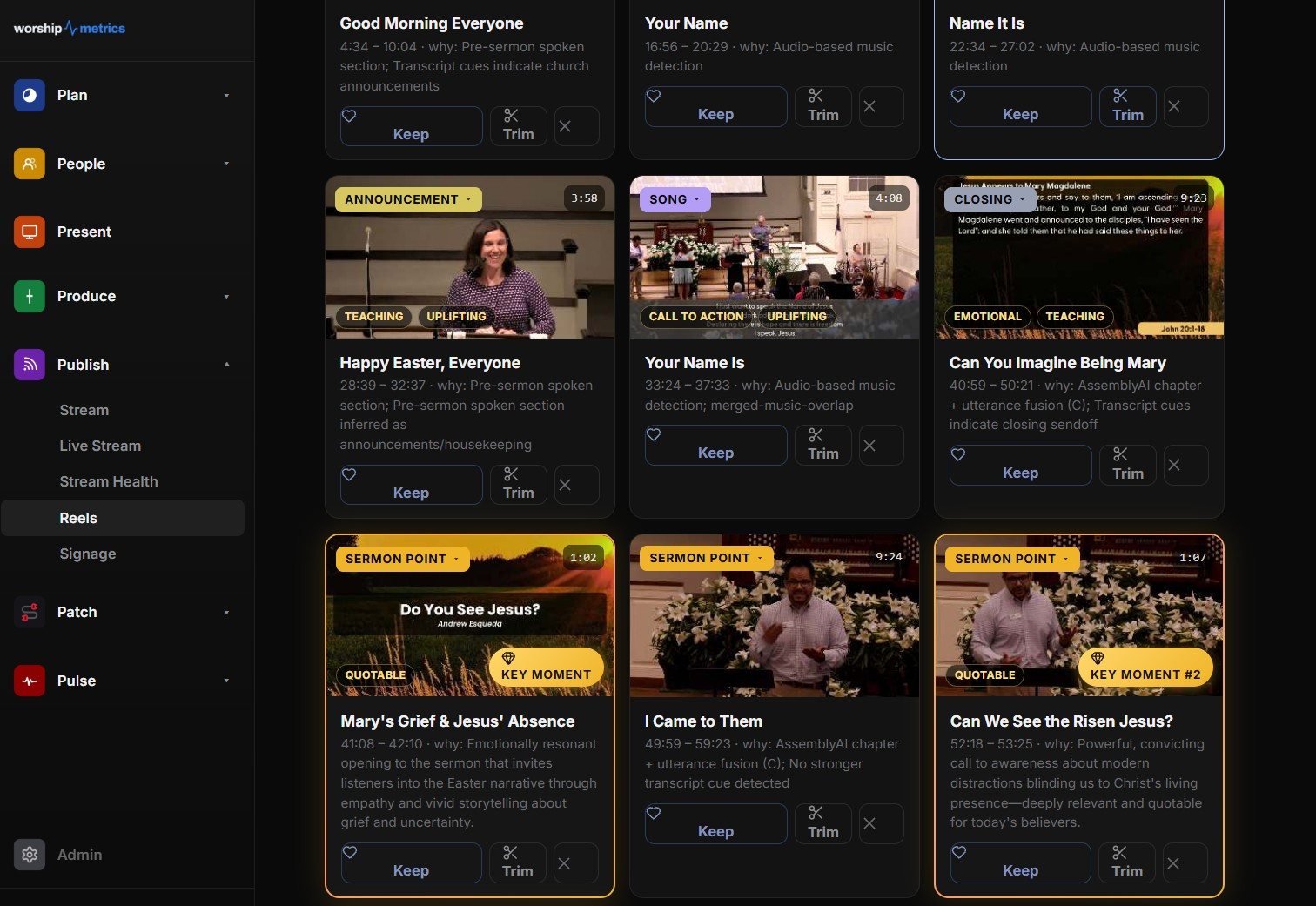
The AI suggests; your team decides what represents your church. Reels runs free on the booth computer in Tech Manager, and cloud Reels comes with Pro and Max. See pricing for what each plan includes.
Your first week
- Open last Sunday’s livestream and pick two moments that pass the “makes sense without context” test.
- Cut each to one complete thought, frame it for vertical, and add captions.
- Give each a title that names a real question someone might have.
- Post one on Tuesday and one on Thursday, each linking to the full sermon.
Then look at which one people watched to the end. That tells you more about your congregation’s voice online than any guide can.
Next: see how every step connects, from Sunday’s livestream to clips to a first-time guest walking in the door, on the Grow Your Church Online page.
Related questions
- Can I make YouTube Shorts from a church livestream?
- Yes. Once the livestream ends, YouTube keeps it as a video on your channel. Cut short vertical clips from it, add captions, and upload them as Shorts. A tool that reads the transcript and suggests moments saves most of the time, because finding the moment is the slow part.
- How long should a church YouTube Short be?
- Most strong sermon Shorts land between 30 and 90 seconds: long enough for one complete thought, short enough to watch twice. YouTube allows longer Shorts, but a clip should end when the thought ends, not when the limit runs out.
- Do YouTube Shorts help a church's main channel?
- They can. Shorts reach people who have never searched for your church, and a good Short points them to the full sermon or a next step. Link the full message in the description, and keep the channel organized with playlists so new viewers find what they're looking for.
The Youth Media Flywheel: How Sermon Clips Bring Young People Into Your Church
NextA Biblical Case for Church Social Media
Related Articles
A Content Engine That Stays Personal: More Clips, Better Titles, Better Thumbnails
Keeping up online means more content than most church teams can make by hand. Clipping every service, with AI help on titles, descriptions, and thumbnails, turns one sermon into a week of posts. Here's how to build a church content engine that stays personal, controllable, and true to your voice.
Which Sermons Resonate? What Clip Metrics Tell Pastors
When you clip every service, each clip becomes a small signal: what people watched, finished, shared, and came back to. Here's how pastors can read sermon clip metrics to learn what's connecting with their congregation and community, without letting the numbers write the sermon.
Which Worship Songs Does Your Congregation Love? Song Insights From Clips
Worship leaders usually choose songs by feel, familiarity, and theme. Clip metrics add another view: which songs people play again and again, at church and online. Here's how to read worship song insights to plan stronger sets, and the licensing to check along the way.