Two goals that are really one
Ask almost any church leadership team about the next five years and two things come up:
- “We need more young people involved.”
- “We need to take social media seriously.”
They usually sit on different agendas, with different budgets, owned by different people. The youth pastor works on the first. Someone on staff, or a volunteer with a spare evening, struggles with the second.
They’re the same project. The people who can make your church’s social media work are the young people you’re trying to involve. And giving them that job is one of the best ways to involve them.
Why the sermon is the place to start
Your church already produces an hour or more of meaningful content every week. The problem is where it lives: inside a 75-minute livestream that most people will never press play on.
Somewhere in that service is a 45-second moment that would encourage someone scrolling at 11 p.m. on a Tuesday. Finding it is the hard part. (See your best sermon moments are buried.)
That’s a perfect job for a student:
- It’s real. The church depends on it, and everyone can see the result.
- It’s flexible. It doesn’t have to happen on Sunday morning, or even at church.
- It uses skills they already have. Many teenagers have watched thousands of hours of short video. They know what makes people stop scrolling.
- It requires listening to the sermon. To find the best moment, you have to pay attention to the whole message. (More on that in why students find better clips.)
How the flywheel turns
1. Students serve. A small team of students takes on the weekly job of finding the best moments from Sunday’s sermon and turning them into clips.
2. Clips reach new people. The church posts the clips, and the students share them. A clip shared by a 16-year-old reaches their friends directly: people who would never follow a church account.
3. Some of those people respond. A friend watches, comments, asks about it, or shows up at youth group. Some want to know how they can help.
4. The team grows. Those new students join the clip team, the AV crew, or another ministry, and bring their own friends and networks.
Then it turns again, a little faster each time. That’s what makes it a flywheel: the results of each turn make the next one easier.
Why student shares beat a church account
A church account mostly reaches people who already know the church. A student sharing a clip reaches people who don’t, and it arrives with a personal recommendation: “this is my church, this is what my pastor said.”
That’s hard to buy with advertising. It’s also why consistency matters. A team of students sharing two or three clips a week, every week, builds a steady stream of personal introductions to your church.
What students get out of it
This isn’t just about reach. Students who serve this way:
- Belong. They’re part of a team the church depends on. (See the students who stay.)
- Learn real skills in media, storytelling, and judgment that carry into school and work.
- Engage with the sermon more closely than almost anyone in the room.
- Work alongside adults who mentor them. (See intergenerational ministry in the tech booth.)
What makes it practical now
Until recently, this idea ran into two problems: editing video takes skill and hours, and students can’t always be at church.
Both have changed:
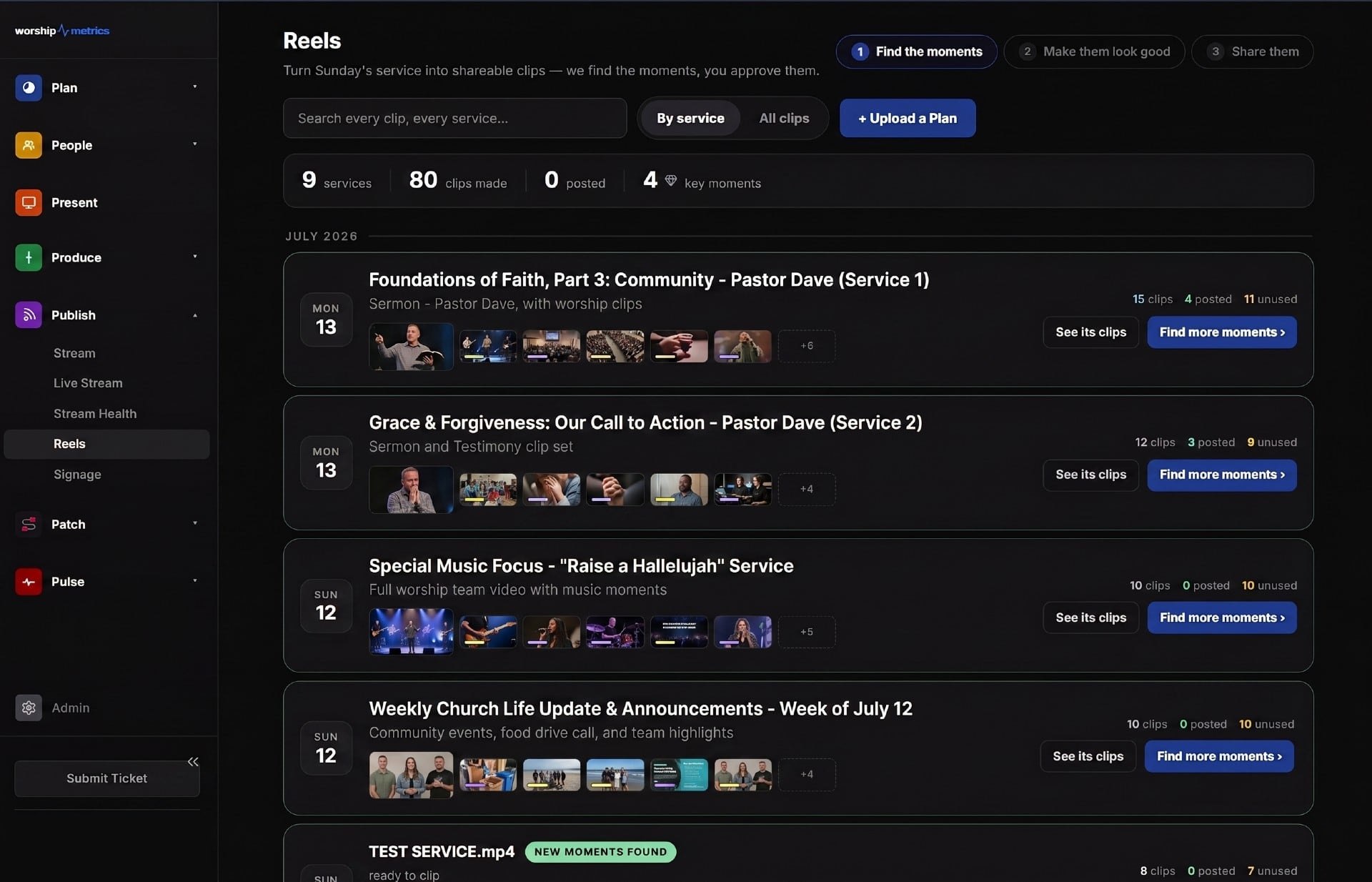
- AI finds the candidates. Reels (formerly Worship Clips) in WorshipMetrics reads the service and suggests moments, then renders clips in vertical, square, and horizontal formats with captions and your branding. Students choose and refine instead of editing from scratch.
- Students can work from home. WorshipMetrics Tech Manager is installed on the church’s streaming computer, where Reels runs free. With cloud Reels on Pro and Max, students can open the same service from home and work on clips whenever they have a spare hour. (See serving from home.)
The guardrails that make it safe
Letting students make content for the church needs clear rules: who approves clips before they’re posted, who holds the account passwords, and how adults and students communicate. None of it is complicated, but it should be decided before day one. (See the guardrails pastors need.)
Start small
You don’t need a big launch. Start with two students, one adult mentor, and one sermon a week. Follow the 30-day plan for starting a youth clip team, and let the flywheel start turning.
See the whole approach on one page: the Youth Clip Team.
Related questions
- How can a church use social media to reach young people?
- Let young people make it. Give students the job of finding the best moments in each sermon, turning them into short clips, and sharing them. They know what works on their platforms, and their shares reach their friends directly, which is far more effective than a church account posting to people who already attend.
- What is the youth media flywheel?
- A loop that keeps getting stronger: students serve by clipping and sharing sermon moments, those clips reach their friends, some of those friends visit or want to join the team, and the team grows. Each turn makes the next one easier.
- Do students need video editing experience to clip sermons?
- No. AI clip tools like WorshipMetrics Reels find candidate moments and handle captions and formatting. What students bring is judgment about which moment will connect, and that's something many of them already have from years of watching short video.
The Sermon Clip Night: A Youth Group Session That Teaches Students to Listen
NextHow to Turn Your Church's YouTube Livestream into Shorts
Related Articles
A Content Engine That Stays Personal: More Clips, Better Titles, Better Thumbnails
Keeping up online means more content than most church teams can make by hand. Clipping every service, with AI help on titles, descriptions, and thumbnails, turns one sermon into a week of posts. Here's how to build a church content engine that stays personal, controllable, and true to your voice.
Which Sermons Resonate? What Clip Metrics Tell Pastors
When you clip every service, each clip becomes a small signal: what people watched, finished, shared, and came back to. Here's how pastors can read sermon clip metrics to learn what's connecting with their congregation and community, without letting the numbers write the sermon.
Which Worship Songs Does Your Congregation Love? Song Insights From Clips
Worship leaders usually choose songs by feel, familiarity, and theme. Clip metrics add another view: which songs people play again and again, at church and online. Here's how to read worship song insights to plan stronger sets, and the licensing to check along the way.