The Sunday-morning problem
Most church serving roles happen at church, at a set time. That works for some students. For many others, it’s the reason they don’t serve:
- A Saturday tournament runs late and Sunday mornings are rough.
- They work weekend shifts.
- They split weekends between two homes.
- They’re shy, and the idea of being in a busy booth at 8 a.m. is too much.
Those students still have gifts to offer. They just need a role that fits around their life.
A role that fits in a spare hour
Sermon clipping is one of the few church jobs that doesn’t need to happen on Sunday, or at church. A student can:
- Watch the AI-suggested moments from Sunday’s service on Monday after school.
- Pick the two or three strongest.
- Trim each one so it starts at the hook and ends when the thought lands.
- Check the captions.
- Send them for approval.
For many students, that’s about an hour. It can happen at the kitchen table, on a laptop at the library, or on the bus.
How the setup works
In WorshipMetrics, the pieces fit together like this:
- At church: Tech Manager is installed on the church’s streaming computer. It runs the booth, and Reels (formerly Worship Clips) works free there, locally.
- The service goes online: your livestream goes to YouTube as usual, or the recording is uploaded.
- At home: with cloud Reels, included in the Pro and Max plans, a student signs in from a browser, opens the service, and works on clips. AI has already suggested the moments, and the clips render with captions and your branding in vertical, square, and horizontal.
- Approval: an adult reviews the clips and publishes them, directly to YouTube or by download for other platforms.
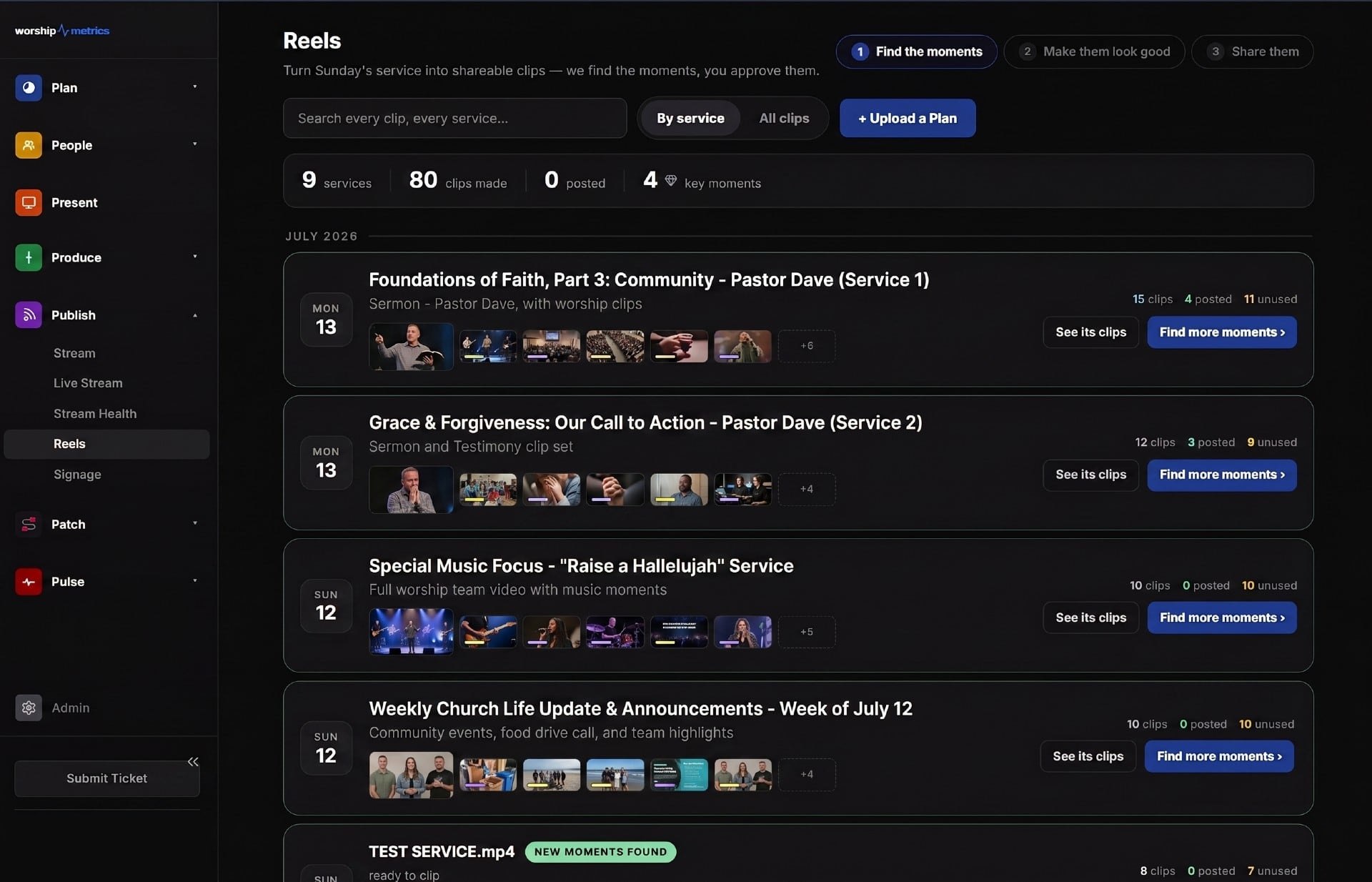
The free local workflow is great for a team that clips at the church computer. Working from home needs cloud Reels, which comes with the Pro and Max plans. See pricing for details.
Keeping it safe
Remote serving still needs the same care as serving in the building:
- An adult approves every clip before it’s posted. Students prepare; an adult publishes.
- Students don’t hold the passwords to the church’s YouTube, Instagram, or other accounts. Give each student their own sign-in with only the access they need.
- Communication stays in group channels. Adults don’t send private messages to students. Use a group thread that includes other leaders, or go through parents. (See safeguarding students in church tech.)
- Parents know what their student is doing, how much time it takes, and who the adult leaders are.
More detail in the guardrails pastors need.
Keep the team connected
Working from home can feel lonely. A few simple habits keep students connected:
- A weekly group thread where the team posts their picks and the adult leader gives quick feedback.
- Credit them. Mention the clip team from the stage now and then, and let students see how their clips performed.
- Meet in person once a month, maybe as part of youth group or an AV Club night.
- Pair new students with experienced ones for their first few weeks.
Why flexibility matters for the flywheel
When serving fits around students’ lives, more of them say yes, and they stay longer. More students on the team means more clips, shared to more friends, reaching more young people. That’s the heart of the youth media flywheel.
Ready to start? Follow the 30-day plan for starting a youth clip team, or see the whole approach on the Youth Clip Team page.
Related questions
- Can church volunteers work on sermon clips from home?
- Yes, with a cloud-based clip tool. In WorshipMetrics, Tech Manager runs on the church's streaming computer, and cloud Reels (included with the Pro and Max plans) lets volunteers open the service and work on clips from anywhere with a browser.
- How much time does sermon clipping take each week?
- With AI suggesting the moments, many volunteers can choose and prepare two or three clips in about an hour. The time goes into watching candidates, picking the best ones, setting in and out points, and checking captions.
- Is it safe for students to volunteer remotely?
- It can be, with the right guardrails: an adult approves every clip before it's posted, students don't hold the church's social media passwords, and adults communicate with students only in group channels or through parents, never in private one-on-one messages.
Letting Students Make Your Church's Social Clips: The Guardrails Pastors Need
NextWhy Students Find Better Sermon Clips Than the Staff Do
Related Articles
A Content Engine That Stays Personal: More Clips, Better Titles, Better Thumbnails
Keeping up online means more content than most church teams can make by hand. Clipping every service, with AI help on titles, descriptions, and thumbnails, turns one sermon into a week of posts. Here's how to build a church content engine that stays personal, controllable, and true to your voice.
Which Sermons Resonate? What Clip Metrics Tell Pastors
When you clip every service, each clip becomes a small signal: what people watched, finished, shared, and came back to. Here's how pastors can read sermon clip metrics to learn what's connecting with their congregation and community, without letting the numbers write the sermon.
Which Worship Songs Does Your Congregation Love? Song Insights From Clips
Worship leaders usually choose songs by feel, familiarity, and theme. Clip metrics add another view: which songs people play again and again, at church and online. Here's how to read worship song insights to plan stronger sets, and the licensing to check along the way.