Start smaller than you think
A youth clip team doesn’t need a launch event, a logo, or ten students. It needs two students, one adult, and one sermon a week. Get that working, and growth takes care of itself. (See the youth media flywheel for why.)
Here’s a four-week plan.
Week 1: Get leadership on the same page
Talk with your senior pastor and youth pastor together. Both need to own this:
- The pastor agrees that students can help share the sermon, and names who approves clips.
- The youth pastor sees it as a ministry for students, not just a social media task.
- Someone agrees to be the adult mentor: a communications volunteer, a staff member, or a parent with good judgment.
Write the one-page policy. Decide who approves clips, who holds account passwords, what never gets posted, and how adults and students communicate. (Use the guardrails pastors need as your outline.)
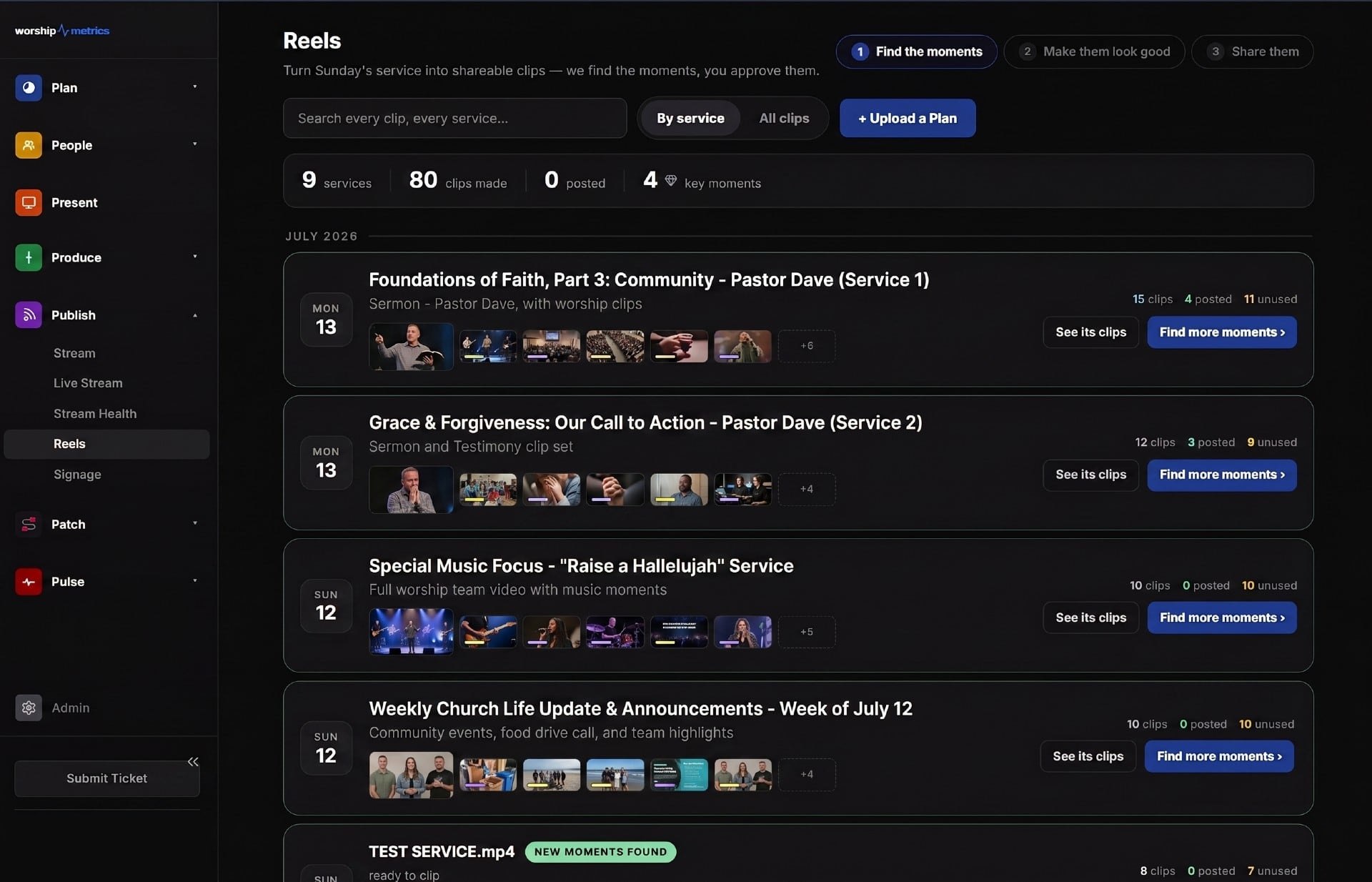
Set up the tools. Install Tech Manager on the church’s streaming computer, where Reels (formerly Worship Clips) runs free. If students will work from home, add cloud Reels with the Pro or Max plan. Connect the church’s YouTube channel under an adult’s control.
Week 2: Recruit two students
Ask personally. A general announcement rarely works. Think of students who:
- Make videos, edit, or stream for fun
- Game or spend a lot of time on short video
- Are thoughtful, and maybe a little quiet
- Don’t currently serve anywhere
Describe the job clearly:
“We need someone to find the best moments from Pastor’s sermon each week and turn them into short clips for Instagram and YouTube. It’s about an hour a week, and you can do it from home. Want to try it with us for a month?”
A one-month trial makes it easy to say yes. Get parental consent, share the policy with parents, and set up each student’s sign-in.
Week 3: Run the first week together
Do the first one in person, maybe on a weeknight or after youth group:
- Open last Sunday’s service in Reels and look at the AI-suggested moments together.
- Ask each student to pick one moment that resonated with them and say why.
- Trim each clip so it starts at the hook and ends when the thought lands. (See sermon clip hooks.)
- Check the captions together. (See captions for sermon clips.)
- The mentor reviews and publishes.
Then let the students watch how their clips do over the next few days. Seeing real people respond is the moment most students get hooked on the role.
Week 4: Set the rhythm
Now make it weekly:
| When | What | Who |
|---|---|---|
| Sunday | Service streams and records as usual | Booth team |
| Monday or Tuesday | Each student picks and prepares one or two clips | Students, from home or at church |
| Within a day | Mentor reviews, gives quick feedback, approves | Adult mentor |
| Through the week | Clips post on a schedule, two or three a week | Mentor |
(See a sermon clip posting schedule.)
Keep a group thread for the team that includes the mentor and another leader, and celebrate the wins there.
After 30 days
Sit down with the students and ask:
- What did you enjoy? What was frustrating?
- Which clips did people respond to most? Why?
- Who else might want to join?
That last question is how the team grows. Students recruit their friends far better than adults do.
Where it can go next
Once the clip team is steady, students often want more:
- Run cameras or the stream on Sunday with the AV Club.
- Make testimony or event videos.
- Train the next students who join the team.
Each step deepens their place in the church. That’s the long-term payoff: not just clips, but students who stay.
See the whole approach on one page: the Youth Clip Team.
Related questions
- How many students do you need to start a church clip team?
- Two is enough to start, plus one adult mentor. Two students can share the work, cover each other's busy weeks, and keep each other going. Grow the team once the weekly rhythm is steady.
- What does a youth clip team need to get started?
- Your church's sermon recordings (a YouTube livestream works), a clip tool, an adult mentor who approves clips, a one-page policy, and a weekly rhythm. With WorshipMetrics, Reels runs free on the church's streaming computer, and cloud Reels on the Pro or Max plan lets students work from home.
- How do we recruit students for a clip team?
- Ask specific students personally, and describe the job clearly: about an hour a week, finding the best moments of Sunday's sermon and turning them into clips. Mention that they can do it from home. Students who make videos, game, or are always on their phones are great candidates.
Social Media Is the Printing Press of Our Time. Will the Church Use It?
NextLetting Students Make Your Church's Social Clips: The Guardrails Pastors Need
Related Articles
A Content Engine That Stays Personal: More Clips, Better Titles, Better Thumbnails
Keeping up online means more content than most church teams can make by hand. Clipping every service, with AI help on titles, descriptions, and thumbnails, turns one sermon into a week of posts. Here's how to build a church content engine that stays personal, controllable, and true to your voice.
Which Sermons Resonate? What Clip Metrics Tell Pastors
When you clip every service, each clip becomes a small signal: what people watched, finished, shared, and came back to. Here's how pastors can read sermon clip metrics to learn what's connecting with their congregation and community, without letting the numbers write the sermon.
Which Worship Songs Does Your Congregation Love? Song Insights From Clips
Worship leaders usually choose songs by feel, familiarity, and theme. Clip metrics add another view: which songs people play again and again, at church and online. Here's how to read worship song insights to plan stronger sets, and the licensing to check along the way.