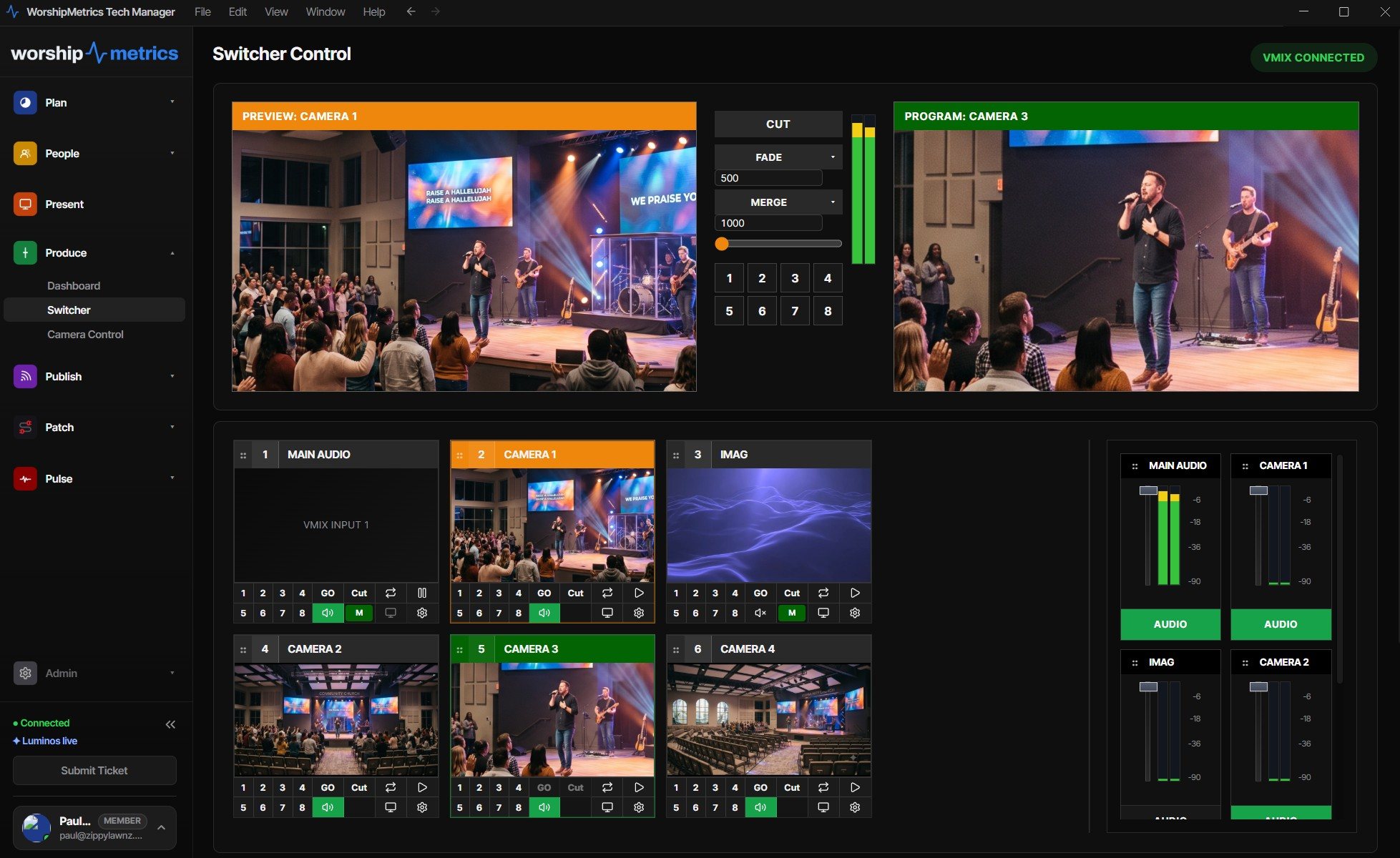
Your vMix, everywhere it needs to be — still living in your booth
vMix is a superb church switcher, and if your church runs it, you’ve already got the hard part. What you probably don’t have is a way for anyone but the person in the chair to see or touch it. Cloud vMix production closes that gap — and the WorshipMetrics version does it without moving your production an inch off the machine you own.
Here’s the architecture in one sentence: vMix keeps running locally in your booth, and WorshipMetrics mirrors its live state and relays its control APIs to any device your team signs in from. The switch happens where it always did — free, instant, reliable. The cloud is just the glass that lets your people reach through to it.
What “the full panel” actually includes
This is the part that distinguishes vMix in the ecosystem: because vMix exposes real control over its HTTP and TCP APIs, the cloud panel isn’t a viewer — it’s the switching surface. From a laptop at home or a phone in the overflow room, an authorized operator gets:
- Cut, and every transition — fade, wipe, zoom, stinger — with adjustable duration, and a hands-on T-bar.
- Preview and program switching across every input, with live thumbnails of each input beside an enlargeable program view — so anyone with access sees exactly what’s on screen and what’s queued.
- Overlays 1–4, input play/pause, and bus audio — mute and volume, the everyday moves of a service, one click each.
- Master and bus meters streamed live beside the video — the same numbers vMix shows, in the panel.
Start and stop the stream and the recording from the panel too — and let a second person confirm the red light is actually on before the prelude ends. (Running an ATEM alongside vMix? Its cut/preview/program control stays local in the booth, with HyperDeck status monitored alongside.)
Why local-switch-plus-cloud beats renting vMix in the cloud
You can rent a vMix instance on a cloud server. For most churches you shouldn’t, and the reasons are the same three that make local-first the right church architecture generally:
- Your live switch never depends on the internet. Cloud-hosted vMix means every cut travels a network round-trip; a bad-bandwidth Sunday degrades your switching, not just your stream. Local vMix cuts instantly regardless, and if the upload drops the stream, Self Healing offers a one-tap restart from the booth or your phone — the service in the room never stutters.
- No compute bill. You already own a vMix machine. Local control is free forever; you add the cloud panel, not a server rental.
- You keep doing it yourselves. This isn’t outsourcing your production — it’s giving your own volunteers a bigger, reachable cockpit.
What it unlocks on a Sunday
The panel is the feature; the team is the point. With the full surface reachable from anywhere:
- The tech director on vacation watches preview and program from their phone and talks a new volunteer through a tricky transition — or takes the switch for ninety seconds and hands it back.
- A student learns on the real board while a mentor watches the identical live state remotely, catching mistakes in preview before they hit program.
- A second campus, a sick operator, an ambitious Christmas service — all become staffable without another expert physically in the room.
Every remote action runs through Tech Manager and lands in your support history with a name attached; only people you’ve invited can connect; and it’s all one secure outbound connection — no port forwarding, no VPN, no firewall holes. The whole story of turning one vMix system into a team is in you already have vMix.
The bigger picture
Cloud vMix control is one capability of a platform that also carries your streaming, clipping, presentation, scheduling, monitoring, and support — so the remote panel isn’t a separate subscription bolted onto your stack; it’s part of bringing the whole stack into one place. If you run OBS instead of (or alongside) vMix, the OBS version of this is here.
Your vMix was always capable. Now it’s reachable — by your whole team, from anywhere, without leaving the booth it runs in.
Share the vMix PC with more volunteers: Splitting vMix roles for church volunteers. See also from the Web Controller to WorshipMetrics · the vMix Web Controller for volunteers.
Related questions
- Can you control vMix from the cloud?
- Yes. WorshipMetrics mirrors your vMix system's live state — what's in preview and program, which inputs and overlays exist — and relays vMix's own HTTP and TCP control APIs, so an authorized person on any device gets the full switching surface: cut, transition, T-bar, overlays, and bus audio. vMix itself keeps running locally in your booth.
- Is cloud vMix control the same as hosting vMix on a cloud server?
- No. Your vMix runs on your booth PC as always — free local control, low latency, reliable even if the internet wobbles. WorshipMetrics adds one secure outbound connection that extends the panel to anywhere, so you get remote production without paying for cloud compute or betting the live switch on your upload speed.
- What does cloud vMix control cost for a church?
- Local control — running vMix from Tech Manager in the booth — is free on every plan, forever. The cloud panel, the same surface from anywhere for your whole team, comes with Pro ($49/mo) or Max ($99/mo).
Cloud Video Production for Churches: What It Actually Means
NextOne Platform Instead of Six Subscriptions: The Church Tech Stack, Consolidated
Related Articles

Bitfocus Companion + ATEM Mini: A Stream Deck Panel for Your Church Switcher
A Stream Deck running Bitfocus Companion turns a Blackmagic ATEM into plain-word buttons with colors that show what's live, and the same panel can run PTZ cameras, projectors, and more. Here's how to connect Companion to an ATEM and build a volunteer page.

Lyrics Over the Camera on an ATEM Mini: Luma Keys, Chroma Keys, and the Slides Computer
To put song lyrics over the camera shot on a Blackmagic ATEM Mini, feed the slides computer into an ATEM input and key it over the camera. Here's how luma and chroma keys work for lyrics, how to design slides that key cleanly, and who should run it.

ATEM Mini + OBS for Church: Hardware Camera Switching with OBS for Graphics and Streaming
Many churches use an ATEM Mini as a camera switcher and send its output into OBS over USB as a webcam. The ATEM gives volunteers real buttons; OBS adds lyrics, graphics, recording, and streaming. Here's how to set it up, split the jobs, and avoid the common sync and quality problems.