Two very different things share one name
“Cloud video production” is having a moment, and for churches it’s worth slowing down on, because the phrase covers two genuinely different architectures — and the one most vendors sell is the one churches want least.
Model one: cloud-hosted production. The switching and compositing run on rented servers somewhere. You send inputs up, the cloud builds the program, it comes back down. It’s powerful, and it makes sense for a distributed broadcast team with no shared facility. For a church with a booth and a Sunday morning, it means an ongoing compute bill and a live service that now depends on a solid, low-latency internet round-trip for the switch itself — the one thing you can least afford to gamble on at 10:00 a.m.
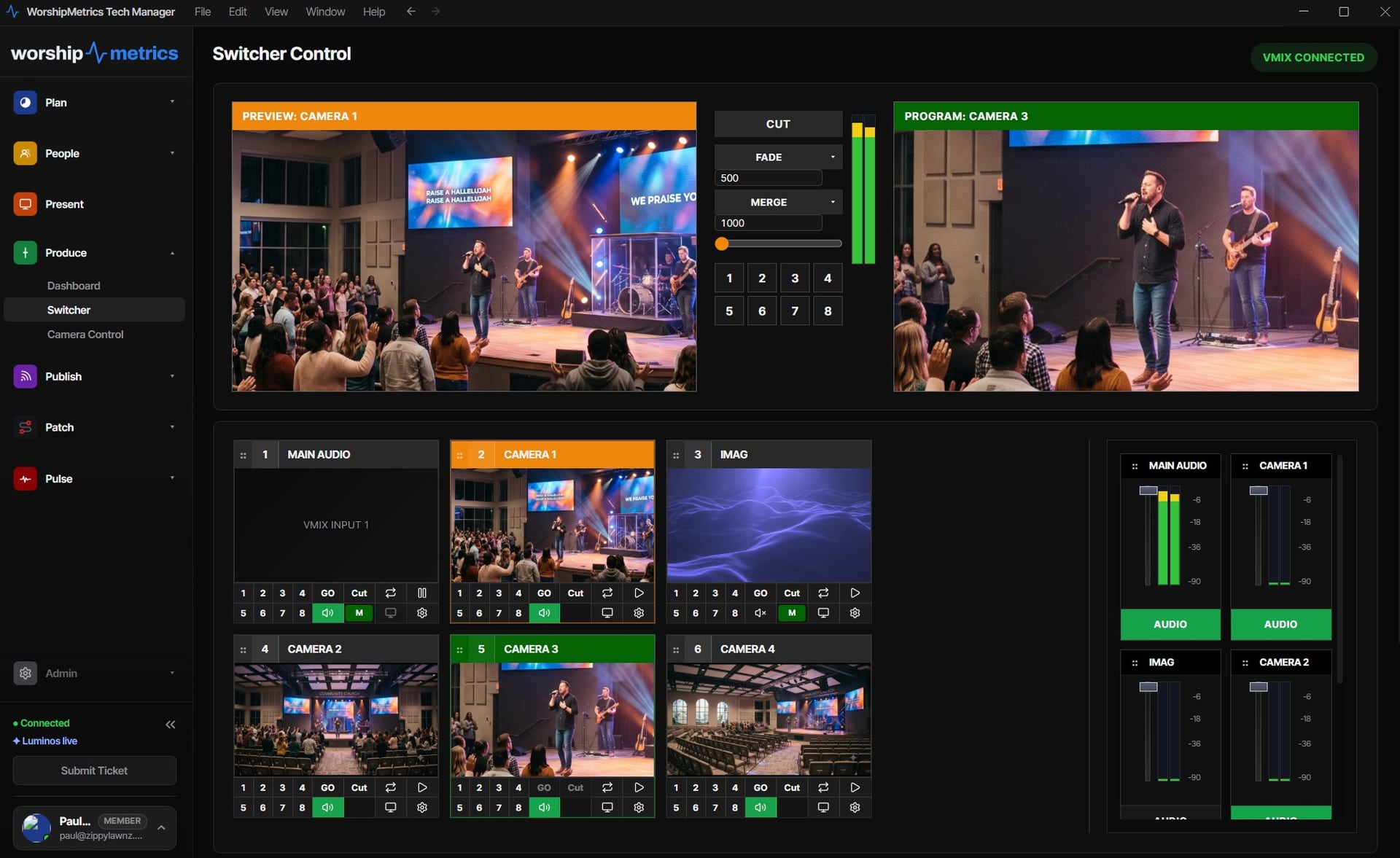
Model two: local production, cloud-connected. The switch stays in your booth, on the vMix or OBS machine you already own — free, instant, reliable, working even if the internet hiccups. The cloud adds what a church actually lacks: the ability to see, reach, and support that booth from anywhere. This is the model WorshipMetrics is built on, and the rest of this post is why it’s the right one for a church that wants to run its own production.
Why “local switch, cloud connect” fits churches
Three church realities make this the better architecture, not just the cheaper one:
- Reliability first. Your Sunday switch cannot depend on your upload staying perfect for 75 minutes. Local switching means a network sag degrades the stream gracefully — it never freezes the service in the room. The cloud layer is additive; if it blips, the service carries on.
- You already bought the gear. The booth PC, the switcher, the cameras — paid for. Cloud-hosted production asks you to rent compute you already own the equivalent of. Local-first means local control is free, forever, on every plan; the cloud layer is the only thing you add.
- Churches want to do it themselves. This is the heart of it. WorshipMetrics isn’t a production company you hand your feed to — it’s the platform for the church that wants its own volunteers running its own booth, with the cloud making that team possible instead of replacing it.
”Cloud production” undersells what’s actually here
Here’s the part that reframes the whole category: for a church, remote switching is the least interesting thing the cloud adds. The connection that carries control also carries four things a generic production service doesn’t:
- Remote monitoring. Live telemetry from the booth — machine health, stream and recording state, encoder performance — so the tech director sees the service from a phone, and an alert fires the moment something drops.
- Collaboration. A veteran or a mentor guiding a student sees preview and program live and can assist — or take the wheel — from anywhere. This is what turns one operator into a team.
- Text and team communication. Team chat where the service plan and the booth already live — not a separate app and a group text.
- Support that can see your system. 910-WORSHIP and the in-app assistant start from your actual wiring and telemetry, not “describe your setup.”
That’s why calling it “cloud production” undersells it. It’s remote production, monitoring, collaboration, and support riding on one secure outbound connection — no port forwarding, no VPN, only people you’ve invited, every action logged.
The consolidation underneath
And there’s a second reason a church specifically benefits: the same platform that adds the cloud layer also collapses the stack of tools you’re paying for separately — streaming, clipping, presentation, scheduling, chat, monitoring, documentation — into one login and one bill. Cloud production for a church isn’t a point solution bolted onto five other subscriptions. It’s one of the things the platform does, alongside everything else the booth and the church office need.
Where to go next
If you run vMix, the cloud panel is the full switching surface — here’s exactly what that looks like. If you run OBS, remote scenes, stream, and recording over its WebSocket — the OBS version is here. And if the number of separate subscriptions is what’s actually wearing your church out, start with one platform instead of six.
Cloud production, done for churches, doesn’t mean handing your service to someone else’s servers. It means your booth, your gear, your volunteers — reachable, watchable, and supportable from anywhere. Local where it should be, cloud where it helps.
Related questions
- What is cloud video production for a church?
- In the church-appropriate model, it means your switcher (vMix or OBS) still runs locally in the booth on hardware you own, while the cloud adds remote access, live monitoring, team collaboration, and support on top. You get the from-anywhere benefits of the cloud without paying for cloud compute or depending on the internet for the switch itself.
- Is cloud production the same as hosting vMix or OBS on a cloud server?
- No, and the difference matters for churches. Cloud-hosted production runs the compositing on rented servers — ongoing compute cost, and your live switch depends on a solid internet round-trip. WorshipMetrics keeps switching local (free, low-latency, reliable) and uses one secure outbound connection to mirror state and relay control to your team anywhere.
- Why would a church want cloud production instead of just running the booth locally?
- Because the booth stops being an island. A tech director can check the service from home, a mentor can guide a student remotely, an alert reaches a phone when the stream drops, and support can see the actual system when you call. The local booth still does the work; the cloud is how your people and your help reach it.
Cloud OBS Production for Churches: Remote Control Over WebSocket
NextCloud vMix Production for Churches: The Full Panel, From Anywhere
Related Articles

Bitfocus Companion + ATEM Mini: A Stream Deck Panel for Your Church Switcher
A Stream Deck running Bitfocus Companion turns a Blackmagic ATEM into plain-word buttons with colors that show what's live, and the same panel can run PTZ cameras, projectors, and more. Here's how to connect Companion to an ATEM and build a volunteer page.

Lyrics Over the Camera on an ATEM Mini: Luma Keys, Chroma Keys, and the Slides Computer
To put song lyrics over the camera shot on a Blackmagic ATEM Mini, feed the slides computer into an ATEM input and key it over the camera. Here's how luma and chroma keys work for lyrics, how to design slides that key cleanly, and who should run it.

ATEM Mini + OBS for Church: Hardware Camera Switching with OBS for Graphics and Streaming
Many churches use an ATEM Mini as a camera switcher and send its output into OBS over USB as a webcam. The ATEM gives volunteers real buttons; OBS adds lyrics, graphics, recording, and streaming. Here's how to set it up, split the jobs, and avoid the common sync and quality problems.