Why trigger from slides at all?
Most worship tech booths run at least four systems in parallel: presentation, lighting, video switching, and audio. On a fully staffed Sunday, four people keep them in sync by ear and by glance. On a two-volunteer Sunday, they can’t — and the misses are the ones people notice: lights that stay bright through the first verse, a switcher lingering on the wide shot, walk-in music still playing under the welcome.
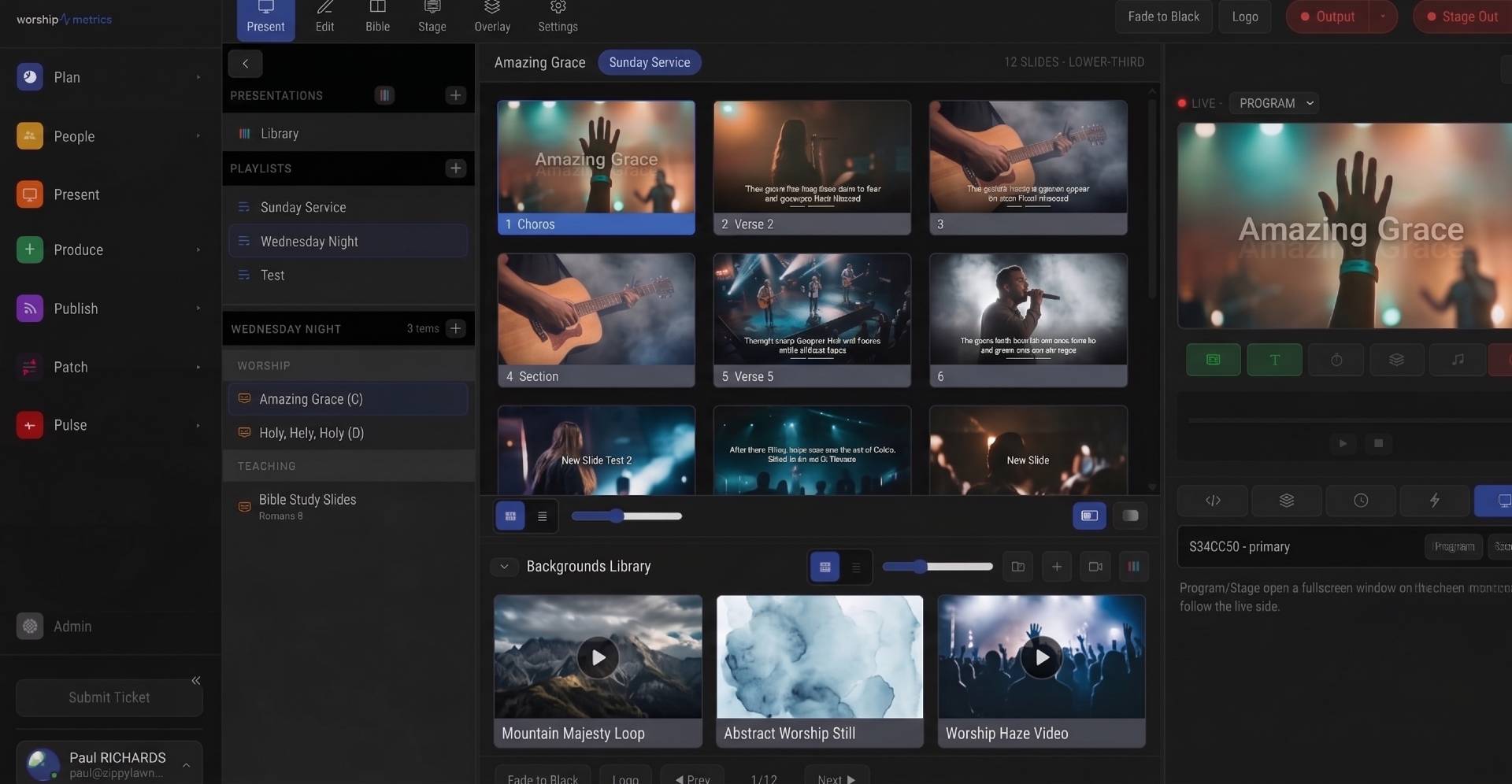
Protocol triggers collapse that coordination into the one action your team already performs hundreds of times per service: advancing a slide. In Present, a trigger can be attached to a slide — firing the moment it goes to program — or placed inside a macro as one step in a named sequence. Either way, the person running lyrics is now also, invisibly, running lights, the switcher, playback, and the console.
Present supports six trigger protocols: OSC, RossTalk, HTTP, MIDI, OBS WebSocket, and Q-SYS QRC. This guide walks through each, explains the architectural rule that governs them all (browsers cannot open raw network sockets), and shows how the preset catalog saves you from memorizing command syntax.
The one rule that explains everything: the Tech Manager relay
Present runs in the browser. That is a genuine strength — any Chromium machine in the building can drive your outputs — but browsers, by design, cannot open arbitrary UDP or TCP connections. A web page is not allowed to blast a UDP packet at your lighting console or hold a raw TCP session with a Ross switcher. That sandbox keeps the web safe, and no vendor gets to opt out of it.
So Present splits triggers into two classes:
- Local MIDI uses the Web MIDI API, which browsers do expose. If a USB MIDI interface or controller is plugged into the machine running Present, MIDI triggers fire directly from the browser with no middleman.
- Everything network-based — OSC over UDP, RossTalk over TCP, RTP-MIDI, HTTP calls to gear on your production VLAN, OBS WebSocket, and Q-SYS QRC — relays through the connected Tech Manager desktop app in your booth. Present sends the trigger to Tech Manager, and Tech Manager, as a native application with full network access, opens the actual socket and delivers the command on your LAN.
The practical consequence: if no Tech Manager is connected, network triggers cannot fire. Present tells you plainly — the trigger fails with a “No connected Tech Manager” error rather than silently doing nothing. Treat “Tech Manager online” as part of your pre-service checklist, right alongside “projector on” and “console recalled.” Local Web MIDI triggers are unaffected either way, since they never leave the machine.
The relay also means triggers originate from a stable, known point — the booth machine — rather than whichever laptop happens to be running Present that week. If you have segmented your production network (and you should — see our guide to church network design for AV and streaming), only the Tech Manager machine needs a route to the lighting, switching, and audio VLANs.
Protocol by protocol
OSC (UDP)
Open Sound Control is the lingua franca of modern show control: lighting consoles, media servers, and software controllers all speak it. OSC rides on UDP — fast and connectionless. You send an address pattern like /cue/next/fire with optional arguments, and the receiver acts on it.
In Present, an OSC trigger takes a target (from a provider preset or a manual host and port) plus the address pattern and arguments to send. Because UDP is fire-and-forget, there is no delivery confirmation — which is exactly why OSC devices should live on the same switch fabric as your booth, not across a Wi-Fi hop. Typical uses: firing lighting cues on the first slide of each song, advancing a media server, or hitting a Companion button that fans out to a dozen other actions.
RossTalk (TCP 7788)
RossTalk is the plain-text control protocol used by Ross Video switchers, defaulting to TCP port 7788. Unlike OSC, it runs over TCP, so the connection is session-based and delivery is ordered. Commands are human-readable strings — cut, transition, recall a memory, fire a custom control — which makes triggers easy to audit later.
Configure the switcher’s IP and port (7788 unless changed on the frame), then attach commands to slides: recall the “sermon” memory when the message title slide fires, cut to the wide shot on the closing slide. If your church runs an ATEM or another brand instead, the same slide-advance moments can usually be reached through Companion via OSC or HTTP — the pattern transfers even when the protocol does not.
MIDI: local Web MIDI vs. network RTP-MIDI
MIDI triggers come in two flavors, and choosing the right one matters:
- Local (Web MIDI): the browser talks directly to a MIDI device attached to the Present machine. Zero network dependency, lowest latency, works even if Tech Manager is offline. Ideal when your lighting console or interface is physically at the booth position where Present runs.
- Network (RTP-MIDI): MIDI packets travel over the network using the RTP-MIDI standard (the same session-based network MIDI macOS ships natively). Because this is network traffic, it relays through Tech Manager like any other network protocol. Use it when the MIDI destination — a console in the amp room, a playback rig on stage — is not physically connected to the Present machine.
Either way, the messages themselves are ordinary MIDI: note on/off, control change, program change. Lighting consoles commonly map incoming notes or program changes to cue stack actions, and many digital mixers accept MIDI for scene recall — a natural companion to the gain and scene discipline covered in our guide to digital mixer setup.
HTTP
The HTTP trigger is the generalist. You configure a base URL for a device or service, then define templated calls against it — paths, query parameters, request bodies. Anything with a REST-ish API becomes reachable from a slide: a PTZ preset recall, a smart relay, vMix’s web API, a building-automation endpoint that dims the house lights.
Because HTTP endpoints on your production gear live on the LAN, these calls relay through Tech Manager too. Keep your templates parameterized rather than hard-coding one URL per slide; when the device’s IP changes, you update the base URL once.
OBS WebSocket
OBS Studio exposes a WebSocket control surface (protocol v5 in current releases), and Present speaks it directly as a trigger type. Scene switches, source visibility, recording and streaming control — all reachable from a slide action. The classic pattern: the pre-service slide starts the stream and selects the lobby scene; the first worship slide switches to the IMAG scene; the final slide stops recording.
If OBS is central to your Sunday, our complete OBS Studio guide for churches covers scene architecture that pairs well with slide-driven switching — the fewer scenes a volunteer must choose between manually, the more the automation earns its keep.
Q-SYS QRC (TCP 1710)
QSC’s Q-SYS platform accepts external control through QRC, a JSON-based remote control protocol on TCP port 1710. If your church runs a Q-SYS Core for DSP and routing, Present triggers can set named control values and recall snapshots — mute the lobby feed during prayer, swap monitor scenes between worship and speech, raise the assisted-listening send when the sermon slide fires.
QRC requires the named controls to be exposed in the Q-SYS design, so plan this with whoever maintains your design file. Once the controls exist, the trigger side is simply: Core IP, port 1710, control name, value.
The preset catalog: start from a known-good target
Every protocol above has a dialect problem: the transport is standard, but each product expects its own addresses, commands, and conventions. Present ships a preset catalog for common production targets so you start from a working template instead of a blank field:
- vMix and OBS Studio for software switching and streaming
- Bitfocus Companion — often the smartest single target, since one Companion button can drive many devices
- Resolume Arena and disguise for media servers
- Behringer X32 / Midas M32 for console control
- QLab for cue-based playback
- ProPresenter 7 — plenty of churches run both in different venues, and the trigger system treats it as just another controllable device
- Q-SYS Core for DSP
Pick the preset, fill in the IP address, and the addressing conventions are already correct. If your device is not in the catalog, the manual OSC, HTTP, and MIDI options cover nearly everything with a published control spec — vMix users will find the API surface covered in our vMix guide for churches.
Triggers inside macros: sequencing, not just firing
Attaching one trigger to one slide is the beginning; the macro system is where automation becomes a service design tool. A macro in Present is a named sequence of actions — clear to logo, go to a playlist item, set a background or template, show or hide an overlay, play or stop audio, wait a defined interval — and protocol triggers slot in as first-class steps.
That wait step is the quiet hero. Real rooms need sequencing: recall the lighting cue, wait two seconds for the fade, then cut the switcher, then start the walk-in track. A “Start of Service” macro does all of it from one operator action, in the right order, every week. Build macros for your recurring transitions — pre-service, worship-to-announcements, sermon start, response, walkout — and your least experienced volunteer inherits your most experienced operator’s timing. That consistency compounds with the habits in our guide to training volunteer AV teams.
A pre-service checklist for trigger-heavy setups
- Tech Manager connected — network triggers depend on it; verify before doors open.
- Ping the targets — switcher, console, Core, OBS machine all reachable.
- Fire each macro once during soundcheck, in show conditions, watching the actual devices respond.
- Confirm local MIDI devices enumerate in the browser if you use Web MIDI triggers.
- Document the map — which slides and macros fire what, so a substitute operator is never guessing.
How WorshipMetrics handles this
Protocol triggers are built into Present, our browser-based presentation environment: OSC, RossTalk, HTTP, MIDI (local Web MIDI or network RTP-MIDI), OBS WebSocket, and Q-SYS QRC are all available as slide actions and as steps inside macros, with presets for vMix, Companion, Resolume, ProPresenter 7, X32/M32, QLab, disguise, OBS, and Q-SYS Core. The network protocols fire through Tech Manager, the desktop companion that gives your booth machine native access to the production LAN — so the browser stays sandboxed, your triggers originate from one known point, and Present tells you clearly if the relay is offline before it can surprise you on a Sunday.
One button panel for the whole booth: Bitfocus Companion for churches: one button panel for your whole AV system. See also Companion buttons inside WorshipMetrics · controlling projectors, PTZ cameras, and sound boards.
Projector, Stage Display, and Beyond: Multi-Screen Output from a Browser
NextWhen Does WorshipMetrics Alert You? The Exact Thresholds
Related Articles
ProPresenter Troubleshooting for Church Teams: The 10 Problems Behind Almost Every Sunday Failure
A symptom-first field guide to the ProPresenter failures church booths actually hit — blank outputs, invisible NDI, mid-service lag, stage display showing the wrong thing — with the fast checks for each, and the upgrades that make next Sunday faster: a mapped system, AI that knows your wiring, and fewer moving parts.
Digital Signage Scheduling That Understands Church Calendars
How day-of-week signage schedules and date-range calendar overrides work together, so a Christmas takeover can run for a season and hand the screens back automatically.
NDI Alpha-Channel Slides: A Clean Lyrics Key Without Chroma
How alpha-channel NDI lets you key lyrics and lower thirds over IMAG cleanly, and how to publish and receive a true-transparency slide feed in vMix or OBS.