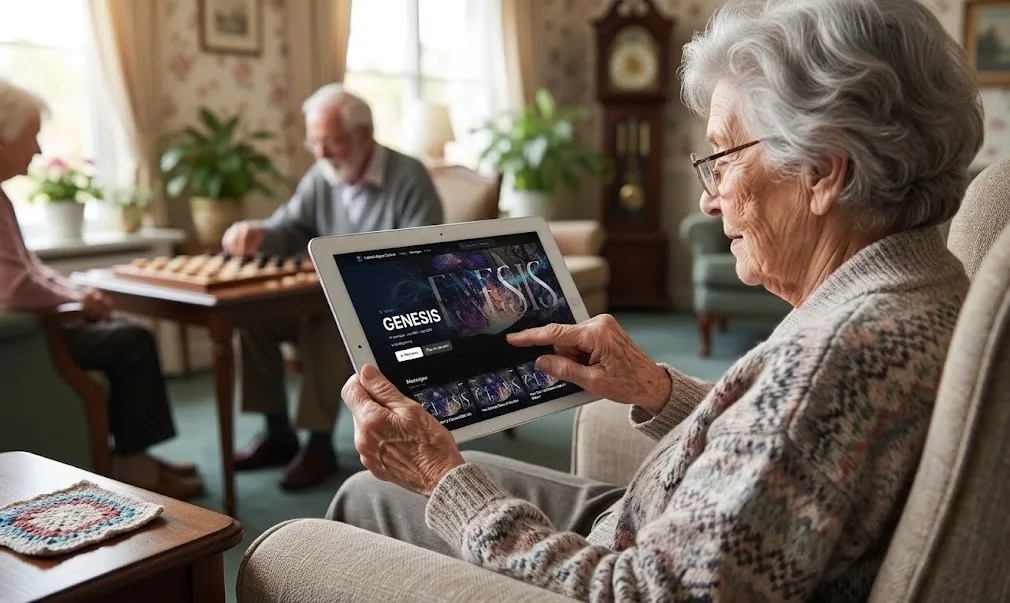
For a homebound member, a resident of a care home or a family that watches together in the living room, online church isn’t a backup plan. It’s church. And for many of them, the hardest part isn’t the sermon or the music. It’s getting from “I’d like to watch” to the service playing on the screen.
A few small choices make the difference between a member who watches every week and one who gives up after the second try.
The short answer: give them one link that always works, put it on their tablet’s home screen as an icon, help them get it on the TV the way their household already can, and send a volunteer to set it up once. Then make sure there’s a way for them to respond, not just watch.
Start with one link that always works
The most common problem is too many places to look: a Facebook page on Sunday, a YouTube channel on Tuesday, a website that changed last year. Pick one link and use it everywhere.
The best link opens straight to what they want: the live service when you’re live, and the latest message the rest of the week. If your church has a watch page that does both, that’s the link to share. See Should Your Sermons Live on YouTube or Your Own Watch Page?
Put it on the home screen
On an iPad or iPhone, a link can become an icon that sits next to their other apps:
- Open the link in Safari.
- Tap the Share button.
- Choose Add to Home Screen, give it your church’s name, and tap Add.
Android tablets have the same idea in Chrome, under the menu: Add to home screen. Now watching church is one tap on an icon with your church’s name, not a web address to remember.
Get it on the TV
Use what the household already has:
| If they have… | How to watch on the TV |
|---|---|
| An Apple TV or AirPlay-compatible TV | Start the service on an iPhone or iPad, then tap the AirPlay icon in the video player |
| A Chromecast or Google TV | Open the link in Chrome and choose Cast from the menu |
| A smart TV with a web browser | Open the browser on the TV and go to the link (bookmark it the first time) |
| A laptop | Connect it to the TV with an HDMI cable and make the video full screen |
Write the steps for their setup on a card and leave it by the TV.
Make it easy to follow
- Full screen. Show them the full-screen button. It’s the single most helpful thing to teach.
- Captions. If your stream has captions, show them how to turn them on.
- Scripture on screen. Lower thirds with the passage help people follow along without a Bible on their lap. See How Do I Put Lyrics and Slides on Our Church Livestream?
- A series they can binge. A homebound member who missed weeks can catch up from Part 1. See How to Organize Sermon Series Online So People Watch the Next Part.
- No sign-in. Every password is a reason to give up.
Send a tech buddy
A volunteer who visits once to set things up does more than any instruction sheet. Pair a younger volunteer with a homebound member: add the home-screen icon, test casting to the TV, write the card, and leave a phone number. It’s a natural job for a student on your youth clip team or a tech-savvy retiree.
Make room for a response
Watching isn’t the same as belonging. Make sure homebound viewers can reach a person:
- Prayer requests. A button on the page that goes privately to your prayer team. See Online Prayer Requests: The Workflow That Shows Whether Your Online Ministry Is Real.
- Giving. Many homebound members want to keep giving. A Give button next to the service makes it simple.
- A call. Numbers can’t tell you who’s lonely. A regular call from a care team member can.
How WorshipMetrics does it
Your WorshipMetrics watch page is one link for everything: your live stream on Sunday, and your Content Library the rest of the week. It works in the browser on phones, tablets, laptops and TVs, with no account to create. On every plan, it has Give, prayer request and “I’m new here” buttons, and prayer requests go privately to your team. With Pro, sermon series let people catch up from Part 1, and Continue watching remembers where they left off on that device.
Want your own app? Ask us about a fully branded app for Apple TV and iPad, under your church’s name. Contact us.
See it on our demo church, Faithful Signal Church. Try adding it to your own phone’s home screen.
Keep going
This article is part of our church content library series. Related reading:
Related questions
- How can elderly members watch church online?
- Give them one link that always works, and put it on the home screen of their tablet as an icon. Have a volunteer visit once to set it up, show them how to make it full screen, and write the steps on a card. A page that plays your live service on Sunday and your past messages the rest of the week means they only ever need that one icon.
- How do we get our church service on a TV?
- Four common ways: AirPlay from an iPhone or iPad to an Apple TV or AirPlay-compatible TV; casting from the Chrome browser to a Chromecast or Google TV; opening your watch page in the TV's own web browser; or connecting a laptop to the TV with an HDMI cable. Pick the one the household already has.
- Do homebound members need an account to watch?
- They shouldn't. The easiest setup for older viewers has no sign-in and no password to remember: one link that opens straight to the service.
- Can our church have its own TV app?
- Some churches want their own app on Apple TV or iPad, under the church's name. WorshipMetrics can talk with you about a fully branded app for Apple TV and iPad; ask us.
Should Your Sermons Live on YouTube or Your Own Watch Page?
NextSermon Clips That Lead Back to the Full Message
Related Articles
Your First Sunday Streaming: A Plan for a Church With One Volunteer
No media team, no budget line, one person who said yes. Here's the first-Sunday plan: what to set up during the week, what to check Sunday morning, and what the platform carries so the volunteer only has to click Go Live.
Adding a Second Service or a Second Campus to Your Church Livestream
The livestream was built for one service in one room. Now there's a 9:00 and an 11:00, or a second campus across town. Here's what actually changes, what carries forward, and what to set up once so the second Sunday isn't twice the work.
Stop Titling Church Livestreams 'Live Stream' and a Date: A Naming System That Makes Your Catalog Findable
Fifty videos called 'Live Stream, October 12' is a channel nobody can search, not even the church. Here's a naming system for church livestreams and messages, and where the AI fills in the title, description, and series for you.