A one-minute clip of your pastor can reach thousands of people who would never search for your church by name. That’s the good news.
The bad news is what happens when the clip ends. On social media, the next video starts. It’s usually from someone else, and the viewer who was just moved by your pastor’s words is now watching a cooking video. Unless the clip gave them somewhere to go, the moment is gone.
The short answer: give every clip two homes. Post it on social media to reach new people, and keep it on your own page, under the message it came from, with a link to the full message. Clips get attention. Your page keeps it.
The clip is the start, not the end
We’ve written about the whole journey from a clip to a first visit in What Happens After Someone Watches Your Church’s Clip? The short version: a clip works when it’s the first step on a path, and the path needs to be obvious. Clip, then full message, then series, then a next step like “I’m new here” or a prayer request.
Most churches get the first step right and leave the rest to chance.
Two homes for every clip
| Where | What it’s for | What to do |
|---|---|---|
| Social media (Shorts, Instagram, Facebook, TikTok) | Reach: putting your message in front of people who don’t know your church | Post two or three clips a week, each with a link home in the description |
| Your own page | Depth: giving people who want more a place to keep watching | Keep each clip under the message it came from, with a “Full message” link |
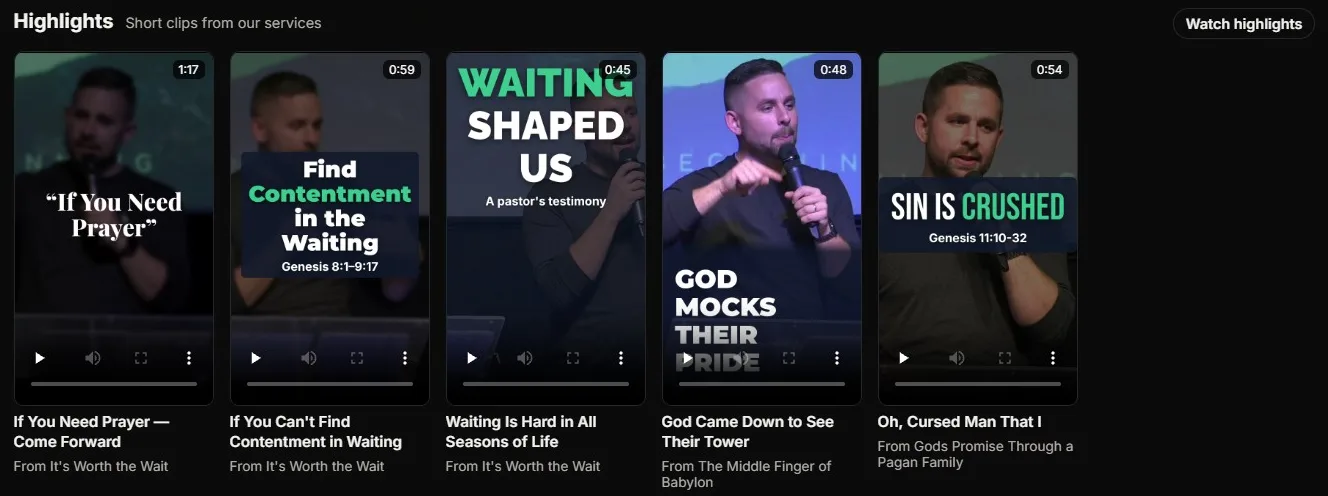
On your own page, a clip does a different job. Someone who arrives from your website, a QR code or a friend’s text sees a row of short Highlights: an easy way in for a visitor who isn’t ready to press play on a 45-minute sermon. One tap, and they’re watching the full message, inside its series, with your Give button and a prayer request form right there.
Make each clip a doorway
- One point per clip. The best clips make one idea land on its own, without needing the rest of the sermon. See Sermon Clip Hooks: How to Make the First Three Seconds Count.
- Title it by the takeaway. “You’ll never find contentment without waiting” beats “Sunday 10/12 clip 2”.
- Link the full message. In the social post’s description, add the link to the message or your watch page. Your page should do this automatically, under every clip.
- Name the series. “From our series on Genesis” tells people there’s more where this came from.
- Keep them coming. A steady rhythm beats a burst. See How Many Sermon Clips Should a Church Post?
A feed of your own
The swipe-through feed is the reason short video took over. People know how to flick from one clip to the next on their phone. You can offer the same thing on your own page: a full-screen feed of your Highlights that works like the apps people already use, except every clip is yours and every clip leads to a full message.
That’s what we mean by being your own social media platform. Use the big platforms to get noticed. Then give people a feed where nothing pulls them away from your church.
How WorshipMetrics does it
In WorshipMetrics, Reels finds the moments in your service and renders the clips, captioned, in vertical, square or wide. You can post them to YouTube now or on a schedule, share them to Facebook, Instagram and your TikTok drafts, and click Add to Library to keep each one in your Content Library as a Highlight.
A Highlight shows under the message it was cut from, in a Highlights row on your watch page’s home page, and in a full-screen swipe feed on phones, with its own link to share and a Full message link. New Highlights are public by default, and you can make any one unlisted or private. Highlights come with Pro and Max, and a clip needs to be rendered in the cloud before it can be added.
Try it on a phone: open the Highlights feed on our demo church, Faithful Signal Church, swipe through, and tap Full message.
Keep going
This article is part of our church content library series. Related reading:
Related questions
- Where should church clips be posted?
- In two places. Post them on social media (YouTube Shorts, Instagram, Facebook and TikTok) to reach new people, and keep them on your own watch page, next to the full message they came from, so anyone who wants more can keep watching.
- How do we get people from a clip to the full sermon?
- Make the full message one tap away. On your own page, show each clip under its message with a 'Full message' link. On social media, put the link to the message, or to your watch page, in the description, and say it out loud at the end of the clip if it fits.
- How many clips should we make from each sermon?
- Two or three good ones is plenty for most churches. Each should make one point that stands on its own, open with the line that hooks people, and run 30 to 60 seconds.
Helping Homebound Members Watch Church on a TV or iPad
NextWhich Sermons Do People Come Back To? Reading Your Sermon Library Numbers
Related Articles
A Content Engine That Stays Personal: More Clips, Better Titles, Better Thumbnails
Keeping up online means more content than most church teams can make by hand. Clipping every service, with AI help on titles, descriptions, and thumbnails, turns one sermon into a week of posts. Here's how to build a church content engine that stays personal, controllable, and true to your voice.
Which Sermons Resonate? What Clip Metrics Tell Pastors
When you clip every service, each clip becomes a small signal: what people watched, finished, shared, and came back to. Here's how pastors can read sermon clip metrics to learn what's connecting with their congregation and community, without letting the numbers write the sermon.
Which Worship Songs Does Your Congregation Love? Song Insights From Clips
Worship leaders usually choose songs by feel, familiarity, and theme. Clip metrics add another view: which songs people play again and again, at church and online. Here's how to read worship song insights to plan stronger sets, and the licensing to check along the way.