The short answer: record through the platform, pick from a ranked list, post the vertical render
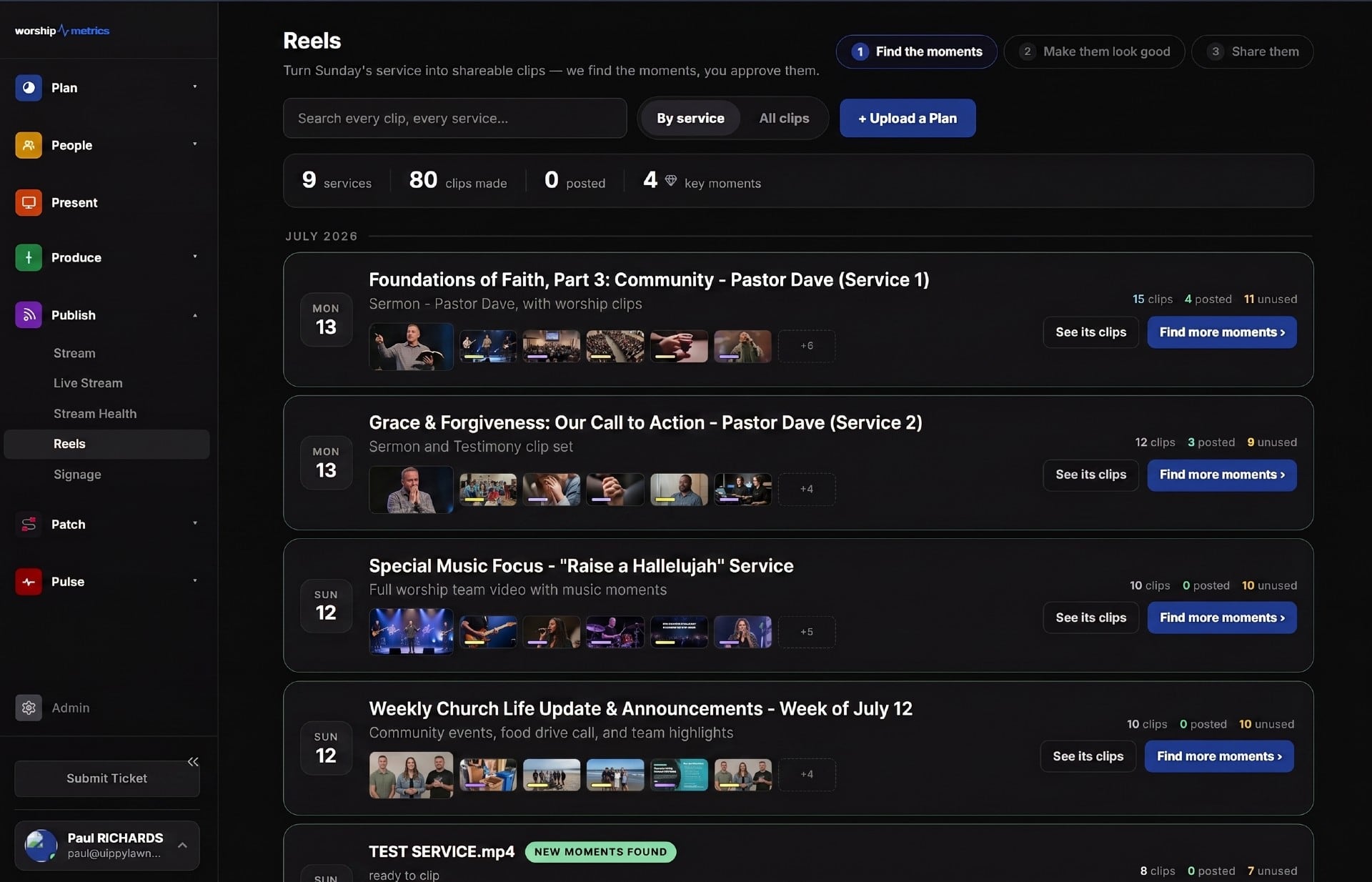
If your service is recorded in WorshipMetrics, the path from “pastor said something great” to “it’s on Instagram” doesn’t involve editing software or an hour of scrubbing. The pipeline watches the whole service so you don’t have to: it transcribes the recording, has AI score and rank the shareable moments, and renders your picks as finished vertical clips — captions burned in, your branding applied. A volunteer with a phone and twenty minutes on Sunday afternoon can genuinely have a clip live before dinner.
Here’s the realistic timeline, stage by stage.
12:10 p.m. — the recording is already in the library
The step most teams overlook is the one that requires nothing: if you stream through WorshipMetrics live streaming, every service records automatically and the finished recording lands in your library without anyone pressing a button. There is no “wait, did we record?” moment, because recording isn’t a task — it’s a property of streaming. (Tech Manager even tells you the moment a recording stops unexpectedly and offers a one-tap restart — the failure you’d otherwise discover on Monday, in regret.)
Even better: if your operator flagged a moment live — “grab the last 30 seconds of that” — those booth clips register as Reels source videos automatically. The moment that made the room go quiet at 10:40 is already waiting in the pipeline at noon.
12:30 p.m. — AI hands you a ranked list, not a blank timeline
This is where the hour of scrubbing disappears. The pipeline transcribes the service with church vocabulary boosted — books of the Bible, phrases like “altar call,” your pastor’s and church’s names — because a caption that mangles “Habakkuk” isn’t postable, and captions get burned into the final video.
Then Claude, Anthropic’s AI model, scores the candidate moments. Each one arrives with three things: a category (one of ten — sermon point, prayer, altar call, welcome, and so on, which keeps announcement clips out of your feed), a shareability score from 0 to 100 estimating how well the moment stands alone to someone who has never visited your church, and an eight-word hook line you can use or rewrite. Quality badges — Quotable, Emotional, Teaching, Call to Action, Uplifting — give you a fast visual filter between strong candidates.
Your Sunday-afternoon job is reviewing the top five of a ranked list, not hunting through 75 minutes of timeline. The full machinery is described in how AI finds your sermon moments; the editorial craft — which moments travel well, pacing, framing — is in the sermon clipping guide.
12:50 p.m. — render once, get every format
A chosen moment renders into the three aspect ratios that cover essentially every platform:
| Format | Resolution | Where it goes |
|---|---|---|
| Vertical 9:16 | 1080 × 1920 | Instagram Reels, YouTube Shorts, TikTok, Stories |
| Square 1:1 | 1080 × 1080 | Feed posts |
| Widescreen 16:9 | 1920 × 1080 | YouTube, website embeds, sermon pages |
Captions are burned in by default — the overwhelming majority of social video plays muted, so captions are the reason anyone stops scrolling — with four style presets and adjustable position, scale, and sync. Branding is applied at render time: lower-third styles, font presets, your color and logo, optional intro and outro. Every clip leaves the pipeline looking like it came from your church, not from a template.
1:15 p.m. — posting
One honest distinction here. Finished renders can publish directly to YouTube and TikTok — each format is its own publish item, so the vertical Short and the widescreen clip go out side by side without exporting twice. Direct publishing to Instagram and Facebook is coming soon; until then, for Instagram you download the 9:16 render and post it from the app — thirty seconds on the phone that’s already in your pocket. The pipeline’s job was getting you a finished, branded, captioned file; the last tap is yours.
That’s the whole Sunday: recording appeared on its own, AI ranked the moments, you picked one, and the render was Instagram-ready before the afternoon nap.
The privacy question, answered before it’s asked
Some churches aren’t comfortable uploading full service video to any cloud — pastoral prayer, baptism testimonies, and care moments end up on recordings. For those teams there’s a fully supported local mode: Tech Manager transcribes on the booth computer using Whisper running entirely locally, analyzes and renders locally, and sends only short clip text to the cloud for scoring — never audio, never video. Same scoring brain, same three formats, different privacy posture. Neither mode is a second-class citizen.
How WorshipMetrics handles this
The workflow above is Worship Clips, part of the WorshipMetrics platform. Services recorded through live streaming flow in automatically, booth-flagged moments arrive as sources on their own, AI does the scrubbing and ranking, and your team spends Sunday afternoon choosing between good moments instead of hunting for them. The sermon your congregation heard at 10:40 can be encouraging someone who’s never walked in your doors by suppertime.
Next: build a full week around those clips with Instagram for churches: a simple weekly plan.
Related questions
- Do I need video editing software to clip sermons?
- No. The Reels pipeline in WorshipMetrics finds candidate moments from the service recording, ranks them by shareability, and renders finished clips with burned-in captions and your church's branding — in vertical 9:16, square 1:1, and widescreen 16:9. Your job is choosing, not editing.
- Does the AI post clips automatically?
- No — the AI proposes and your team disposes. It hands you a ranked list of moments with categories, scores, and suggested hook lines; a human picks what goes out. Finished renders can publish directly to YouTube and TikTok; direct Instagram and Facebook publishing is coming soon, so for now you download the vertical render and post it in the Instagram app.
- What if our church doesn't want to upload full services to the cloud?
- Use local mode: the Tech Manager desktop app transcribes with Whisper running entirely on the booth computer and renders locally. Only short clip text is ever sent to the cloud for scoring — never audio, never video.
How Can a Pastor Check That Sunday Went Okay Without Asking the Tech Team?
NextHow Do Small Churches Schedule Volunteers Without the Weekly Text-Message Scramble?
Related Articles
A Content Engine That Stays Personal: More Clips, Better Titles, Better Thumbnails
Keeping up online means more content than most church teams can make by hand. Clipping every service, with AI help on titles, descriptions, and thumbnails, turns one sermon into a week of posts. Here's how to build a church content engine that stays personal, controllable, and true to your voice.
Which Sermons Resonate? What Clip Metrics Tell Pastors
When you clip every service, each clip becomes a small signal: what people watched, finished, shared, and came back to. Here's how pastors can read sermon clip metrics to learn what's connecting with their congregation and community, without letting the numbers write the sermon.
Which Worship Songs Does Your Congregation Love? Song Insights From Clips
Worship leaders usually choose songs by feel, familiarity, and theme. Clip metrics add another view: which songs people play again and again, at church and online. Here's how to read worship song insights to plan stronger sets, and the licensing to check along the way.