The connector question every church lighting rig eventually asks
It usually starts innocently. The church buys four LED wash fixtures, and they arrive with 3-pin XLR jacks on the back. The lighting console has a 5-pin output. And the drawer in the tech booth is full of microphone cables that fit the 3-pin jacks perfectly.
So the questions come fast: Do we need adapters? Can we just use mic cables? Why does the plug on the console look backwards? And why did the lights start flickering when we added the fourth fixture?
DMX is a genuinely simple system once you understand a few rules, and most mistakes are cheap to fix — but a couple of them can damage equipment, which is why it’s worth ten minutes to get this right.
DMX in ninety seconds
DMX512 is the control protocol behind almost every stage light made in the last three decades. One DMX line — called a universe — carries up to 512 control channels. A basic LED par might use 4–8 channels (red, green, blue, dimmer); a moving head might use 16–30.
Electrically, DMX is EIA-485 (often called RS-485): a differential data signal running over a shielded twisted pair. Data flows in one direction only, from the console outward, and devices connect in a daisy chain: console output to the first fixture’s DMX IN, that fixture’s DMX THRU to the next fixture’s IN, and so on down the line. The last fixture in the chain gets a terminator (more on that below).
No hubs, no Y-cables, no star wiring — one line, one direction, one chain.
3-pin vs 5-pin: what the standard says, and what manufacturers ship
The DMX512 standard specifies a 5-pin XLR connector:
- Pin 1 — signal common (shield)
- Pin 2 — Data − (data minus)
- Pin 3 — Data + (data plus)
- Pins 4 and 5 — reserved for an optional second data link that almost no fixture ever implemented
So in practice, a 5-pin DMX cable carries the same three active conductors as a 3-pin cable, plus two pins that usually connect to nothing. Manufacturers of budget and entry-level fixtures noticed this decades ago and started shipping 3-pin XLR jacks instead — the connectors are cheaper, and 3-pin cables are everywhere. It technically departs from the standard, but electrically it’s the identical signal.
That’s why real-world church rigs are almost always mixed: a 5-pin console, some 5-pin professional fixtures, a batch of 3-pin LED bars. This is fine. It’s not a compatibility problem — it’s an adapter problem, and passive adapters solve it completely.
Why did the standard choose 5-pin at all? Partly for that never-used second data pair, but largely for a very practical reason: a 5-pin connector physically cannot plug into audio equipment. Which brings us to the most important safety point in this article.
Gender runs backwards from audio — on purpose
If you’ve wired microphones, you know the audio convention: signal leaves a device on a male XLR and enters on a female XLR. A mixer’s mic input is female; the main outputs are male.
DMX deliberately reverses this:
- A console’s DMX OUT is female
- A fixture’s DMX IN is male
- A fixture’s DMX THRU is female
So on a fixture’s rear panel, the male jack is the input — the exact opposite of what an audio brain expects. Once you know the convention, it’s actually a gift: in a dark booth you can tell which direction a chain flows just by looking at the panel connectors, no labels required.
The reversal — along with the 5-pin connector — exists to keep lighting data and audio signals from being cross-plugged, and the danger is real: an audio mixer’s mic inputs can supply 48-volt phantom power on pins 2 and 3, and DMX transceivers are low-voltage data chips that never expect to see 48 V. Patch a DMX device into a phantom-powered mic line through a patchbay or wall plate, and you can genuinely fry the fixture’s data driver. That’s the “without frying anything” part of the title, and the single best argument for keeping lighting and audio lines visually and physically distinct.
Why mic cable and DMX cable are not the same
Here’s the trap: a 3-pin DMX jack accepts a microphone cable perfectly, and for one fixture on a ten-foot run, it will usually even work. So churches conclude mic cable is fine — until the rig grows.
The difference is characteristic impedance. DMX cable is built as 110–120 Ω low-capacitance data cable, matched to the EIA-485 signal. Microphone cable is designed for analog audio and typically lands somewhere around 40–70 Ω with much higher capacitance. At DMX’s data rate, that mismatch causes signal reflections — parts of the waveform bounce back down the line and collide with the data behind them.
The symptoms are maddening because they’re intermittent: fixtures that flicker, strobe randomly, jump to full, or ignore the console — usually only after the chain gets longer, a fixture gets added, or someone bumps a cable. The run that worked at the demo fails on Sunday. If your lights are behaving like they’re haunted and the chain includes mic cable, you’ve very likely found the ghost.
The fix is cheap and boring: buy actual DMX-rated cable for lighting runs, and label it so it never wanders into the audio drawer. (A consistent labeling scheme is worth its own read — see our cable labeling guide.) Mic cables and DMX cables should live in different bins, full stop — not because audio cable is bad at its own job, but because the two look similar enough that “casually interchangeable” becomes “mystery flicker at the worst moment.”
Adapters, crossover cables, and the pin-swap gotcha
Because pins 4 and 5 are almost always unused, converting between 3-pin and 5-pin is trivial. A passive adapter or adapter cable wires pin 1 to pin 1, pin 2 to pin 2, pin 3 to pin 3, and leaves 4 and 5 unconnected. No electronics, no power, nothing to configure. Keep a few of each direction (3-pin male to 5-pin female, and the reverse) in the lighting kit permanently.
One historical wrinkle: a handful of older fixture lines shipped with reversed data polarity — pins 2 and 3 swapped relative to the standard. Gear like that ignores a correctly wired chain until you insert a passive crossover cable that swaps pins 2 and 3. If you inherit vintage fixtures that stay dark on a known-good line, polarity reversal is worth checking. If you do build or buy a crossover cable, label it in screaming colors — an unlabeled crossover that sneaks into the normal cable stock will “break” standard fixtures in a way that’s miserable to diagnose.
Termination: the three-dollar part that exorcises haunted rigs
An EIA-485 line needs to be terminated: a 120 Ω resistor across pins 2 and 3 at the far end of the chain, absorbing the signal so it doesn’t reflect back up the line. You can buy a DMX terminator plug for a few dollars, solder a resistor into a spare XLR shell, or flip the termination switch that many fixtures include on the rear panel.
An unterminated chain often works — right up until it doesn’t. Short chains are forgiving; longer chains produce the same ghost-flicker symptoms as wrong cable. And if your rig uses RDM (Remote Device Management, which sends data back up the line), clean termination matters even more, because the line now carries traffic both directions.
Two chain rules complete the picture:
- Never split a DMX line with a Y-cable. EIA-485 doesn’t tolerate passive branches. When you need two runs — say, stage left and stage right — use a powered DMX splitter (ideally optically isolated), which regenerates the signal on each output and protects the console from faults on any one leg.
- Keep chains modest. The electrical spec allows up to 32 unit loads per line, but you’ll usually want a splitter well before that for routing sanity and fault isolation.
Where Art-Net and sACN nodes fit
Once a rig grows past a couple of universes — or the console lives a long way from the stage — churches move DMX onto the network. Art-Net and sACN (E1.31) both wrap DMX universes in IP packets, which means they travel over ordinary Ethernet: through switches, across VLANs, over the building’s existing structured wiring.
The architecture is simple: the console (or lighting software) sends Art-Net or sACN onto the network, and nodes — small boxes mounted near the fixtures — convert it back to physical DMX ports. Instead of one long fragile daisy chain snaking across the ceiling, you run short local DMX chains from a node at each stage position. Many nodes power themselves over PoE, which makes placement even easier (here’s how PoE classes and budgets work).
Two network notes worth knowing:
- sACN uses multicast, so on managed switches you’ll want IGMP snooping (with a querier) configured, or lighting traffic can flood ports it doesn’t belong on.
- Art-Net traditionally broadcasts, which is chatty; modern consoles can unicast to specific nodes. Either way, lighting traffic is happiest on its own VLAN, alongside — but logically separated from — your Dante and NDI traffic. Our guides to which AV signals survive a network switch and building a church network for AV cover the bigger picture.
The mental model: Art-Net and sACN are network citizens; classic DMX is a point-to-point chain. The node is the border crossing between the two worlds. Everything on the network side follows networking rules; everything downstream of the node follows the daisy-chain, termination, and gender rules above.
How WorshipMetrics handles this
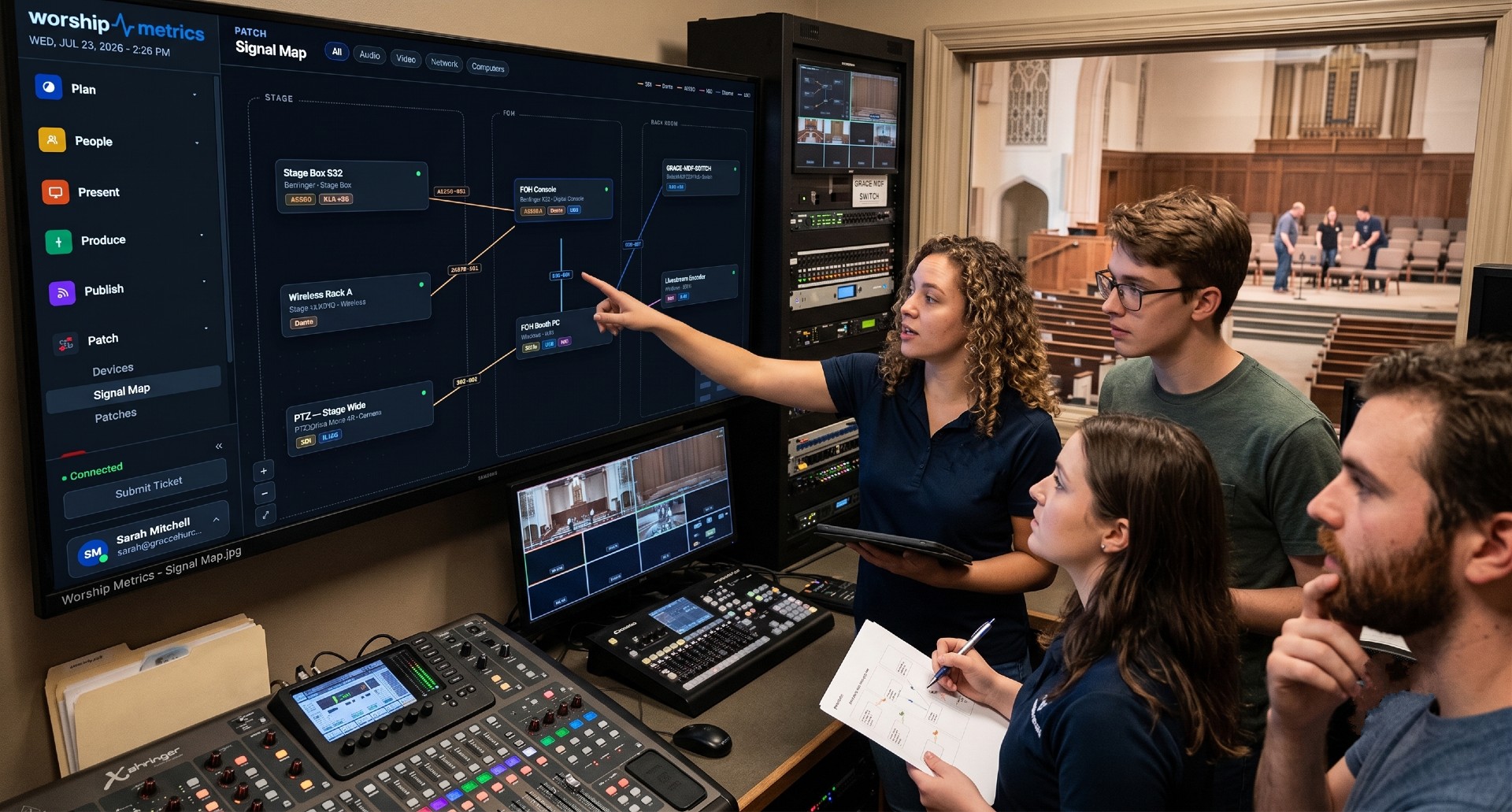
This whole article is really about one discipline: knowing which cable is which, and which rules apply to it. That’s exactly what the WorshipMetrics Signal Map is built to capture. Lighting is one of its eight device categories, and its signal vocabulary already knows that Art-Net and sACN are switchable network signals while a classic DMX chain is a point-to-point link — the “does it die at the switch” distinction is modeled into the map itself. As you draw a connection, compatible ports light up green, orange, or red, distinguishing “a passive adapter works here” from “this needs a powered converter,” and continuous wiring audits flag direction conflicts and connector mismatches — exactly the errors a one-way protocol like DMX invites. Every lighting run you draw gets a stable, per-signal cable ID that flows onto a printable patch sheet and a vector PDF wiring diagram, so the volunteer re-plugging the rig on Saturday night knows precisely which XLR is data and which is audio. Learn more on the system documentation page.
How WorshipMetrics Knows You Run Dante
NextLinking Logins to Directory People: Invites, Email Matching, and Fixing Mistakes
Related Articles
Controlling Projectors, PTZ Cameras, and Sound Boards with Bitfocus Companion
Bitfocus Companion can control far more than OBS and vMix. Projectors over PJLink, PTZ cameras over VISCA, digital sound boards over the network, and almost anything else with an IP address. Here's how churches connect the rest of the room, and how to plan a 'Start Service' button that does it all.
PTZ Camera Troubleshooting for Churches: The 10 Problems Behind Almost Every Sunday Failure
A symptom-first field guide to the PTZ and network camera failures church booths actually hit — cameras that vanish from the network, presets that drift, flicker under LED lighting, video lagging the audio — with fast checks for each, and the upgrades that end the guessing: a mapped system, cameras on watch, and AI that knows your wiring.
AI That Knows Your Wiring: How Luminos and Journey Actually Work
The AV manager's tour of the context architecture: how the Signal Map, live inventory, telemetry, and support history become an assistant that answers questions about YOUR booth — in the app as Luminos, on the phone as Journey.