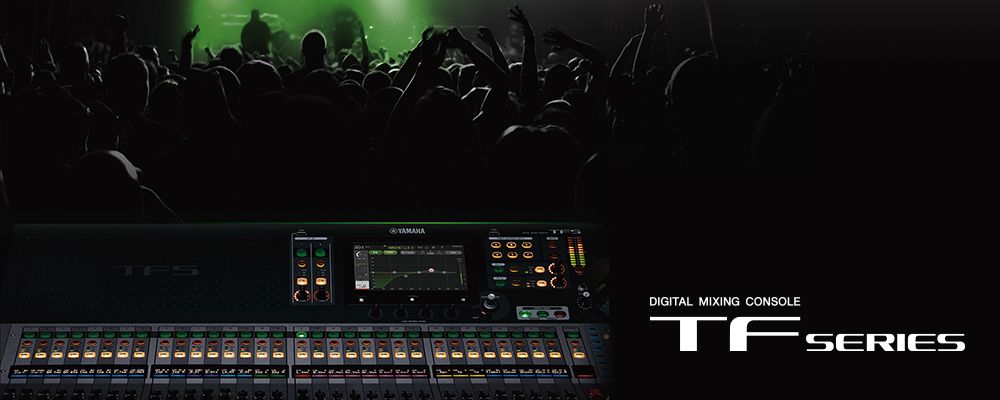
The Yamaha TF3 represents a significant step up in capacity and sophistication from the TF1. With 32 channels of mixing capability, eight auxiliary buses, and expanded processing power, the TF3 handles the audio demands of medium-sized churches that run larger worship bands, multiple services with different musicians, or complex audio requirements across larger facilities.
Assessing Whether TF3 is Right for Your Church
The TF3 makes sense if your church regularly operates with 20+ simultaneous audio inputs. If you run a large contemporary worship band with multiple keyboards, background vocalists, live drums, and comprehensive sound design, the TF3 provides comfortable headroom that the TF1 might lack under extreme loads.
The expanded auxiliary bus count—eight stereo buses instead of TF1’s four—enables sophisticated monitoring capabilities. You can provide independent mixes for different areas of your facility, multiple monitor mixes for the band, and dedicated feeds for broadcast or effects processing.
Physical Setup and Network Configuration
The TF3 is larger and heavier than the TF1, requiring dedicated console furniture or rack mount space. Before purchasing, ensure you have appropriate physical space and adequate ventilation for the mixer’s rear panel.
Connect the TF3 to your network through its Gigabit Ethernet port. Navigate to the System Settings and configure network settings to connect to your facility’s network. If you’re planning to use remote control applications or network audio expansion, configure network parameters now.
Connecting Your Audio Infrastructure
The TF3 provides 16 physical analog audio inputs plus expansion capabilities through digital networking. Begin by mapping out your church’s audio sources and assigning them to specific TF3 input channels. Create a clear diagram showing which source feeds which input.
Connect your microphones with appropriate gain staging—speaking into each microphone while setting input gain so peaks reach approximately -12 dB. Do this methodically for every input you plan to use regularly, establishing consistent gain structure across all sources.
Configuring Your Main and Auxiliary Outputs
With inputs connected, establish your primary mixing path. Route your configured inputs to your main stereo mix through the MIX1 bus. The TF3’s expanded auxiliary bus count lets you create sophisticated monitoring infrastructure.
Configure AUX1 and AUX2 as stage monitor feeds—AUX1 for your main band monitor, AUX2 for additional monitors or overflow areas. Configure AUX3-4 as effects sends if you’re using reverb or delay devices. Configure AUX5-6 as broadcast feeds if you’re streaming to online platforms.
This expanded bus infrastructure allows you to maintain completely independent mixes for different purposes. Your FOH mix optimizes for room acoustics and live audience experience. Your monitor mixes optimize for stage performers’ needs. Your broadcast mix optimizes for online viewers. All happening simultaneously from a single mixer.
Advanced Mixing Capabilities
The TF3’s processing architecture provides significantly more headroom than the TF1. You can apply comprehensive parametric EQ, compression, gating, and effects processing to numerous channels simultaneously without reaching processing limitations.
Use this capacity thoughtfully. Apply gentle compression to vocal channels to smooth performance variations. Add parametric EQ to compensate for room acoustics or microphone characteristics. Use gating on ambient microphones to reduce unwanted room noise. These processing choices, multiplied across many channels, create the polished, professional audio that distinguishes well-mixed services from adequate ones.
Creating Scene Structure for Complex Services
With the TF3’s capacity, you can create remarkably detailed scenes for different service elements. Create highly specific scenes: “Worship Set 1 - Opening,” “Sermon Portion 1,” “Communion,” “Worship Set 2 - Closing,” each optimized for that exact portion of your service.
Because the TF3 has significant processing capacity, you can apply comprehensive effects chains, multiple bus compression, and detailed EQ to numerous channels simultaneously. Build your scenes with this capacity in mind, creating sophisticated processing that supports your worship aesthetic.
Monitor Mixing for Complex Band Setups
With eight auxiliary buses, you can provide nuanced, independent monitor mixes for different musicians. The drummer might hear primarily drums and click track. The keys player hears keyboards and guide vocals. The bass player hears bass and kick drum. The lead vocalist hears their own vocals and band instruments slightly lower.
This level of customization is valuable for larger worship bands where musicians need to hear specific elements to perform together effectively. Each musician feels confident and in time, knowing exactly what they need to hear is being provided in their monitor mix.
Backup and Redundancy Planning
For churches relying heavily on the TF3 for their audio infrastructure, having backup capability is important. Some churches maintain a secondary TF1 as a fallback for basic mixing. Others maintain multiple TF3 units distributed across different spaces.
Export your show files weekly to USB backup. Maintain multiple copies of your configuration files in different secure locations. This protection ensures that if hardware failure occurs, you can restore your carefully crafted mixing setup quickly.
Remote Control and Network Integration
The TF3 supports remote control through Yamaha’s StageMix application, just like the TF1. Install StageMix on iPad and position your operator where they can best hear and respond to your mix. The expanded capacity of the TF3 doesn’t change how remote control works—it simply gives you more powerful options available through that remote interface.
Commissioning Your TF3 System
Before trusting the TF3 with your first live service, spend substantial time in rehearsal becoming familiar with its layout and workflow. Your entire mixing team should participate in this commissioning process. Have operators practice recalling scenes, adjusting monitor mixes, and handling complex mixing tasks.
Test your backup procedures. Export and restore show files. Verify that your remote control app works properly. This preparation ensures that when you go live, your team has confidence and has already encountered and resolved most potential issues.
Your Yamaha TF3 now provides the expanded capacity and sophisticated capabilities that medium-sized churches require for reliable, professional audio across complex worship services.