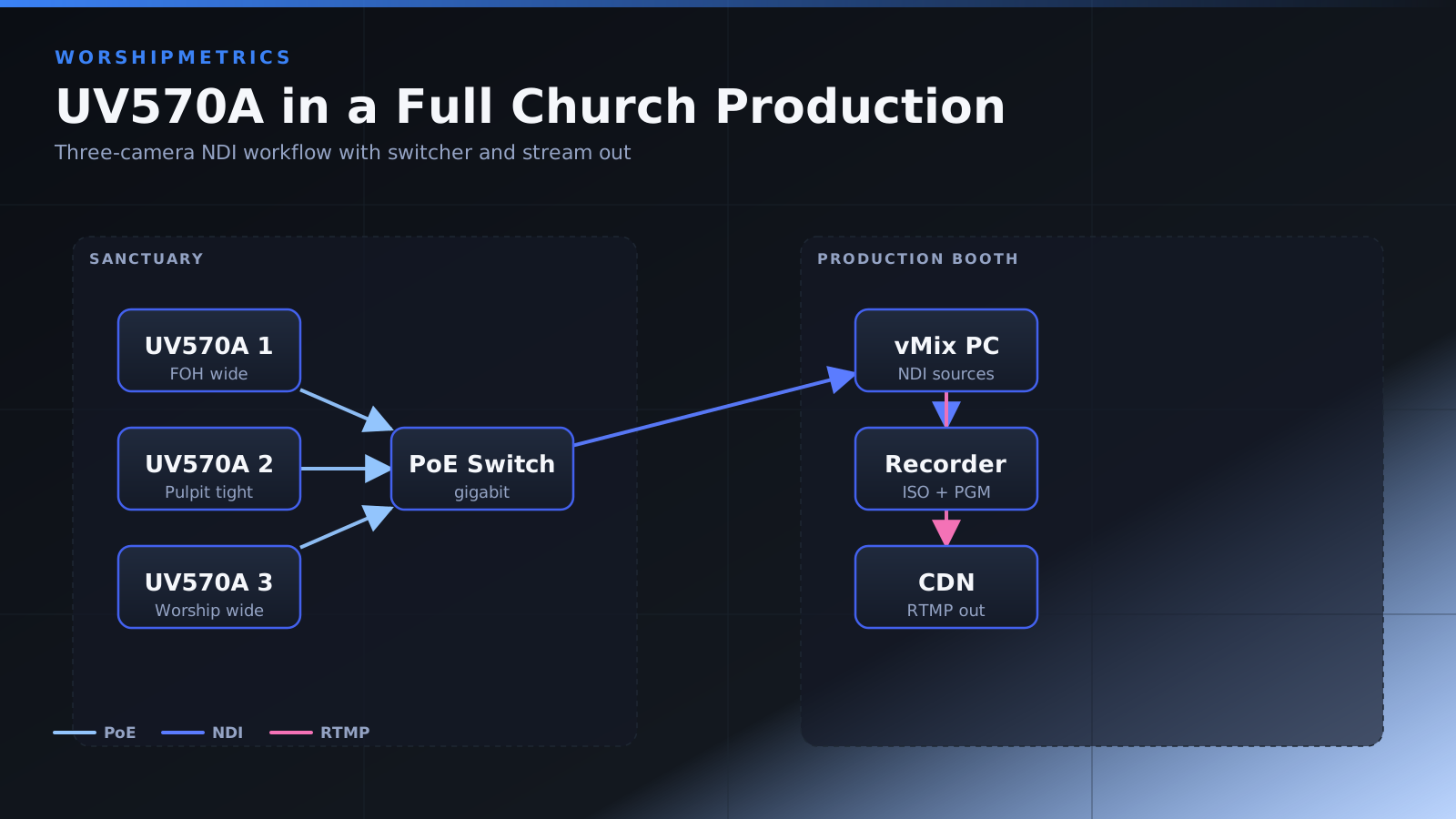
The Minrray UV570A’s professional-grade 30x zoom and NDI capability make it an excellent centerpiece for a complete church broadcast production. This guide covers building a full production workflow that includes the UV570A alongside other equipment.
Assessing Your Current Production Setup
Before integrating the UV570A, evaluate your existing broadcast infrastructure. What switcher or broadcast software are you using? What are your current streaming destinations (YouTube, Facebook, etc.)? Do you have multiple cameras or just one?
Understanding your current setup helps you plan how the UV570A fits into your existing workflow. In most cases, the UV570A replaces an older single camera or works alongside existing equipment.
Planning a Multi-Camera Production
If you’re building a multi-camera system, plan how the UV570A will be used alongside other cameras. The UV570A’s 30x zoom makes it ideal as your primary dynamic camera, while a second camera might provide a static wide shot.
Identify what shots are most important for your broadcast. The UV570A should handle those dynamic, zoomed shots that require operator skill.
Preset Strategy for Sunday Services
Create presets that match your typical service flow. A standard hour-long service might use eight to twelve presets across different segments.
Example presets: Opening wide stage, pastoral introduction (medium), worship song (band focused), transition (medium stage), sermon (pulpit close-up), congregational song, closing prayer, final song. Document your preset plan before saving presets.
Network Infrastructure Planning
Ensure your network can support NDI video from the UV570A. A gigabit switch with adequate capacity is essential.
If you’re planning multiple cameras, discuss bandwidth requirements with your IT administrator. A managed switch with QoS is ideal for multi-camera deployments.
Broadcast Software Configuration
Configure your broadcast software (OBS, vMix, etc.) to include the UV570A. In OBS, add the NDI source. In vMix, add the NDI input and potentially enable PTZ controls.
Set up your scene layouts, graphics, titles, and overlays. Test that the UV570A video appears correctly with all your production elements.
Control Station Setup
Establish a dedicated control station for your camera operator. This might be in your control room, sound booth, or elsewhere depending on your facility layout.
Provide the operator with a clear view of the broadcast output so they can see what’s actually being transmitted. Most operators appreciate seeing the program output on a monitor while they operate the camera.
Operator Training and Rehearsal
Before using the UV570A in a live service, thoroughly train your operators. They need to understand how to use the joystick or controller, how to recall presets, and how their actions affect the broadcast output.
Run a full rehearsal with the actual service structure. Have your operators practice recalling presets in the correct order and at the right times.
Camera Positioning and Sight Lines
Position the UV570A where it can see your entire stage and some of the congregation. The 30x zoom works best from a position with good sight lines to all areas you want to capture.
Mount the camera securely so vibration from the pan-tilt mechanism doesn’t cause drift. Ensure cables are routed safely and don’t interfere with camera movement.
Lighting Coordination
Work with your worship leader and lighting team to ensure adequate lighting for both in-person worship and video broadcast. Different lighting for worship looks might need to be adjusted slightly for optimal camera performance.
The UV570A’s autofocus and exposure adjustment usually handle varied lighting well, but extreme lighting challenges can affect video quality.
Streaming and Recording Configuration
Configure your streaming settings for your destination platforms. YouTube, Facebook, and other platforms have different optimal bitrates and resolutions.
Record locally to your computer or network storage for archival. Many churches record at higher quality than they stream to the internet, giving them excellent archive footage for later editing.
Emergency Procedures
Develop backup procedures in case the UV570A fails. Do you have a backup camera? Can an operator manually set a preset position if the joystick fails?
Have your team understand the backup plan so they can execute it smoothly if something goes wrong during a live broadcast.
Audio Integration
While the UV570A is purely a video camera, ensure it integrates well with your audio system. Most churches keep audio separate from video, with audio coming from a mixing console.
Verify that your broadcast software correctly combines the UV570A video with audio from your audio mixer.
Graphics and Lower Thirds
Plan how you’ll display graphics, titles, church information, or speaker names with your UV570A video. Design overlays that complement the video without obscuring important content.
Test graphics with various zoom levels of the UV570A to ensure they remain readable and well-positioned.
Monitoring and Adjustment
During your first few broadcasts, monitor the setup carefully. Watch for any technical issues, quality problems, or workflow problems.
Ask your congregation or online viewers for feedback about the video quality and framing. Use this feedback to fine-tune your presets and configuration.
Building Consistency
Once your UV570A is fully integrated and working well, strive for consistency. Use the same presets for the same shots each week. Train all operators to follow the same workflow.
Consistency is what makes your broadcast feel professional and polished. Viewers notice and appreciate the smooth, consistent camera work that comes from repeatable presets and trained operators.
Growth and Expansion
As your comfort level grows, consider expanding your production. Add a second camera, implement automated preset recall based on service timing, or add more advanced graphics and effects.
The UV570A’s professional-grade quality and features support growth. Start with basics and add complexity as your team gains experience.
Documentation and Knowledge Sharing
Document your complete production workflow. Include camera positions, preset lists, operator procedures, and troubleshooting guides.
Make this documentation accessible to all team members so that new volunteers can learn your system quickly. Regular training sessions keep everyone on the same page.
Conclusion
The Minrray UV570A integrated into a complete production workflow transforms your church’s broadcast from simple to professional. The 30x zoom, NDI streaming, and professional build quality support broadcasts that viewers genuinely enjoy watching. With proper planning, operator training, and attention to detail, your church broadcasts will achieve a professional quality that reflects the importance of your ministry.