The Roland V-160HD is a professional-grade 16-input switcher for large, complex productions. It’s designed for theaters, broadcast studios, and large churches running multiple simultaneous streams or complex productions.
This guide covers basic setup for a church production context.
Physical Scale and Infrastructure
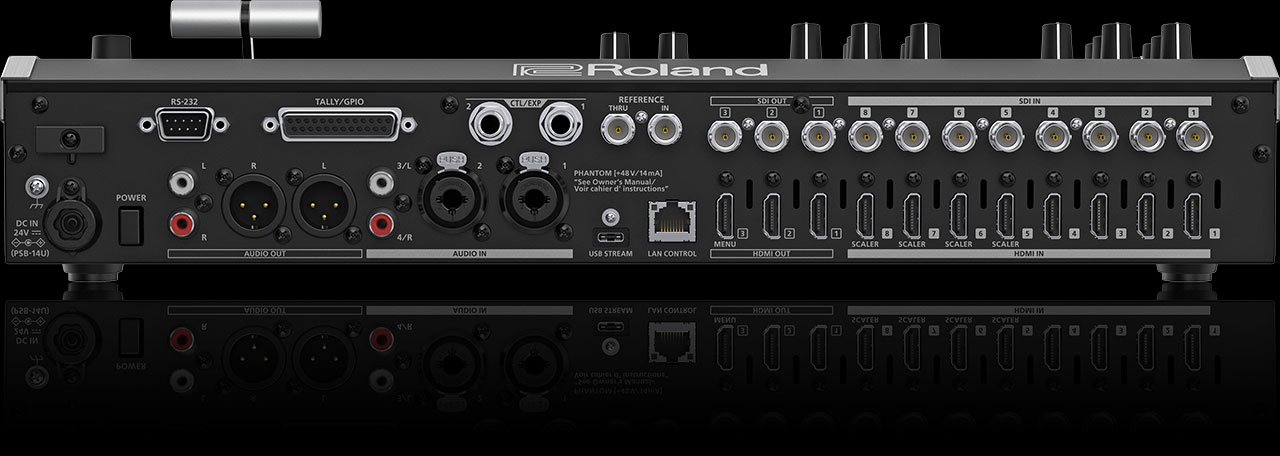
The V-160HD is a large device requiring substantial desk or rack space. It comes with an optional control panel adding even more size. Power requirements and cooling are significant.
Place the V-160HD in a well-ventilated location. Connect your SDI and HDMI inputs (up to 8 of each), audio inputs, Ethernet for control, and outputs. This is not a plug-and-play device—installation requires planning and sometimes professional assistance.
Input and Output Configuration
With 16 inputs (8 SDI and 8 HDMI), you can accommodate: eight cameras, graphics from two separate sources, two laptop inputs for PowerPoint and ProPresenter, a remote-site feed through a decoder, a document camera, a crawl feed, and spares.
Configure your inputs thoughtfully. Document which input is which. Label cables clearly.
The V-160HD has multiple output options: program HDMI, multiview HDMI, aux outputs, and streaming capability.
Control Panel Operation
The V-160HD typically comes with a physical control panel providing hardware buttons for switching, effects, and audio. This is essential for managing 16 inputs—software-only control would be overwhelming.
The control panel follows the same T-bar paradigm as Roland’s smaller models, but with many more buttons and more complex parameter control.
Streaming and Recording
The V-160HD can stream directly to YouTube or Facebook, similar to smaller Roland models. Configure your stream key and credentials in the device menu.
With 16 inputs and multiple output options, you have flexibility in what to stream: your program output, a custom multi-input view, or a secondary stream.
Network Integration
The V-160HD’s LAN port is for remote control; it has no NDI input. To bring in satellite campuses or remote presenters, use a decoder that turns their NDI or SRT stream into HDMI or SDI for one of its inputs.
Network configuration requires IT knowledge. Work with your church’s IT team to set up properly.
Audio Integration
Professional XLR audio inputs and outputs. Your audio mixer can integrate seamlessly. Multiple audio channels and mixing capability.
This is substantially more complex than smaller switchers.
When V-160HD Makes Sense
Large churches (1000+ attendance) with professional production ambitions. Multi-campus situations requiring complex input coordination. Professional event production beyond worship services. Dedicated video production team with significant technical expertise.
For most churches, the V-160HD is overbuilt and too complex. Even large churches often thrive with an ATEM Mini Pro or Mini Extreme.
Comparison to ATEM Models
The ATEM Television Studio HD is Blackmagic’s comparable professional option. Both are expensive and complex. Choose based on your existing equipment ecosystem and technical team expertise.
Your Setup Workflow
This is beyond the scope of this guide. The V-160HD requires professional installation and ongoing technical support. Consult Roland documentation and consider hiring a professional AV integrator.
For most churches, smaller switchers (ATEM Mini family, Roland V-1HD) are more appropriate. The V-160HD is for exceptional circumstances.