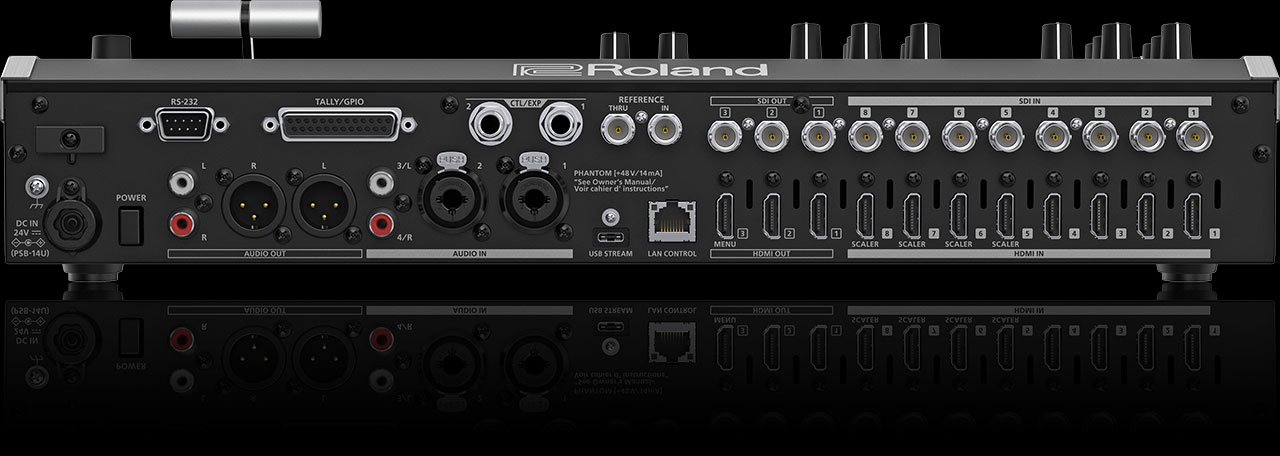
The Roland V-160HD can receive NDI (Network Device Interface) feeds, allowing you to bring video from remote campuses, remote presenters, or other sources over your network. This enables sophisticated multi-campus productions coordinated from a central control room.
This is advanced territory requiring network knowledge and planning.
NDI Basics for Churches
NDI is a networking protocol that sends high-quality video over your church’s Ethernet network. A remote site (satellite campus, remote office, etc.) encodes its video to NDI, sends it over your network to your main production site, where the V-160HD receives it as an input.
This allows decentralized capture with centralized production control.
Encoding NDI at Remote Sites
Each remote campus needs an NDI encoder. Options include: Kiloview N2 (HDMI-to-NDI encoder, ~$300), software encoders like OBS with NDI plugin, or professional NDI encoders.
At each remote site: camera or presentation feed → encoder → NDI output onto your network. The remote site doesn’t need high-end equipment, just an encoder and network connectivity.
Receiving NDI in the V-160HD
The V-160HD has NDI input capability (typically built-in or via optional module). Configure the V-160HD to receive NDI sources. It will scan your network and discover available NDI feeds.
Assign each NDI feed to an input on the V-160HD. Now remote cameras or presentations appear as inputs just like local HDMI sources.
Network Requirements
Your church network must support video streaming. This is data-intensive—a single 1080p30 NDI stream uses about 200 Mbps, and multiple streams can quickly exceed typical office network capacity.
Work with your IT team to ensure your network can handle your NDI requirements.
Synchronization Across Campuses
When mixing local and remote NDI sources on the V-160HD, audio and video sync is critical. Verify that all NDI encoders are configured to the same frame rate and resolution.
Minor sync issues (a frame or two) are acceptable. Large sync gaps indicate encoder problems.
Multi-Campus Worship Production Workflow
Main campus: local cameras → V-160HD inputs. Satellite campus 1: camera → Kiloview encoder → NDI → V-160HD input. Satellite campus 2: same setup.
Control operator at main campus: mixes all inputs (local and remote) on the V-160HD. Single program output is streamed to YouTube, available to all campuses.
All campuses watch the main campus stream, or they can watch their own campus camera full-screen with the option to see what the main campus is producing.
Disaster Recovery and Backup
If a remote campus’s network connection drops, its NDI feed becomes unavailable. The V-160HD switches to a backup source (maybe a generic “satellite campus” slide) until the remote feed returns.
Plan for these outages. Have fallback content ready.
Audio Coordination Across Campuses
Each campus needs coordinated audio. Typically, main campus audio (music, pastor speaking from main) is sent to satellite campuses as background, with each satellite’s local presenter’s audio mixed in.
This requires careful audio setup and a dedicated audio mixer.
Latency and Lip Sync
Network latency can introduce audio/video sync issues. NDI typically has lower latency than streaming to YouTube and back, but it’s still present.
For critical moments (pastor speaking), position the V-160HD to use the local audio feed and remote video feed, or find audio and video that match.
Scaling Beyond Two Campuses
The V-160HD can handle multiple NDI inputs, but network bandwidth becomes the limiting factor. Two or three remote NDI sources is typical. Beyond that, your network might not support the bandwidth.
When NDI Is Appropriate
Large multi-campus churches coordinating production across locations. Events where you want to mix presentations from multiple rooms. Training or simulcast scenarios where multiple locations produce content simultaneously and you need to mix them.
For most churches, simpler setups (each campus streams independently to YouTube) are more practical than NDI-based centralized production.
Your NDI Production Workflow
This is complex and requires significant planning. Work with an AV integrator who has multi-site NDI experience. The technical requirements are substantial.
The V-160HD is capable of this, but the real work is in network infrastructure, encoder setup, and audio coordination. Don’t underestimate the complexity.
NDI is powerful for large, well-resourced churches. Most churches are better served by simpler approaches.