The Teradek VidiU Go is a portable streaming encoder specifically designed for outdoor events where traditional Ethernet or Wi-Fi connectivity isn’t available. Unlike the standard VidiU X, the Go includes built-in cellular connectivity and supports bonding multiple cellular connections to create a stable, high-bandwidth stream from nearly anywhere. This guide covers setup and configuration for outdoor church streaming.
Understanding Cellular Bonding
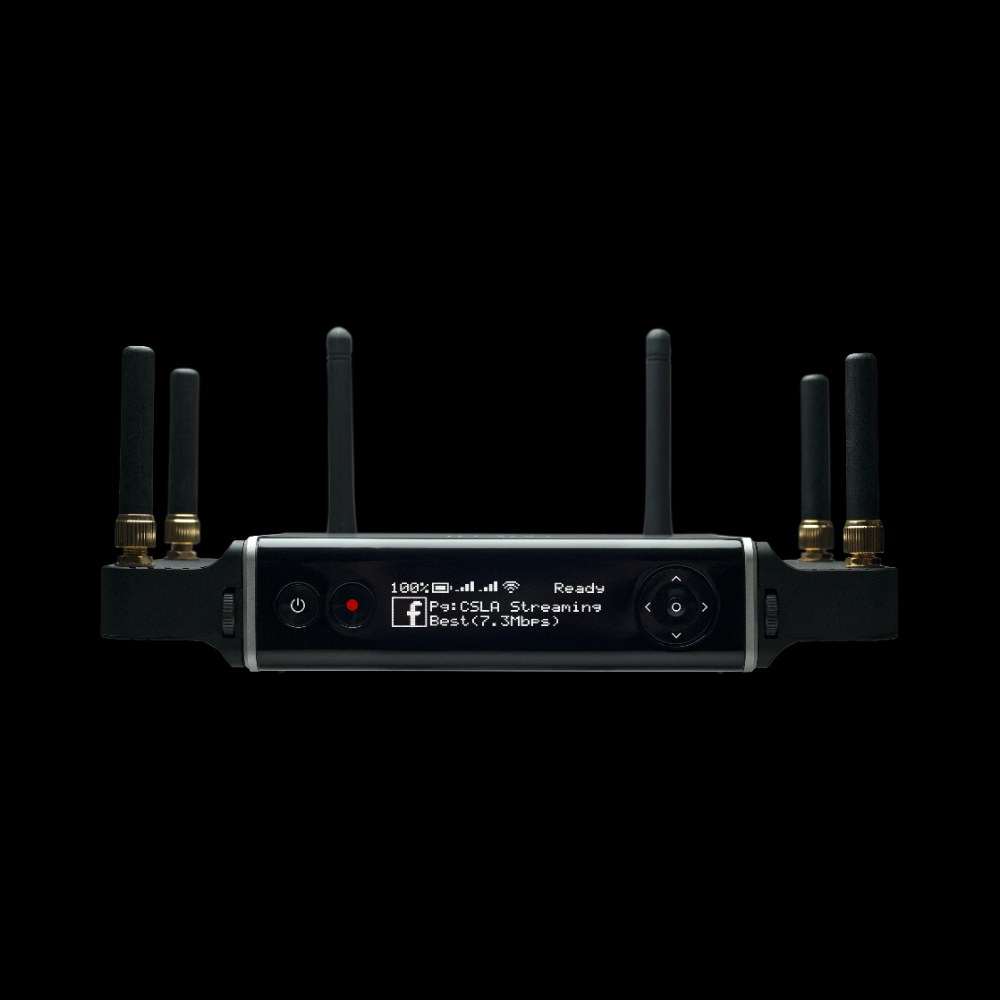
Cellular bonding is the practice of combining multiple mobile signals into a single logical connection. Instead of relying on one cellular carrier’s signal, the VidiU Go can simultaneously connect to multiple carriers (via different SIM cards) or multiple access points (via cellular and Wi-Fi together). This provides redundancy and increased bandwidth.
For example, if you insert SIM cards from both Verizon and AT&T, the VidiU Go can draw bandwidth from both carriers simultaneously. If one carrier’s signal is weak, the other compensates. If one connection drops temporarily, the other continues. This is far more reliable than a single cellular connection for critical broadcasts.
Physical Setup and SIM Card Installation
The VidiU Go arrives with slots for multiple SIM cards. The exact number varies by model (typically 2-4 SIM slots). Before your first outdoor event, activate SIM cards from at least two different carriers and obtain data plans with sufficient monthly allowances for streaming.
A two-hour service streamed at 6000 kbps consumes about 5.4 GB of data. Ensure your plans aren’t limited (some cheap plans throttle after 50 GB monthly). Unlimited or very high data cap plans are ideal for regular streaming.
When you receive your SIM cards, insert them into the VidiU Go according to your device’s manual. Each SIM slot is spring-loaded—slide the SIM card in until it clicks. Ensure all SIM cards are fully inserted before powering on the device.
Power on the VidiU Go. The device boots and detects all installed SIM cards. You should see indicators on the front panel showing signal strength for each carrier. Optimal setup has at least 2-3 bars of signal for each SIM card.
Network Configuration for Cellular Bonding
Access the VidiU Go’s web interface using the same method as the VidiU X—connect to the device via Wi-Fi or Ethernet (if available) and navigate to its IP address or .local address in a web browser.
Navigate to Network or Cellular Settings. You’ll see all installed SIM cards listed with their carriers and current signal strength. The VidiU Go automatically enables all available SIM cards for bonding by default.
In the bonding settings, you can typically configure load balancing (distribute traffic equally across all carriers) or priority settings (use one carrier primarily, switching to another if signal is lost). For outdoor events, load balancing is recommended—it uses all carriers’ bandwidth simultaneously, providing maximum throughput and reliability.
The interface might also allow you to prioritize specific carriers by quality or speed. Some carriers have better coverage in specific areas, so you could configure the VidiU Go to prefer the stronger signal in your particular venue.
Connecting Your HDMI Video Source
Just like the VidiU X, the VidiU Go has an HDMI input. Connect your video camera or mixer output to this input. Power on your video source and ensure it’s outputting video.
In the web interface, navigate to Input and verify “HDMI Signal Detected” appears. The detected resolution and frame rate should match your video source’s output.
The VidiU Go operates exactly like the VidiU X from an encoding perspective—the key difference is its cellular connectivity rather than relying on Ethernet or Wi-Fi.
Configuring Your Streaming Destination
Navigate to Streaming in the web interface. Add your streaming destination (YouTube, Facebook, or custom RTMP server). Enter your stream key and configure bitrate and resolution settings.
For outdoor events with cellular connectivity, consider conservative bitrate settings. Even with bonded cellular from multiple carriers, streaming is less stable than wired Ethernet. Set bitrate to 4000-5000 kbps to provide headroom for cellular fluctuations.
The VidiU Go can stream to the same destinations as the VidiU X (YouTube, Facebook, custom RTMP). Configure these the same way you would with a wired encoder.
Testing Cellular Connectivity Before Your Event
Never debut a new cellular setup during a critical live service. Schedule a test run at your outdoor venue at least one week before streaming an actual service there.
Arrive at the venue with your VidiU Go and configured SIM cards. Power on the device and check signal strength for each carrier in the web interface. If you’re getting weak signals (1 bar or less) from all carriers, you might have a problematic location—consider a different venue or bring an external cellular antenna booster.
Start streaming a test broadcast to YouTube or Facebook. Monitor the stream quality on your phone or tablet. Watch for dropped frames, stuttering, or quality degradation. Stream for at least 30 minutes to simulate a full service.
If performance is poor, try temporarily disabling one or more carriers in the bonding settings to identify which carrier is causing issues. Some venues have excellent Verizon coverage but poor AT&T coverage, for example. Document which carriers work best at your venue.
Bonding Carriers Effectively
For optimal bonding, use carriers with complementary coverage. Major carriers like Verizon, AT&T, and T-Mobile use different network infrastructure and often have varying coverage in specific areas.
In rural areas where your church might hold outdoor services, coverage can be spotty. Before selecting which carriers to bond, check coverage maps for each carrier at your specific venue. AT&T might have excellent coverage while Verizon is weak, or vice versa.
Some churches partner with volunteers who have different carriers, asking them to bring their cellular hotspots as backup bonding sources. This leverages equipment you might already have while providing carrier diversity.
Data Plan Considerations
Streaming via cellular consumes data rapidly. Calculate your monthly data needs based on service frequency and length. If you stream every Sunday for two hours at 5000 kbps, that’s about 20 GB a month (2.25 GB per hour × about 9 hours a month).
Ensure your data plans can handle this consumption. Unlimited plans are ideal. Some carriers offer streaming-specific plans optimized for video. Verify you don’t have throttling clauses—some plans reduce speed dramatically after a certain data threshold.
Consider your plan costs multiplied across multiple carriers. Bonding three carriers with unlimited data plans costs more monthly than a single carrier, but the reliability improvement is often worth it for critical broadcasts.
Power and Equipment Considerations
The VidiU Go requires power. For outdoor events without shore power, you’ll need a portable generator or large battery pack. A small inverter generator (1000W) is adequate and much quieter than larger generators.
Ensure your power supply is adequate for extended streaming. A two-hour service plus setup and testing time might require four hours of power generation.
Protect your VidiU Go from weather. Outdoor venues might have rain, wind, or harsh sun. Use a weatherproof case or tarp to shield the device, ensuring ventilation so it doesn’t overheat.
Antenna Placement and Signal Optimization
The VidiU Go has internal antennas for cellular connectivity. For maximum signal strength, position the device with clear line-of-sight to nearby cellular towers (typically toward a major city or developed area).
Some VidiU Go configurations support external antenna connectors. If your unit has this capability and your venue has weak signal, consider connecting external directional antennas or signal boosters designed for cellular frequencies.
Position the device in an elevated location rather than on the ground. Ground-level placement significantly reduces signal strength.
Documentation and Redundancy
Document your cellular bonding setup carefully. Create a checklist of which carriers you’ve bonded, which SIM cards are active, plan renewal dates, and venues where you’ve tested streaming successfully.
Establish a backup plan. If cellular bonding fails completely, can you switch to a Wi-Fi hotspot? Can you fall back to recording the service locally and uploading afterward? Having contingencies ensures a single point of failure doesn’t prevent broadcast entirely.
The Teradek VidiU Go transforms outdoor events from a streaming impossibility into a genuinely reliable broadcast option. With proper preparation and testing, you can stream Easter sunrise services, baptisms in rivers, or outdoor weddings to your global congregation.