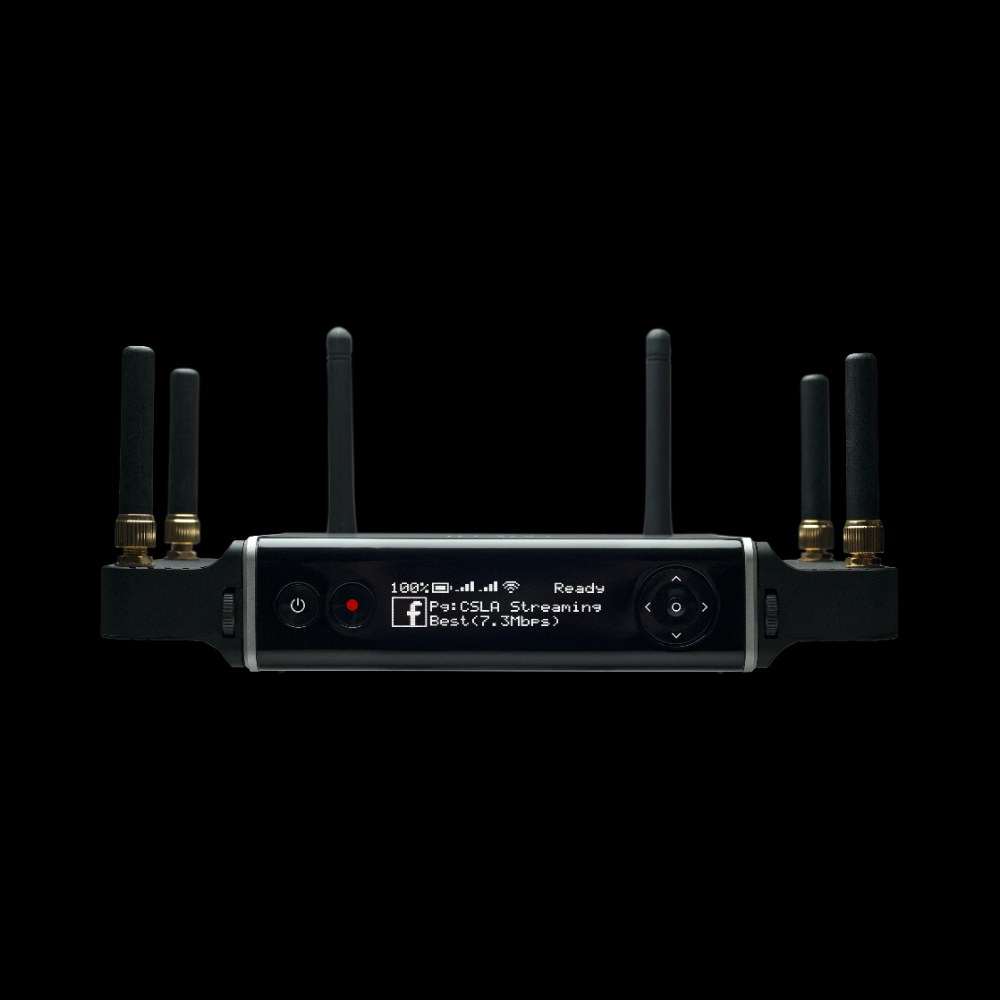
Outdoor church events—Easter sunrise services, riverside baptisms, mountaintop prayer gatherings—create unique streaming challenges. Your venue might be miles from reliable internet, in an area with weak Wi-Fi coverage, or in an environment where running cables is impractical. The Teradek VidiU Go’s cellular bonding capability was designed precisely for these scenarios. This article covers practical strategies for reliable outdoor streaming.
Site Survey and Planning
Before committing to stream an outdoor event, visit the venue and assess cellular connectivity. Arrive at the time of day you’ll be streaming (early morning for sunrise services, afternoon for outdoor baptisms, etc.) and test signal strength with your devices and carriers.
Use a cellular signal meter app on your phone to see which carriers have the best signal at your venue. Visit different areas of the venue to identify the location with the strongest combined signal. This is typically elevated terrain with clear line-of-sight to nearby cities.
Document everything: which carriers work, approximate signal strength, and what the sky looks like (cloud cover or heavy foliage will degrade signals). Return to this information when setting up for the actual event.
Equipment Placement Strategy
Place the VidiU Go in the location with the strongest cellular signal. This might be elevated ground, a high point in a parking area, or even on a tripod several feet off the ground. Elevation matters—ground-level placement significantly reduces cellular signal strength.
If possible, run a short HDMI cable from your camera or mixer to the VidiU Go. Position the encoder itself for optimal cellular reception, even if it’s separated from your video equipment by 50-100 feet. The HDMI cable can span that distance without signal loss.
Protect the VidiU Go from elements. If rain is forecast, cover the device with a weatherproof case or tarp while ensuring ventilation to prevent overheating. For harsh sun, provide shade without restricting antenna area.
Power Management for Extended Outdoor Streaming
Outdoor events without reliable power require battery backup or generator power. Calculate your power needs realistically. A typical VidiU Go draws 15-25 watts depending on cellular activity. Over a two-hour event plus setup time (4 hours), you might need 100-150 watt-hours of energy.
A small portable inverter generator (typically 1000W) is adequate and much quieter than larger generators. Some churches use automotive power inverters connected to the venue’s vehicle to supply power without needing a dedicated generator.
Alternatively, battery backup systems like Eaton or APC uninterruptible power supplies (UPS) can provide 2-4 hours of runtime. For critical outdoor events, some churches use multiple battery backups in sequence—swap batteries when one runs out of power.
Ensure your power system is accessible but safely positioned away from foot traffic and weather exposure.
Cellular Bonding Strategy for Outdoor Venues
Your VidiU Go with multiple SIM cards provides bonding capability—use it aggressively at outdoor venues where reliability is paramount. If you have SIM cards from three carriers, enable all three for bonding. The combined bandwidth and redundancy are worth the monthly costs.
Monitor signal strength throughout your event using the VidiU Go’s web interface on a tablet. If one carrier’s signal degrades (perhaps due to weather or time of day), the other carriers compensate. If any single carrier drops completely, the others seamlessly continue streaming.
Some churches bring volunteer cellular hotspots from personal phones as additional bonding sources. If you have a Wi-Fi tethering option on your VidiU Go, this can provide supplemental bandwidth if multiple volunteers bring active hotspots.
Contingency Plans for Complete Connectivity Loss
Even with bonded cellular, total connectivity loss is possible (rare but possible in truly remote locations). Establish a contingency before the event.
Recording locally is the most practical backup. Configure the VidiU Go to record your event to local storage even while streaming. If streaming fails, you have a video file that you can upload to YouTube and Facebook after you return to a venue with good internet.
Alternatively, establish a relay agreement with someone at your main church building who has good internet. Your colleague streams the local video recording to YouTube after you return, going live at a scheduled time with an announcement that this is the recorded version.
For critical Easter services, some churches deploy two VidiU Go units with different carriers bonded differently, providing dual-path redundancy. If one unit fails completely, the other continues streaming.
Audio Handling for Outdoor Events
Audio quality is critical for outdoor services. Wind noise is the primary challenge—even a light breeze can overwhelm microphone audio if not properly managed.
Use a high-quality external microphone with a windscreen (a foam cover designed to reduce wind noise). Position the microphone to capture the speaker clearly while minimizing environmental noise. For outdoor baptisms, position the mic to capture the person being baptized and the pastor equally.
If your HDMI source doesn’t carry audio (some cameras output video-only), the VidiU Go can accept audio from a separate audio interface via USB if your model supports it. Check your device specifications.
Test your audio setup during your site survey visit. Record 2-3 minutes of audio and review it on your computer back home. If wind noise is problematic, invest in better windscreening or microphone technique.
Testing the Full Setup
Don’t debut a new configuration during a live service. Plan a full dress rehearsal at your outdoor venue one or two weeks before the actual event. Bring all equipment, set it up exactly as you’ll have it during the real event, and stream a complete test broadcast.
Stream for the full length of your actual event (two hours for most services) and monitor stream quality throughout. Watch for dropped frames, pixelation, or audio issues. Adjust your bitrate if needed—outdoor cellular is less predictable than wired connections, so conservative bitrate (4000 kbps) is often wiser than aggressive bitrate (7000-8000 kbps).
Test your backup contingency plans too. If streaming fails, confirm you can switch to recording locally. Test your power system for the full duration. Identify any equipment issues before the real event.
Communication Plan During Event
Establish clear communication between your AV tech, the event coordinator, and any volunteers assisting. Use radios, text messages, or simple hand signals (thumbs up when streaming starts).
Designate one person to monitor the VidiU Go’s web interface on a tablet throughout the event. They should watch for connectivity drops, excessive dropped frames, or error messages. If problems emerge, they can alert the AV tech or backup plans can be enacted.
Document what goes well and what causes problems. Keep detailed notes for future outdoor events.
Post-Event and Archival
After your outdoor event stream, confirm the recording is saved to YouTube or Facebook and is viewable. Some churches email a link to the stream to their congregation and post it on their website.
If you recorded locally as a backup, upload that recording to YouTube as well, either as the official archived version or as supplementary documentation of the event.
Clean and store your equipment properly after the event. Outdoor use exposes equipment to dust, moisture, and temperature extremes. Dry the VidiU Go thoroughly before storing it.
Scaling to Multiple Outdoor Events
If your church holds multiple outdoor events annually (Easter sunrise, summer picnics, outdoor baptisms, etc.), document what works at each venue. Create a “outdoor streaming kit” with proven equipment, configurations, and backup strategies.
Maintain your SIM cards and data plans year-round even if not actively streaming, so they’re ready when needed. Check plan balances monthly to ensure you haven’t exceeded data caps.
As you gain experience with outdoor streaming, you’ll refine your approach. The first outdoor stream is stressful; by the third or fourth, your team will execute with confidence.
The Teradek VidiU Go transforms outdoor events from a technical impossibility into a genuinely viable broadcast option. With proper planning, testing, and contingency strategies, you can reliably stream critical services from virtually any location.