Introduction
Proper physical installation of the AVKANS PTZ-U30 determines whether the camera functions well for years or becomes a problem over time. Unlike small cameras that you can mount quickly, the U30 requires thoughtful planning of mounting location, cable routing, power delivery, and network connectivity. The 30x zoom capability allows flexibility in where you place the camera, but power and cable infrastructure must be planned carefully.
This guide covers choosing a mounting location, installation best practices, cable management strategies, and long-term maintenance planning so your U30 installation is reliable and accessible for troubleshooting.
Choose the Optimal Mounting Location
The U30’s 30x zoom lets you position the camera in locations that would be impossible with fixed-lens cameras. You do not need a front-row position to frame a distant speaker; you can mount the camera at the back of the sanctuary or on a side wall and zoom to frame the pulpit with clarity.
When selecting a mounting location, consider these factors: can the camera see all the key positions in your service (pulpit, worship team, audience)? Will the camera be relatively stable and secure once mounted? Can you route power and network cables to the location? Can you access the camera for maintenance and adjustment?
Avoid locations where the camera will be directly hit by stage lighting, as heat buildup can affect camera reliability. Also avoid locations where the camera is exposed to strong air conditioning or heating that causes temperature swings.
Test your intended mounting location by temporarily placing the camera on a tripod at that location. Use the presets you created earlier to confirm that the 30x zoom covers all necessary positions with good framing. Take photos from that location showing the zoom range you need. This testing prevents mistakes in permanent installation.
Plan Cable Routes and Infrastructure
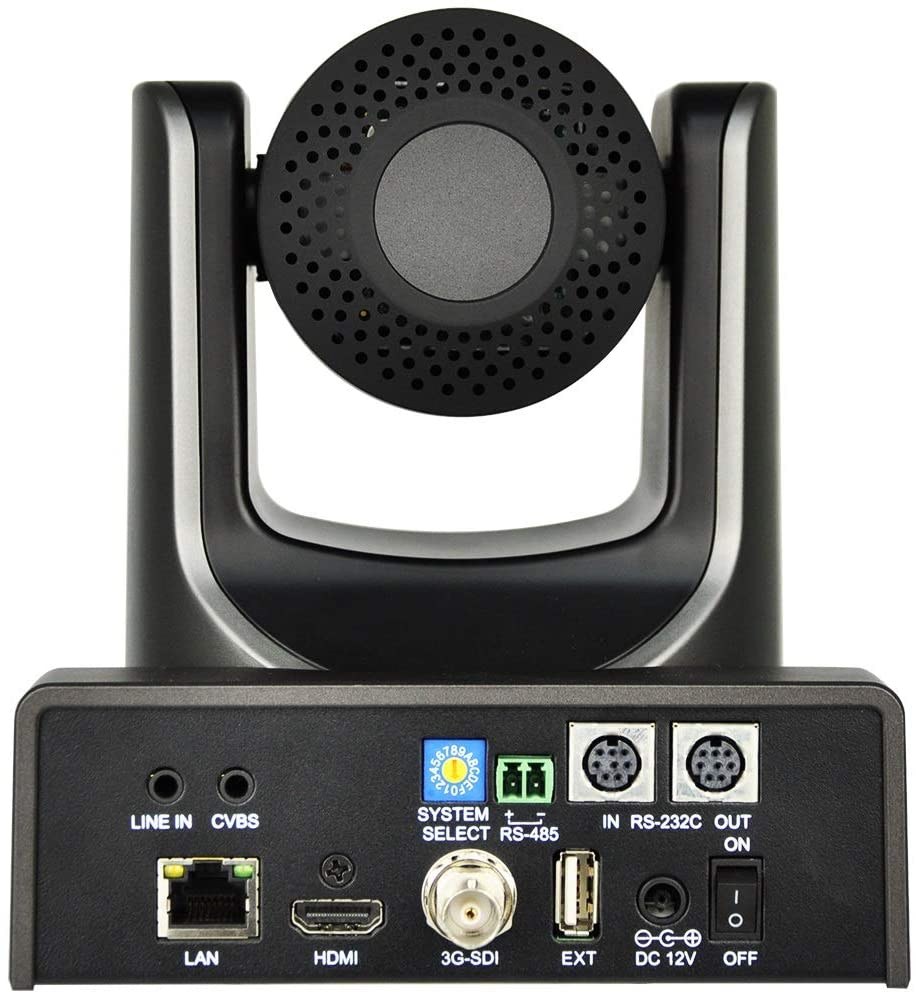
Before mounting the camera, plan how power and network cables will reach the camera location. The U30 requires both power and network connectivity, so you need to route cables from your equipment area to the camera.
Check whether existing cable trays, conduits, or pathways already exist in your sanctuary that can accommodate additional cabling. Church buildings often have existing infrastructure from previous AV installations that can be repurposed. Avoid running new cabling if you can use existing pathways.
If you must run new cables, plan the route to avoid creating visible clutter or tripping hazards. Cable can be routed above ceiling tiles, along walls using clips, through cable trays, or through conduit, depending on your building. Consult with your facilities team or AV installer about the best routing for your specific building.
Cables should be secured regularly with clips or supports so they do not sag or create tension on the camera connector. A cable that pulls on the camera connection will eventually fail.
Select Appropriate Mounting Hardware
The AVKANS PTZ-U30 is heavier than smaller cameras, so mounting hardware must be appropriate for the camera’s weight and size. Most installations use either a ceiling mount (for cameras mounted above the audience or stage) or a wall mount (for cameras mounted on a wall in a permanent location).
Ceiling mounts typically use a bracket that attaches to the ceiling structure, with an adjustable pan/tilt head that allows the camera to be positioned at the right angle. Wall mounts similarly use a bracket secured to the wall structure, with adjustment hardware to aim the camera correctly.
Have a qualified AV installer or your facilities team perform the mounting work. Camera mounting is not a task for volunteers unless they have specific experience with AV installation. A poorly mounted camera can fall, damaging both the camera and potentially injuring someone.
Route Power to the Camera Location
The U30 requires power from an outlet or power distribution system. If an outlet is not accessible at your camera mounting location, you have several options:
Install a new outlet at or near the camera location, which requires work by an electrician and ideally a conduit to protect the power cable.
Run power from an existing nearby outlet using a heavy-duty extension cord rated for the camera’s power requirements. This is less ideal than a dedicated outlet but is practical if outlets are nearby.
Install a dedicated power conduit from your equipment area to the camera location. This is more complex but creates a professional installation and simplifies troubleshooting.
Consult with your facilities and IT teams about the best approach for your church. Improper power installation can be a fire hazard, so take this seriously.
Route Network Connectivity to the Camera Location
The camera needs network connectivity for remote control and for video output if you are using network-based routing. Run a network cable from your switch to the camera location using the same routing as your power cable if possible.
Network cables should be cat5e or cat6 quality. Do not skimp on cable quality—a cheap network cable can introduce instability and make troubleshooting difficult.
The network cable should be secure and protected from damage. If the cable must cross a walkway, use a cable protector to prevent tripping or accidental damage.
Secure and Test the Installation
Once the camera is mounted, power is connected, and network cable is in place, test the installation before considering it complete. Confirm that power is delivered reliably, that the camera boots normally, and that network connectivity is stable.
Move the camera through its pan and tilt range using the web UI or controller. Confirm that the camera moves smoothly and that the mechanical positioning is stable and does not drift. If the camera exhibits any instability or unusual movement, investigate and correct the problem before using it in production.
Create a detailed photo record of the installation, showing the mounting location, cable routing, power source, and network connection point. Store these photos in a shared location so future maintenance is straightforward.
Document Your Installation for Future Maintenance
Create detailed documentation of your installation that includes:
The camera’s physical mounting location and mounting hardware used. A photo and description is helpful.
Cable routing: power cable path and network cable path, including conduit information if applicable.
Power source: outlet location, any extension cords used, and circuit information.
Network connection point: which network switch port the camera is connected to, and the static IP address assigned.
Contact information for the AV installer or professional who performed the installation, for future troubleshooting or maintenance needs.
Access procedures: how to safely access the camera if maintenance is needed.
This documentation should be stored in your church’s shared AV documentation folder and referenced when training new team members on camera operation and maintenance.
Plan for Long-Term Maintenance
The U30 can operate reliably for many years if maintained properly. Plan for periodic maintenance: inspect cable connections annually to ensure they remain secure, clean the camera lens occasionally to maintain image quality, and test the complete system at least quarterly to confirm everything is functioning.
If the camera needs software updates or firmware updates, plan the maintenance during a low-pressure time, not the day before a major service. Updates should be tested before they are deployed in production.
Conclusion
A properly installed AVKANS PTZ-U30 becomes an invisible part of your production system, working reliably week after week. The investment in good mounting hardware, careful cable routing, and detailed documentation pays dividends in long-term reliability.
Partner with qualified AV professionals for the physical installation work. A well-installed camera that is safely mounted with proper power and network connectivity will serve your church faithfully for years.