Planning Center Online (PCO) is where most churches organize their service order, song selections, and volunteer assignments. ProPresenter reading the same data directly from PCO eliminates manual data entry. Instead of typing songs into ProPresenter one by one, you import your entire service from PCO with a single click. Arrangements, tempos, and custom slides all sync automatically.
This integration saves time, reduces errors, and keeps your presentation software always in sync with your planning. This guide walks you through authorizing ProPresenter to access your PCO account and importing your first service.
Authorizing ProPresenter to Access Planning Center
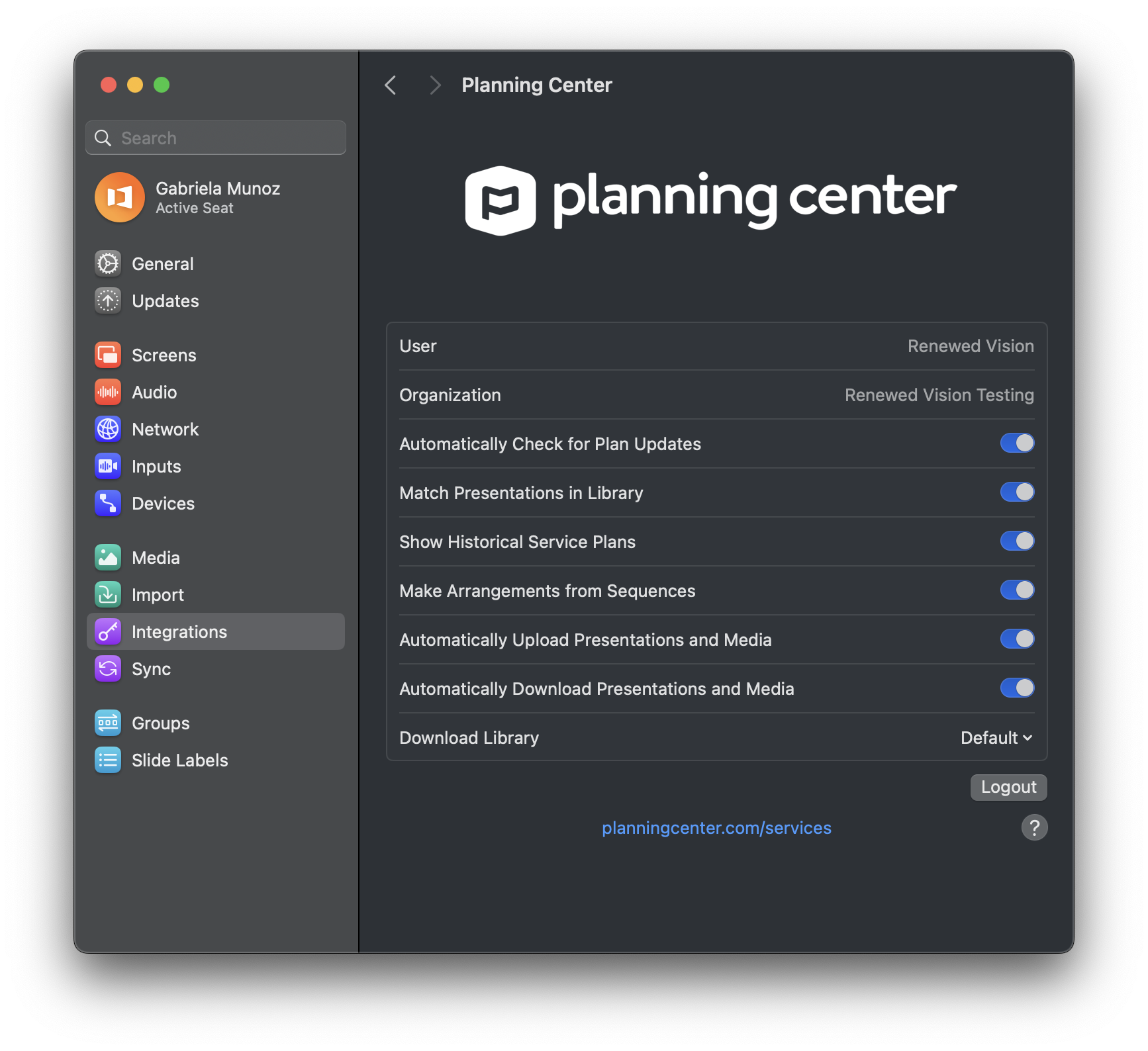
Open ProPresenter and go to ProPresenter → Preferences → Planning Center. Click “Sign In” and you’ll be directed to a Planning Center login page. Log in with your Planning Center credentials.
ProPresenter asks for permission to access your PCO account (specifically, to read your service plans and song library). Click “Allow” to grant permission. You’re returned to ProPresenter and the integration is authorized.
You only need to authorize once. ProPresenter will remember your connection and update automatically when you refresh.
Importing a Service Order
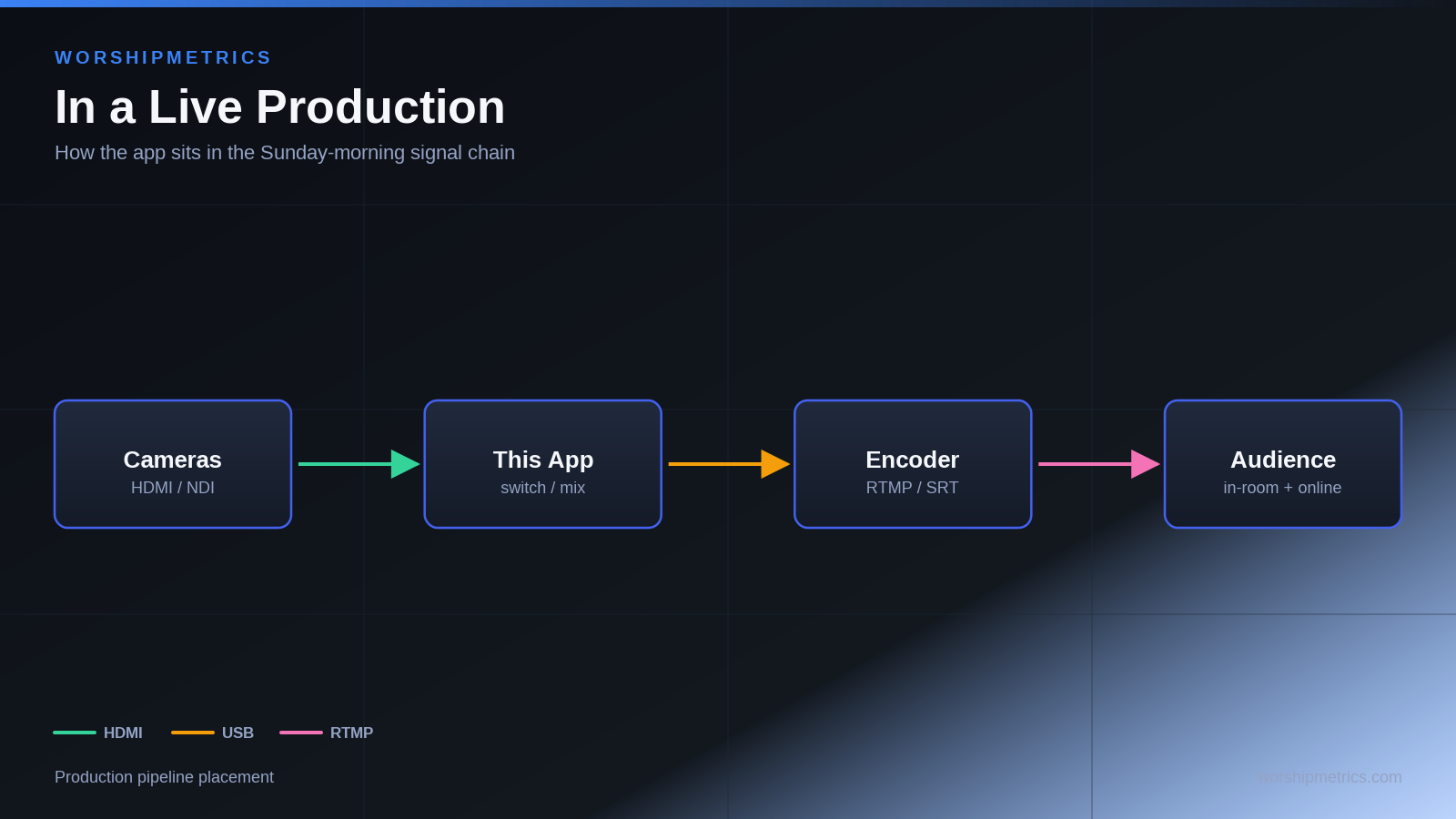
Now that ProPresenter is authorized, create a new presentation based on your PCO service plan. Go to File → New Presentation, and you’ll see an option to import from Planning Center. Click it.
ProPresenter shows a list of upcoming services from your Planning Center calendar. Select the service you want to import (this Sunday, for example). ProPresenter displays the songs and content scheduled for that service.
Review the service plan. You’ll see all songs, videos, scripture readings, and announcements listed in order. ProPresenter can import all of these automatically. Click “Import” and ProPresenter creates a complete presentation with all your songs, already arranged in service order.
Customizing Imported Content
Once imported, you can customize the presentation further. ProPresenter has automatically pulled songs from its database, but you can add notes, adjust transitions, or add custom slides specific to this week.
If your worship leader has special notes (a capo change, a key request, movement cues), you can add them now. These notes will appear on the stage display during service.
Add graphics or videos that aren’t part of the standard song template. For example, an offering video or announcement graphic.
Arrangement Syncing
ProPresenter pulls song arrangements from Planning Center. If your PCO plan specifies an arrangement (for example, “Hillsong: Oceans - in key of G”), ProPresenter imports that specific arrangement. Your musicians can see which arrangement is planned and prepare accordingly.
Some churches use this to coordinate with their band. Your band leader sets up the arrangement in PCO, ProPresenter imports it, and musicians see the same arrangement reference in both systems.
Handling Songs Not in ProPresenter’s Database
Most contemporary worship songs are in ProPresenter’s database. But occasionally you have a custom or very recent song not in the database. When you import from PCO, ProPresenter can’t find the song and alerts you.
For missing songs, you have options. Create a blank slide in ProPresenter and manually type the lyrics (time-consuming but works in a pinch). Purchase the song from ProPresenter’s online store if it’s now available. Or contact ProPresenter support to request the song be added to their database.
Most churches maintain a strategy for handling edge cases. Some accept that occasionally a song won’t be in ProPresenter and manually create slides. Others only plan songs they know are in the database.
Updating from Planning Center Mid-Service
If you discover during service that you need to adjust the service order or add a song, you can refresh the import from PCO. Go to File → Update from Planning Center. ProPresenter will pull any changes you made in PCO and update the presentation.
This flexibility is valuable. If your pastor adds a scripture reading 10 minutes before service, update the presentation in PCO and refresh ProPresenter, and the scripture slides appear without manual creation.
Keeping PCO as Your Single Source of Truth
The power of this integration is consolidation. Instead of maintaining a separate song list in ProPresenter, a separate service order in ProPresenter, and a separate list in PCO, you maintain only one: PCO. Everything else derives from it.
This means your band director, worship leader, and streaming team all reference the same service plan. Changes made in PCO automatically propagate everywhere.
Automating Song Transitions
PCO can specify transition times and song tempos. ProPresenter respects these. If you specify in PCO that a song is 3:45 long, ProPresenter can auto-advance slides after that duration (if you enable auto-advance). This removes manual slide timing and keeps the service flowing.
Most churches don’t use auto-advance because worship leaders sometimes extend songs or cut them short. Manual control is more flexible. But if you have a predictable service structure, auto-advance can simplify production.
Testing the Integration
Before relying on PCO import for a real service, test it. Create a test service in PCO, import it into ProPresenter, and verify all content imported correctly. Check that arrangements are correct, songs are in the right order, and custom notes appear.
Ask your worship leader to look at the imported presentation and confirm it matches their expectations. If something is missing or wrong, you can adjust in PCO and re-import.
Ongoing Workflow
As you move from week to week, the pattern becomes routine. Update your service plan in PCO (which you’re already doing for band, volunteers, etc.). Import it into ProPresenter with a single click. ProPresenter is now ready for service without manual song entry.
This is massive time savings over weeks and months. A church that manually entered songs into ProPresenter might spend 30 minutes per week on data entry. That same church using PCO integration spends 5 minutes per week and has fewer errors.
Planning Center Songs vs. Other Songs
PCO integration works best for songs that are part of your planned service. For spontaneous songs (a pastor requests a hymn that wasn’t planned, a band member wants to do a surprise arrangement), you manually add these to ProPresenter.
The integration doesn’t prevent you from manually adding content—you can have both imported content and manual content in the same presentation. But the bulk of your service is imported, which is efficient.
Professional Benefit
Churches using PCO integration often see improved service flow and fewer technical hiccups. Since everything is coordinated through one system, communications are clearer, everyone is on the same page, and surprises are minimized.
For streaming, this coordination is invaluable. Your director knows exactly what’s coming because the service plan is detailed in PCO. Transitions are smooth. Timing is predictable. Volunteers are confident.
ProPresenter and Planning Center integration is a gateway to higher-quality productions. The time you save on data entry becomes time you invest in polish and refinement.