The PreSonus UC Surface application transforms your iPad into a complete control surface for the StudioLive 32S. Rather than being confined to the physical console’s control area, your mixing operator gains freedom to position themselves anywhere in your facility with network connectivity. This remote control capability enables mixing approaches that stationary control simply cannot achieve.
Understanding UC Surface Capabilities
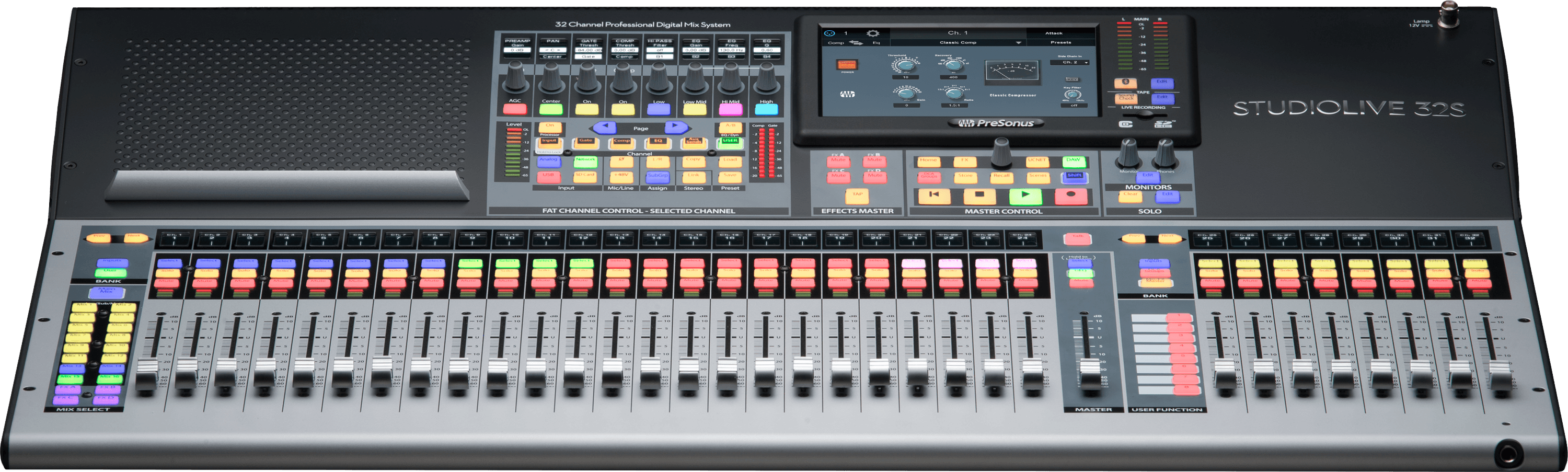
UC Surface provides complete mixing control through iPad—access to all channels, buses, processing, effects, and scene recall. The interface is logically organized and quickly becomes intuitive. Because the StudioLive’s processing is so comprehensive, controlling it remotely means you have access to sophisticated mixing tools from anywhere in your facility.
This capability is particularly valuable for proximity mixing—positioning your operator near the musicians to hear exactly what they’re hearing while maintaining full mixing control.
Network Infrastructure Preparation
For reliable remote control, ensure your network infrastructure is solid. The StudioLive 32S should connect via Gigabit Ethernet to your facility network, ideally a dedicated network separate from guest WiFi and office systems.
For iPad control, ensure your WiFi extends throughout your facility with strong signal. If signal is weak in expected mixing locations, consider adding a WiFi range extender or positioning your WiFi access point for better coverage.
Alternatively, use a wired Ethernet to WiFi bridge positioned near your mixing location, providing rock-solid network connectivity without relying on facility-wide WiFi coverage.
Installing UC Surface on iPad
Download the PreSonus UC Surface app from the Apple App Store onto your iPad. Ensure your iPad runs iOS 12 or later for full compatibility.
Once installed, open UC Surface and it will automatically search for available StudioLive consoles on your network. Your StudioLive 32S should appear in the list within a few seconds. Tap it to connect.
Authentication and First Connection
If this is your first UC Surface connection, you might be prompted for authentication. Enter your StudioLive’s password if one is configured, or use the default credentials if this is a new console.
Once authenticated, UC Surface connects and the complete mixing interface appears on your iPad. You’ll see all 32 channels, all buses, and access to every mixing function. The interface is remarkably comprehensive despite the screen limitations.
Understanding UC Surface Interface Layout
The primary view shows your channel faders vertically arranged. Swipe left or right to navigate between different channel pages if 32 channels don’t all fit on screen simultaneously. Tap channel names to access channel-specific controls like the Fat Channel processing.
At the bottom of the screen, tabs provide access to different functional areas: Channels, Buses, Master, Scenes, and others. Each tab reveals different aspects of the StudioLive’s mixing capabilities.
Customizing UC Surface for Your Workflow
UC Surface allows layout customization. You can arrange controls, resize elements, and optimize the interface for your specific mixing approach. Create different layouts for different mixing scenarios.
Create a “Main Mixing” layout that prioritizes the channels and buses you use most frequently. Create a “Monitor Mixing” layout if you have a dedicated monitor operator. Create a “Scene Recall” layout that makes scene selection prominent while minimizing other controls.
Switch between layouts by tapping the layout selector. This flexibility lets different operators have appropriate interface complexity for their responsibilities.
Mixing from Stage Position
One of the most valuable use cases for UC Surface is proximity mixing—positioning your operator near the musicians. Your operator hears exactly what the band hears, can observe their performance, and responds intuitively to what they see.
Using UC Surface from stage position requires good network connectivity. Use wired Ethernet via a portable bridge if WiFi signal is unreliable. The investment in network infrastructure pays dividends in mixing quality and operator responsiveness.
Building Complex Monitor Mixes
With UC Surface in hand near the musicians, you can create sophisticated, responsive monitor mixes. Start with a base monitor mix, then make moment-to-moment adjustments based on what you observe.
The drummer signals they need more drums. You boost the drum channels in their monitor mix. The lead vocalist needs more of their own voice. You adjust their monitor specifically. These real-time adjustments create responsive monitoring that makes musicians feel supported and confident.
Managing Multiple Simultaneous Operators
The StudioLive can support multiple UC Surface connections simultaneously. One operator might be at the physical console handling main mixing while another operator uses UC Surface for monitoring. Both control the same mixer in real time, and all adjustments synchronize instantly across both devices.
Coordinate responsibilities clearly. Your main operator focuses on FOH mix. Your monitor operator focuses on stage mixes. Your streaming operator (if you have one) manages streaming-specific audio. Each role operates somewhat independently while contributing to overall mixing quality.
Network Reliability and Backup
During critical services, ensure network reliability. Test your connection during rehearsals, moving the iPad throughout your expected operating area. Verify that signal remains strong and connection remains responsive.
Have a backup plan if UC Surface connectivity fails. Your physical StudioLive console remains fully functional if remote control disconnects. Practice using the physical console as fallback so your team can quickly transition if network problems occur during a service.
Handling Scene Recall from Remote Control
UC Surface displays all your saved scenes. Transition between scenes by tapping on them. Build your scenes well in advance and test them thoroughly. When you’re confident in your scene structure, service scene transitions become simple—tap, and the mixer reconfigures instantly.
Coordinate scene transitions if multiple operators are mixing. Your main operator and monitor operator might recall different scenes simultaneously to configure their respective mixes for the next service segment.
Remote Control Security
Set a strong password on your StudioLive 32S. This prevents unauthorized access to your mixing system through UC Surface. Only share your password with authorized mixing team members.
Disable remote control access when your StudioLive isn’t in use, particularly if it’s in a publicly accessible area. This simple practice prevents accidental changes or unauthorized mixing experiments.
Troubleshooting Remote Control Issues
If UC Surface won’t connect, verify that your iPad and StudioLive are on the same network. Check your iPad’s WiFi settings and confirm it’s connected to the correct network.
If connection is slow or laggy, move closer to your WiFi router. You might be at the edge of coverage area where signal is weak. If performance doesn’t improve, try a wired Ethernet connection.
If UC Surface suddenly disconnects during mixing, close and reopen the app. Usually it reconnects within a few seconds. If disconnections are frequent, investigate your network infrastructure—you might have signal issues or network congestion.
Your PreSonus StudioLive 32S with UC Surface now provides the ultimate flexibility in mixing control. By combining sophisticated processing at the console with responsive remote control from any location, you create mixing circumstances where your technical team excels and your congregation experiences excellent worship audio.