Outdoor church events—Easter sunrise services, baptisms in rivers or lakes, outdoor weddings—present a unique challenge: these venues often lack reliable internet infrastructure. The Magewell Ultra Stream’s built-in Wi-Fi capability, combined with mobile bonding through a cellular hotspot, provides a solution for streaming these special events reliably.
Understanding Mobile Bonding
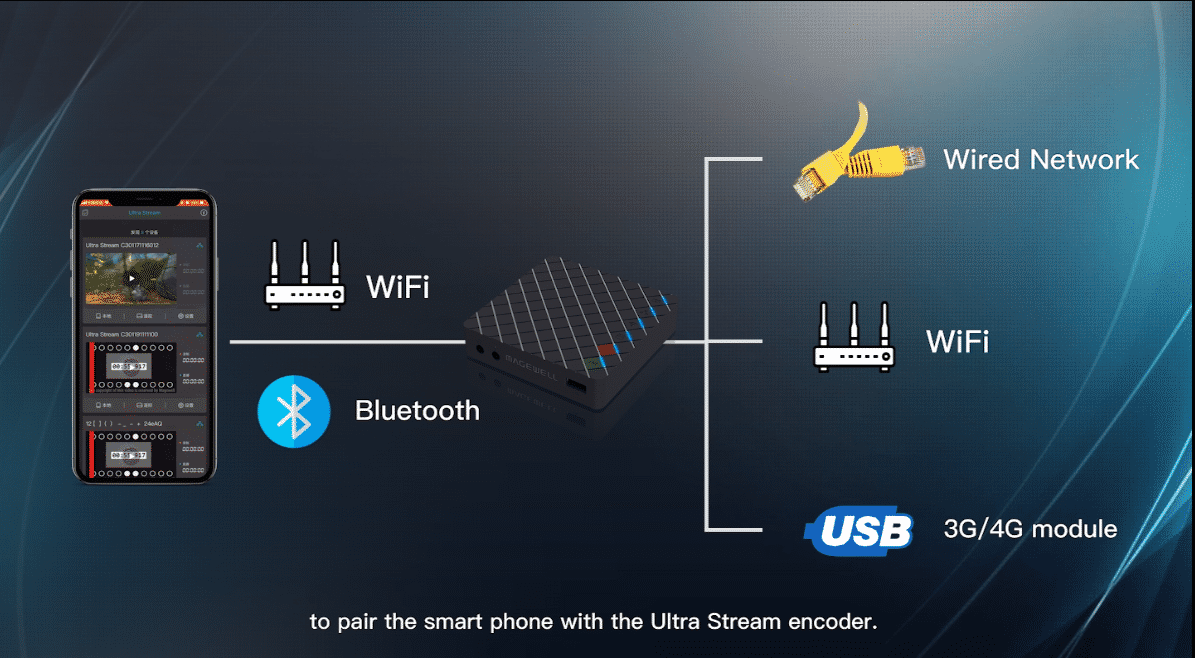
Mobile bonding is the practice of combining multiple internet connections to create a more stable, higher-bandwidth connection. Instead of relying on a single Wi-Fi network, you combine your church’s cellular hotspot with other available signals (perhaps public Wi-Fi at the venue, tethered phones, or mobile hotspots from volunteers) into a single logical connection that the encoder perceives as one robust link.
The Magewell Ultra Stream doesn’t have built-in dual cellular radios, so true hardware bonding isn’t possible without external equipment. However, you can achieve practical bonding by using a dual-WAN router that combines cellular and Wi-Fi into a single network interface. The encoder then connects to this router and benefits from the combined bandwidth.
Alternatively, you can use advanced mobile hotspot devices (like those designed for outdoor production) that intelligently blend multiple cellular connections. These devices present themselves as a Wi-Fi hotspot to the encoder while internally managing multiple cellular networks.
Simple Approach: Single Cellular Hotspot
For many church outdoor events, a simpler approach works just fine: use a single cellular hotspot as your encoder’s internet connection. Modern mobile hotspots from carriers like Verizon, AT&T, and T-Mobile offer 4G LTE and 5G connectivity with consistent throughput.
To set this up, ensure you have a data plan with sufficient monthly data allowance for your streaming. A two-hour service streamed at 6000 kbps consumes about 5.4 GB of data. Make sure your cellular plan isn’t limited (some small business plans cap at 50-100 GB monthly).
Activate your cellular hotspot before the event and place it near your encoder. Configure the Ultra Stream to connect to this hotspot’s Wi-Fi network. Most hotspots create a Wi-Fi network with a default name and password printed on the device.
In the Ultra Stream’s web interface, navigate to Network Settings and select your hotspot’s Wi-Fi SSID. Enter the password. The encoder should connect within seconds. Test the connection by loading the encoder’s interface or starting a test stream.
Dual-WAN Router for True Bonding
For more robust outdoor streaming, a dual-WAN router creates a single network interface that internally balances traffic across a cellular connection and a Wi-Fi connection (or a wired connection if available). This is more complex to set up initially but provides superior resilience.
A typical setup uses a router like the ASUS RT-AX88U or Ubiquiti EdgeRouter (configured with dual WAN) as your network backbone. Connect your cellular hotspot to this router’s WAN port and your primary internet source (if available, like a cellular dongle or tethered phone on a different carrier) to the second WAN port.
Configure the router’s load-balancing and failover settings. Most dual-WAN routers can distribute traffic equally across both connections (load balancing) or prioritize one connection with the other as failover (if the primary fails, traffic automatically switches to the secondary).
The Magewell Ultra Stream connects to this router’s Wi-Fi or Ethernet port and benefits from the combined bandwidth. During testing, you should observe throughput approaching the sum of both connections. If your cellular connection offers 25 mbps and your second connection offers 10 mbps, you theoretically have 35 mbps available, though overhead and throttling will reduce this in practice.
Carrier Selection for Outdoor Events
Cellular signal strength varies significantly by location, carrier, and time of day. In rural areas where your church might hold outdoor events, coverage can be spotty.
Before committing to a cellular bonding strategy, test actual signal strength at your venue. Contact your carrier’s support line and ask about signal coverage maps for the exact location. Better yet, visit the venue beforehand with your cellular hotspot and run a speed test. If the speed test shows 5+ mbps upload, you can reliably stream at 3000-4000 kbps.
Some outdoor venues are served well by one carrier but poorly by another. If AT&T signal is weak, Verizon might be strong. Ideally, establish a relationship with volunteers who have different cellular carriers and can bring their hotspots as backups. This gives you multiple carriers represented in your bonded connection and protects against single-carrier outages.
Power Considerations for Outdoor Streaming
Outdoor events present power challenges. Your Ultra Stream requires continuous power, and portable power banks typically provide only 2-4 hours of runtime—not sufficient for many services.
Bring a portable generator (small inverter generators are quiet and adequate) or ensure access to shore power at your venue. Some outdoor venues have electrical hookups. If not, a generator running at 1000W is sufficient for your encoder plus cellular hotspot.
Battery backup is essential for your cellular hotspot if you’re relying on it. Most hotspots have 6-8 hour battery life, but heavy use drains them faster. Bring a USB-C power bank as backup and establish a charging routine: charge the hotspot immediately after your event so it’s ready for the next outdoor service.
Testing and Contingency Planning
Never debut a new technical setup during a critical live service. Schedule a practice run at your outdoor venue at least one week before your first service there. Stream a full test broadcast and monitor all metrics: bitrate, dropped frames, connection stability, and video quality on receiving devices.
During this test, intentionally disconnect one of your bonded connections (e.g., turn off the Wi-Fi to simulate Wi-Fi failure) and confirm the stream continues via the remaining connection. This validates your bonding is actually working.
Establish contingencies for total internet failure. If your encoder loses all internet during a service, you can’t stream, but you can still record the service locally if your encoder has that capability. Have a backup plan to upload and publish the recording later once you’re back at your venue with reliable internet.
Positioning and Signal Quality
The physical location of your cellular hotspot and antenna significantly impacts signal quality. Place the hotspot in an elevated position with clear line-of-sight to the cellular tower (typically, toward the nearest city). Avoid placing it in a backpack or case that might shield the antenna.
Some cellular hotspots support external antenna connectors. If your outdoor venue is in a weak signal area, consider a model with external antenna support and bringing a directional antenna or a cellular booster kit designed to amplify weak signals.
If your venue is in a valley or surrounded by trees, even a good hotspot might struggle. In this case, mobile bonding with multiple carriers becomes essential—one carrier might have a tower line-of-sight while others don’t.
Cost and Practical Considerations
A cellular hotspot costs $50-300 depending on capability. Data plans typically cost $20-50 monthly for small data allowances or $100-150 monthly for unlimited plans suitable for streaming.
A dual-WAN router costs $150-400 and provides more robust bonding but adds complexity. For outdoor events that happen only a few times yearly, a simple cellular hotspot strategy is often sufficient.
Document your outdoor streaming configuration carefully. Create a checklist: hotspot activation, Ultra Stream Wi-Fi connection, codec and bitrate settings, backup power, and contingency plans. Train a second person on this setup so that if your primary tech person is unavailable, someone else can manage outdoor streaming.
Outdoor events are inherently unpredictable, but with proper testing and contingency planning, the Magewell Ultra Stream and a quality cellular hotspot can deliver reliable streams even in challenging venues.